Section 2. Installing the PX-230A Internal ATAPI Drive
PX-230A Installation and Users Manual 9
• Mode jumper: Use the mode jumper to select operation as an IDE
master or slave, or for cable select. In general, leave this jumper at
its factory setting, which is master; and ensure that any other device
on the bus is jumpered as slave.
• IDE/ATA cable connector: Connects to your computer’s IDE
(ATAPI) interface using a standard 40-conductor IDE cable or an
80-conductor IDE/ATA cable.
• Power connector: Connects to your computer’s power supply to
provide DC +5 volts and +12 volts to the PX-230A.
What Else Is In the PX-230A Box
What you find in your Plextor box depends on what the company that
sold you the box put in—or took out—while the Plextor drive was in
their possession. Plextor currently sells the PX-230A drive in this
configuration:
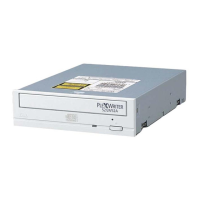
• PX-230A CD-R/RW drive
• 4 mounting screws
• Extra jumper
• Emergency eject tool
• Quick Installation Guide
• Plextor software disc with bundled software and PDF of PX-230A
Installation and Users Manual
NOTE: The PX-230A retail package does not contain an IDE ribbon
cable. You can connect your Plextor drive to the free connector on any
existing 40-pin or 80-pin ribbon cable in your computer.
Save Your Box!
Be sure to save the box after you have installed your drive. The box
and its packaging material were designed and drop tested to ensure
your drive can endure rough treatment and still arrive in working
order. If you have to ship your drive back to Plextor, you’ll want to
send it in the original box. (For more details about returning your
drive to Plextor, see page 57.)


 To Next Page