Section 2. Installing the PX-230A Internal ATAPI Drive
14 PX-230A Installation and Users Manual
Inspect Your Computer’s Cables
You can use either the older 40-conductor IDE cable or the newer 80-
conductor IDE/ATA cable.
NOTE: The PX-230A retail package does not contain an IDE ribbon
cable. You can connect your Plextor drive to the free connector on any
existing 40-pin or 80-pin ribbon cable in your computer. If your
computer’s ribbon cables don’t have a free connector, you will have to
purchase another ribbon cable.
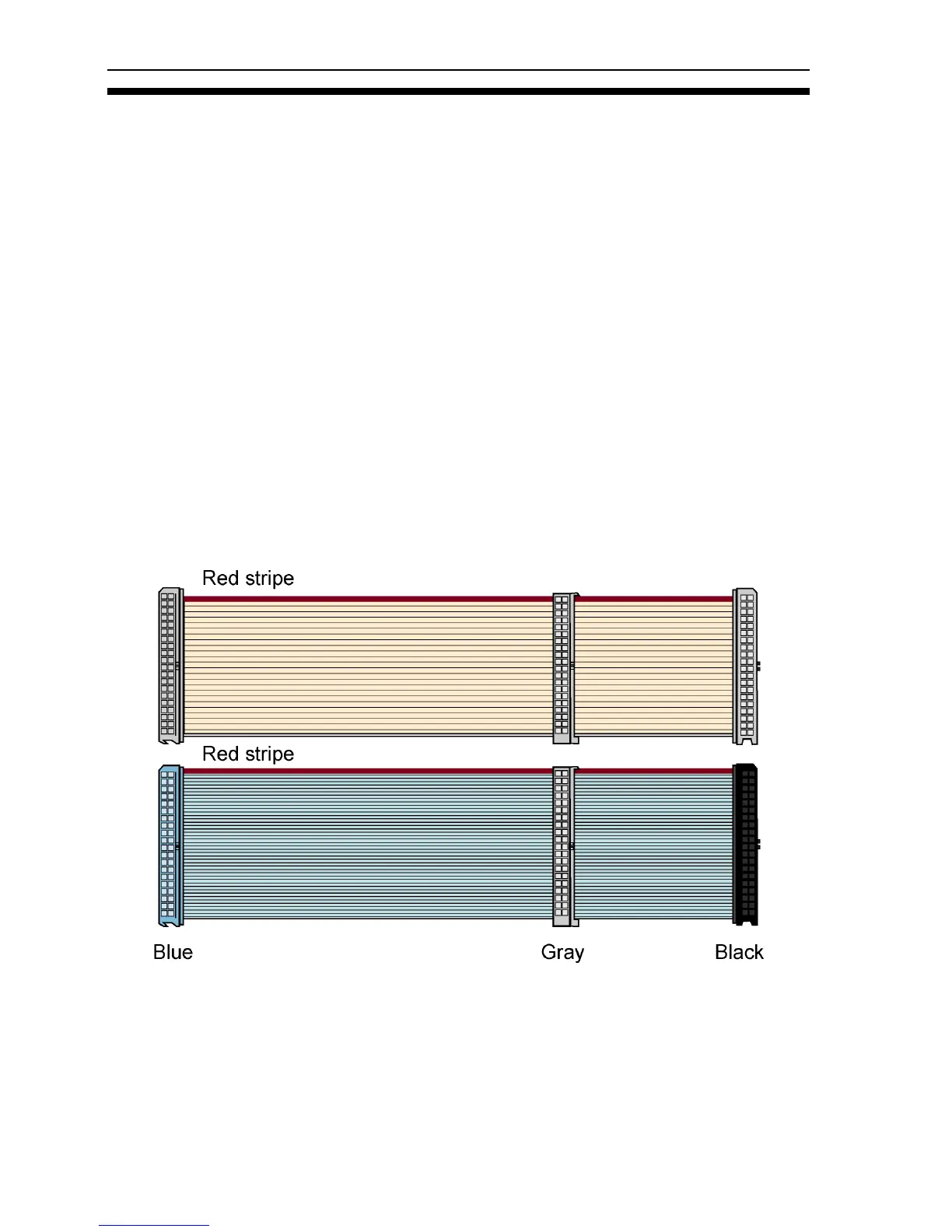
Although the newer cable has 80 conductors (wires), its connectors have
only 40 pins, so it’s physically interchangeable with the older cable. The
80-conductor cable is slightly wider than the older 40-conductor version.
The wires in the 80-conductor version are narrower, too.
CAUTION: The length of any IDE or IDE/ATA cable cannot exceed 18
inches.
Figure 4: You can use either the older 40-conductor cable (top) or the
new 80-conductor type (bottom).


 To Next Page