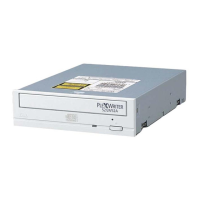
Section 2. Installing the PX-230A Internal ATAPI Drive
PX-230A Installation and Users Manual 11
PX-230A QuickStart Installation
For Experienced PC Users Only
If you’ve installed computer peripherals before, use this QuickStart
installation to get up and running quickly.
Typical Scenario 1: You have a PC with an IDE interface installed,
you have Windows 98, 98SE, Me, 2000, or XP, and you have
nothing installed on the secondary IDE port. What to do: Leave the
PX-230A’s jumper set to Master, attach it to the secondary IDE port,
and go. Windows will recognize the drive automatically.
Typical Scenario 2: You have a PC with an IDE interface installed,
you have Windows 98, 98SE, Me, 2000, or XP, the primary IDE port
already has two devices connected and you have a CD-ROM
installed on the secondary IDE port. What to do: Change the CD-
ROM to Slave, leave the PX-230A’s jumper set to Master and attach
the PX-230A to the secondary IDE port. Windows recognizes the
new drive automatically.
If neither of these situations applies to you, or you’re not comfortable
with IDE installation, read the rest of this chapter for more detailed
installation instructions.


 To Next Page