Section 2. Installing the PX-230A Internal ATAPI Drive
18 PX-230A Installation and Users Manual
For example, to change the drive to be a Slave, move the jumper to the
middle set of mode pins, leaving the other pins uncovered. To change
the drive for Cable Select, move the jumper to the left set of mode pins.
Note that if any device is jumpered as Cable Select, then both devices
connected to that cable must be jumpered as Cable Select. (And the
cable you use must be a special Cable Select cable. The newer 80-
conductor IDE/ATA cable supports Cable Select.)
Changing Jumper Settings
• To remove a jumper, pull it off with your fingers or a pair of needle-
nose pliers.
• To install a jumper, push it onto the jumper pins.
CAUTION: Ensure power to the drive is OFF before installing or
removing a jumper.
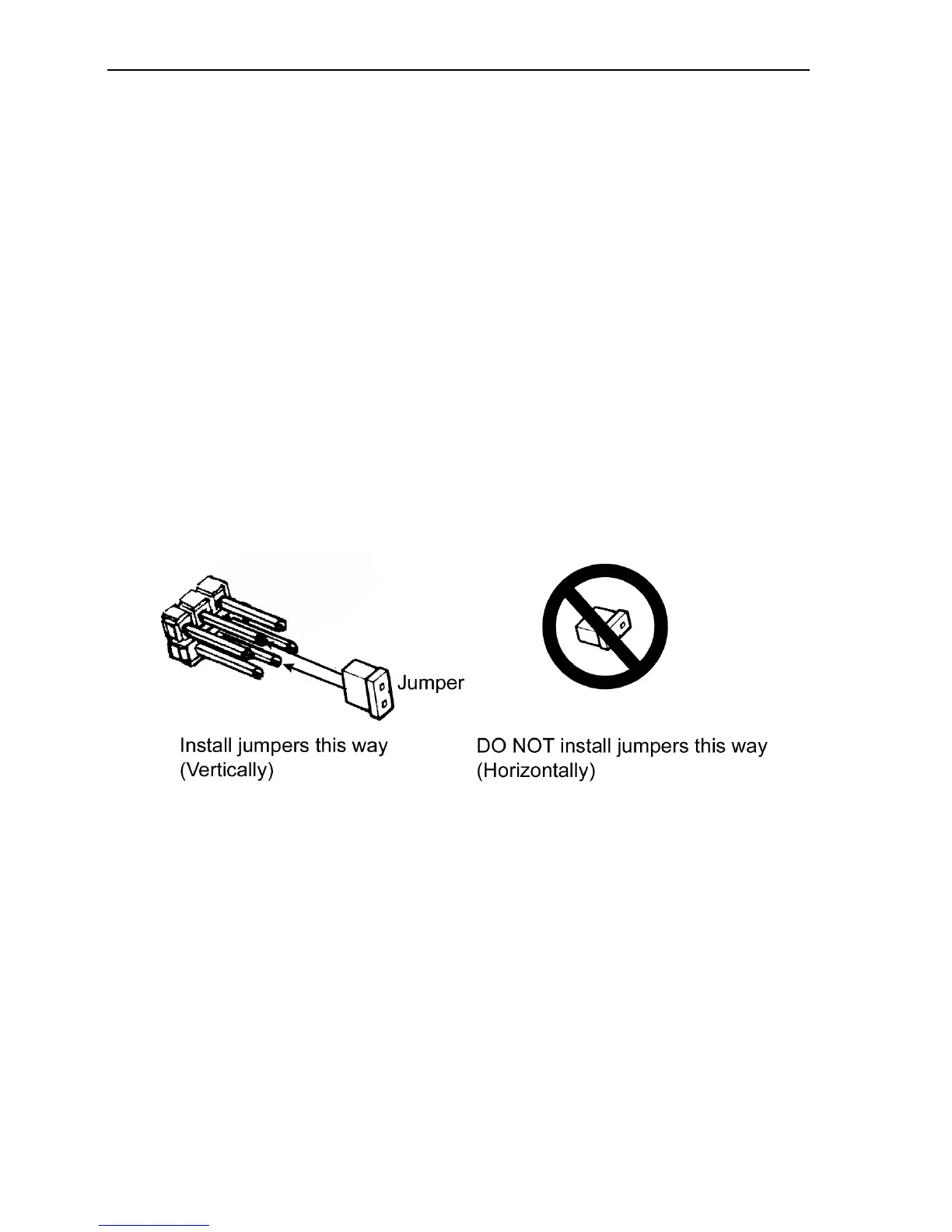
Figure 7: Install the mode jumper across vertical pairs of pins
CAUTION: Install the mode jumper across the pins as shown (vertically).
Do not connect one pin switch to another by installing the jumper
lengthwise (horizontally). Doing so could result in damage to the drive.


 To Next Page