27
463X Chlorine Systems Manual
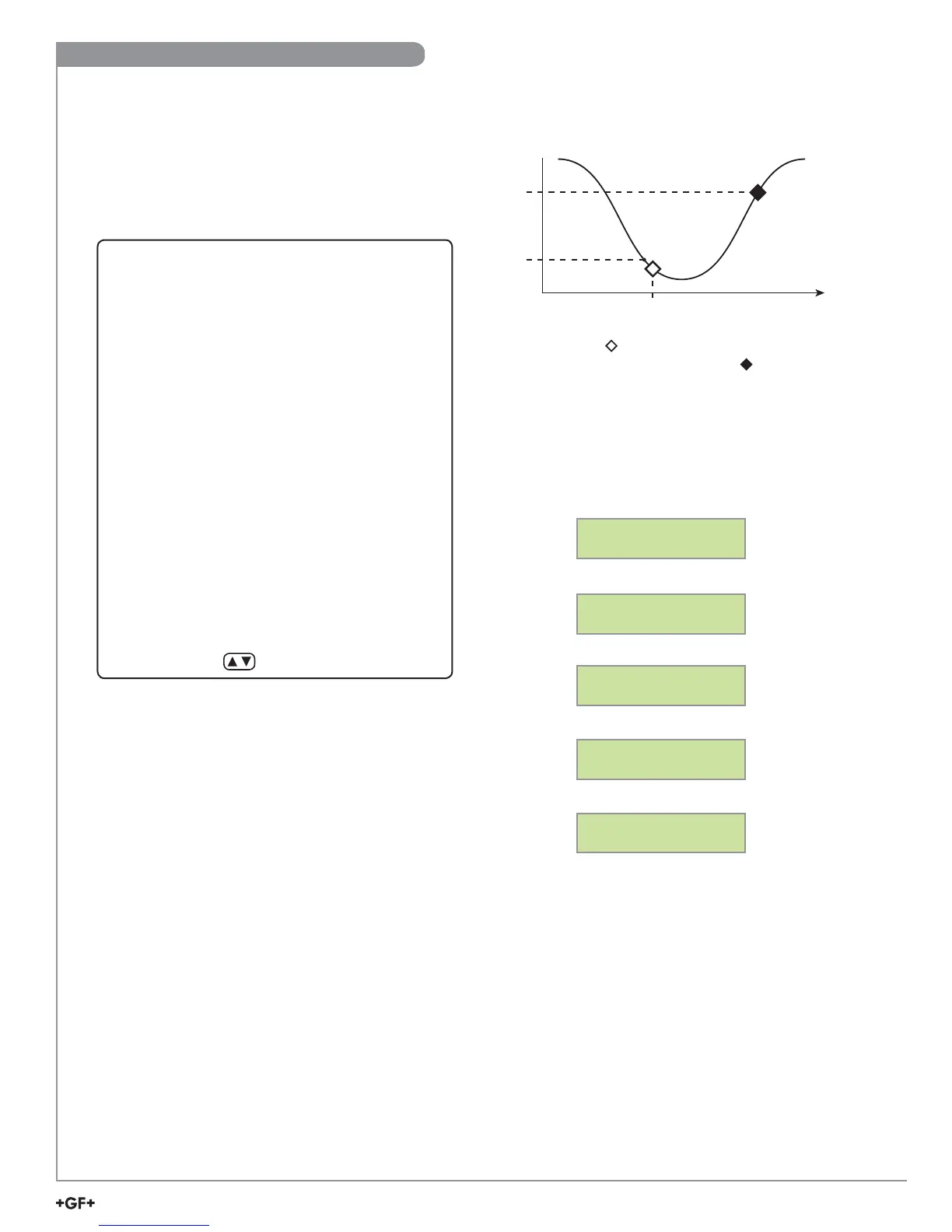
Example: Set a relay to energize at a low setpoint of
1.0 ppm with a time delay of 15 seconds and de-energize
at 1.30 ppm.
• Once a setting is saved it immediately becomes
active.
1. Go to the Calibrate Menu.
2. Scroll down ▼ to the Relay 1 Mode menu.
3. Press ► to enter Edit Mode.
4. Scroll down ▼ and choose Low.
5. Press Enter.
6. Scroll down ▼ to the Relay 1 Source menu. The default
is Free Chlorine.
7. Scroll down ▼ to the Relay 1 Setpnt menu.
8. Press ► to enter Edit Mode.
9. Set the ppm value to trigger the relay: 1.00 ppm.
10. Press Enter.
11. Scroll down ▼ to the Relay 1 Hys menu.
12. Press ► to enter Edit Mode.
13. Set the hysteresis (dead zone) for this relay. This affects
the turn off only: 0.3 ppm.
14. Press Enter.
15. Scroll down ▼ to the Relay 1 Delay menu.
16. Press ► to enter Edit Mode.
17. Set the turn-on delay in seconds for the relay: 15 secs.
18. Press Enter.
19. Exit to View Mode.
• Relay function can be tested in the Options Menu.
EXAMPLE
Relay Settings
Relay energized
1.00
1.30
Time
Cl ppm
Time Delay
Low
Setpoint
Calibrate Menu
Step 4
6
9
13
17
Set and save
Relay 1 Mode:
Low >
Set and save
Relay 1 Source:
Chlorine >
Set and save
Relay 1 Setpnt:
1.00 ppm >
Set and save
Relay 1 Hys:
0.30 ppm >
Set and save
Relay 1 Delay:
15.0 secs >
EXAMPLE
Output Settings - Loops and Relays


 To Next Page