33
463X Chlorine Systems Manual
Sensor Removal
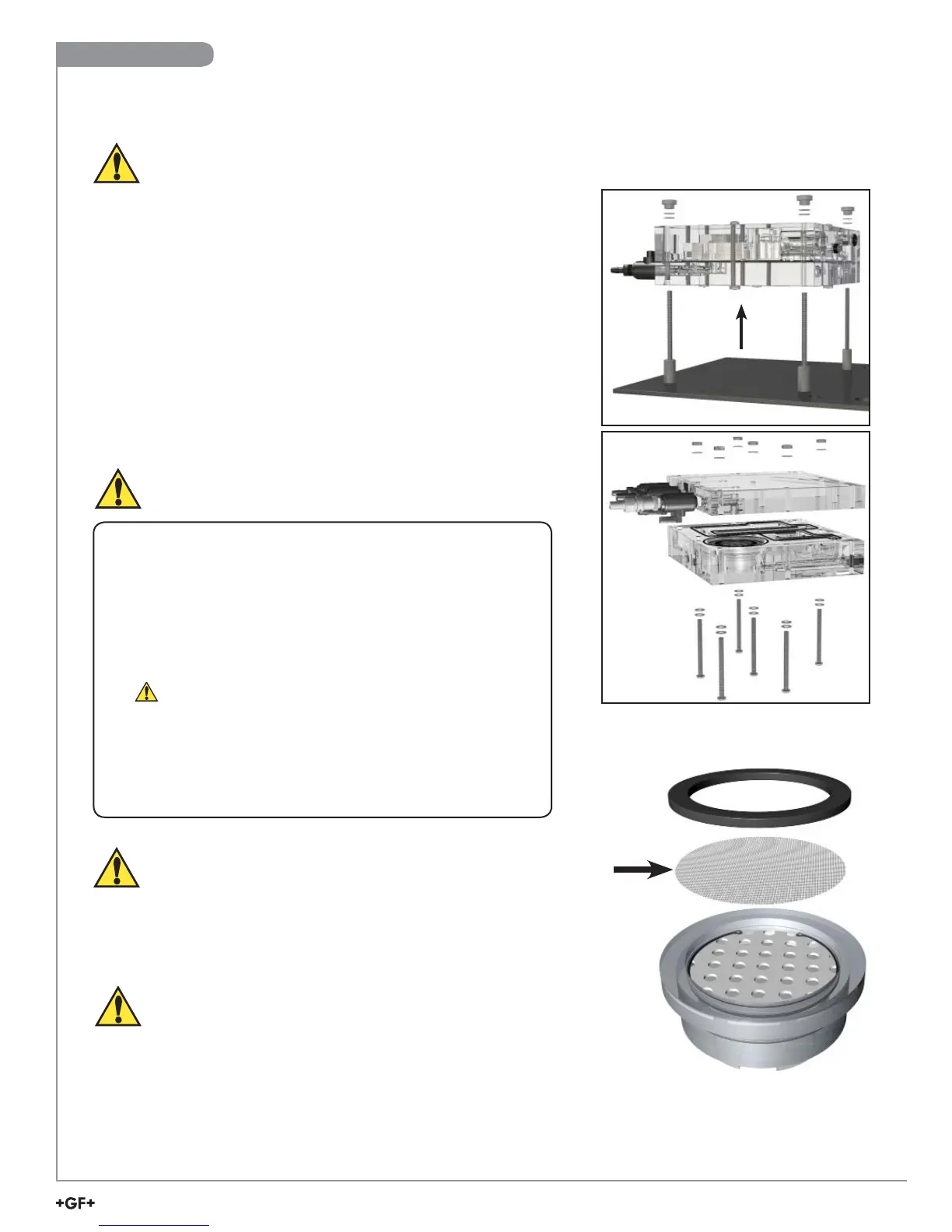
Figure 2
Figure 1
Under certain conditions, a dirty fl ow cell and fi lter can create a chlorine demand
which could lower the chlorine concentration in the water fl owing past the
chlorine sensor. It is recommended to clean the fi lter and fl ow cell on a regular
basis. The frequency of necessary cleaning will depend on the application in
which the system is being used and the level of accuracy required.
Step 1. Keep the system powered on.
Step 2. Disable the relays and any output loops.
Step 3. Turn off the water fl ow.
Step 4. Remove the sensors from the fl ow cell. NOTE: It is not
necessary to remove the electronics from the sensor.
Step 5. Install the vinyl caps on to the sensor tips or place the tips of
the removed sensors in a cup of sample water for temporary
storage while cleaning the fl ow cell.
Keep the sensor tips wet and the sensors energized.
Step 6. Remove the fl ow cell from the panel by removing the
knurled nuts (Figure 1).
Step 7. Remove the remaining hardware from the fl ow cell.
(Figure 2).
NOTE: It is recommended that an anti-seizing compound appropriate for the
application be used during the reassembling of the fl ow cell.
Maintenance - 463X Chlorine Analyzer Flow Cell
CAUTION: Over time, a sensor can get tight in the fl ow cell fi tting. When removing the sensor, avoid
hitting the sensor electronics on the bottom of the wiring enclosure if the sensor suddenly releases.
Take care not to damage the components.
While holding the fl ow cell, grasp the yellow electronics as a whole unit and
carefully pull upwards, gently rocking back and forth if necessary. Once the
sensor is loose, disengage the electronics, then remove the sensor.
TIP: A tool can be used to carefully pry the sensor electronics up and out if it is
diffi cult to remove.
Cleaning
Service the fl ow cell on a clean, dirt free surface
to avoid scratches or damage to the fl ow cell.
• Wash the surfaces with plain or soapy water only.
• Use gentle, liquid dishwashing soap if necessary.
• DO NOT USE commercial glass cleaning fl uids.
• Use a soft, lint-free cloth.
If your inlet pressure is less than 1 bar (15 psi), remove
the fl ow regulator and quick disconnect inlet connector.
Remove fi lter
screen to clean.
If the fi lter is not
desired, it may
be removed from
the system.
Flow Regulator
Servicing the Flow Regulator and Filter
WARNING: Do not disassemble the fl ow regulator.
There are no user serviceable parts inside.
Appendix


 To Next Page