EasyManua.ls Logo

POINTMOBILE PM451 - Page 7

POINTMOBILE PM451
68 pages
Print Icon
To Next Page IconTo Next Page
To Previous Page IconTo Previous Page
Loading...
PM451 Android 9.0 User Manual
6
© 2006 2020 POINTMOBILE Co., Ltd. All rights reserved
Getting Started
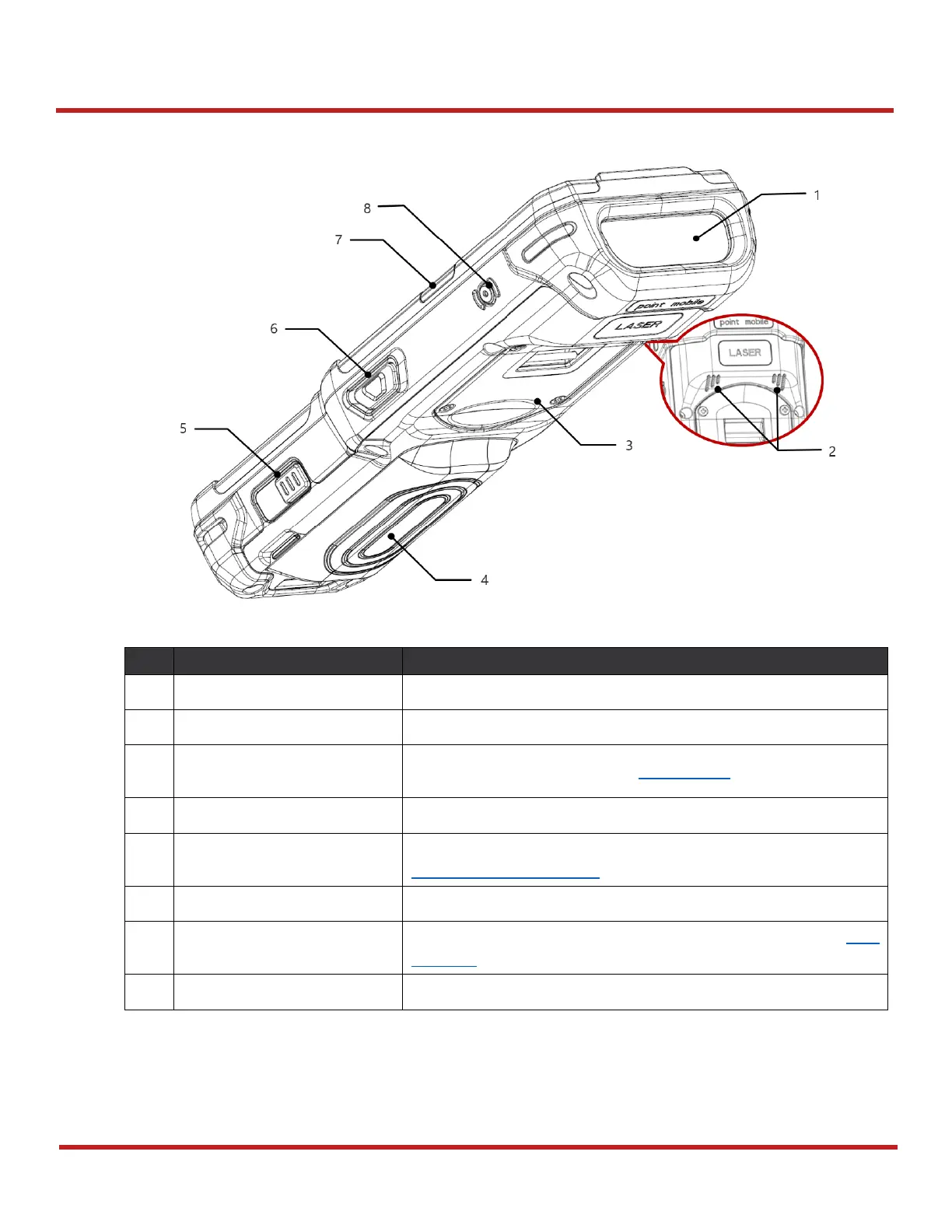
No
Name
Description
1
Scanner & Top camera
Scan a barcode and take a photo
2
Speaker
Provide system and multimedia sound
3
Gun handle
connection part
Plug the gun handle. Refer to Gun Handle.
4
Battery
Provide power to device
5
Battery lock (Right)
Press to release the battery from PM451. For more detail, see
Install & Remove Battery
6
Scan button (Right)
Scan a barcode by pressing
7
Center LED indicator (Right)
Indicates success/failure of barcode reading. See LED
Indicator
8
Power button
Press to turn on/off the device or the screen
Figure 2 PM451 Back view