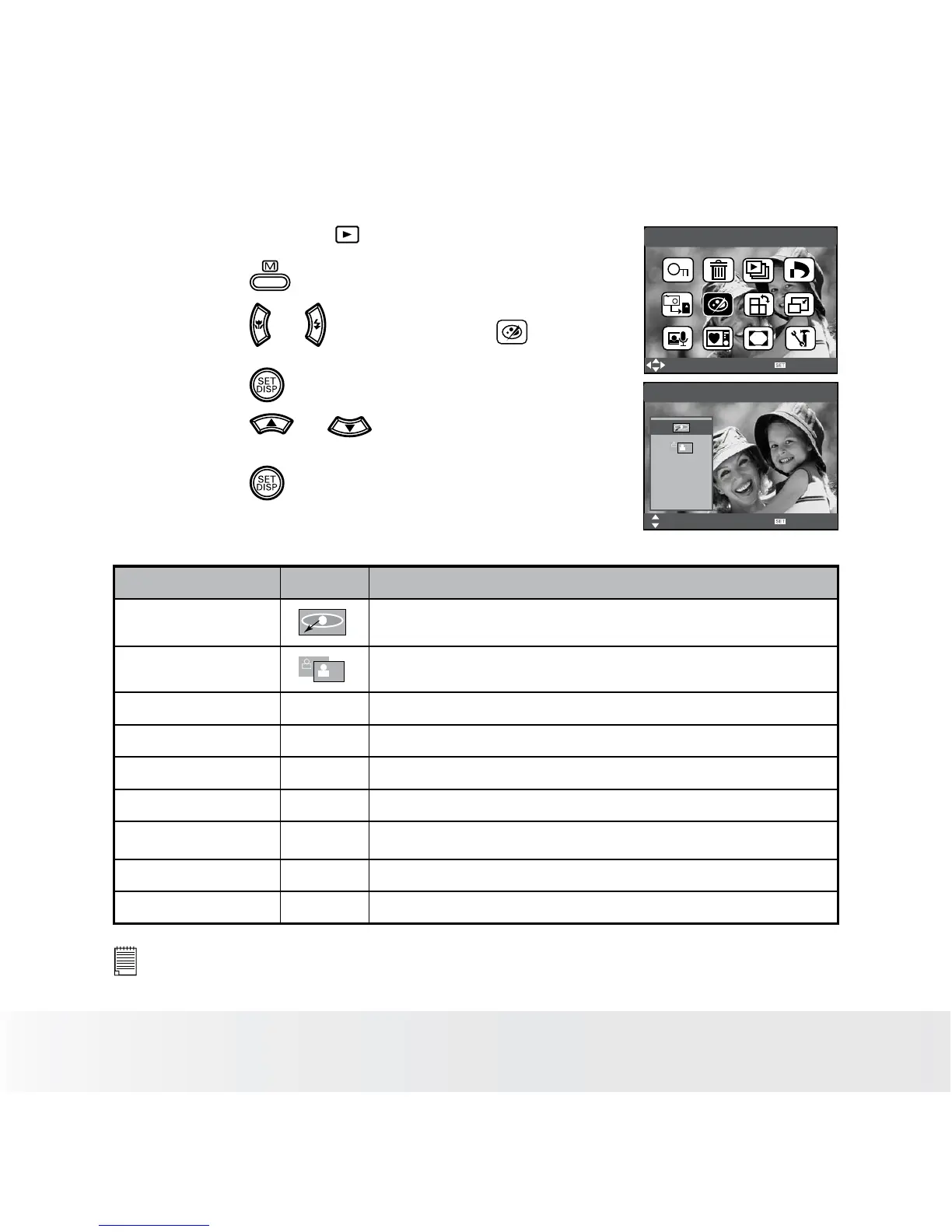
• Setting the Photo Edit
1. Set the camera to PLAYBACK mode.
2. Press the button.
3. Press the or button to select
(Photo Edit).
4. Press the button.
Photo Edit
Select
OK
B&W
Sepia
Nagative
Photo Edit
Select
OK
5. Press the or button to select the
desired setting.
6. Press the button.
Option Icon Description
Red Eye Removal Remove subject’s red eyes from the images
Dynamic Lighting Enhance the color and contrast automatically
B&W ---- Convert image to black & white
Sepia ---- Recorded image will be stored in a sepia tone
Negative ---- Opposite what was in the original image
Mosaic ---- Add mosaic tiles to the images
Red
----
The images becomes reddish
Green ---- The images becomes greenish
Blue ---- The images becomes bluish
NOTE:
• The edited image will be saved as a new le and the original le will be
replaced by the new one.













 To Next Page