Configuration Files
A - 125
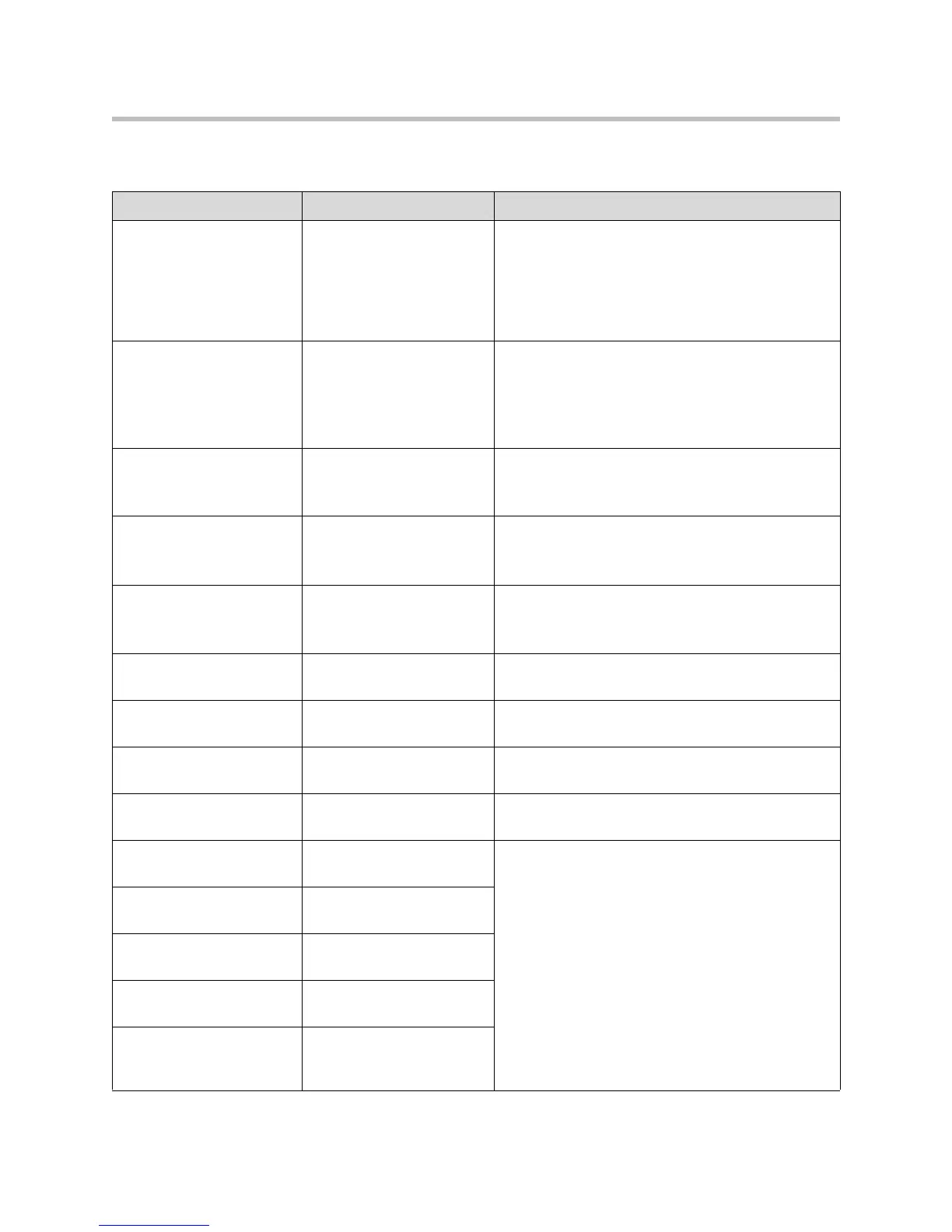
This flash attributes are defined as follows:
Name Possible Values Description
device.set 0 or 1
default = 0
If set to 0, do not use any
device.xxx.yyy
fields to
set any parameters. Set this to 0 after the initial
installation.
If set to 1, use the
device.xxx.yyy
fields that have
device.xxx.yyy.set
= 1. Set this to 1 for the initial
installation only.
device.xxx.yyy.set 0 or 1
default = 0
If set to 0, do not use the
device.xxx.yyy
value.
If set to 1, use the
device.xxx.yyy
value.
For example, if
device.net.ipAddress.set
= 1,
then use the contents of the
device.net.ipAddress
field.
device.net.ipAddress dotted-decimal IP address Phone's IP address.
Note: This field is not used when DHCP client is
enabled.
device.net.subnetMask dotted-decimal IP address Phone's subnet mask.
Note: This field is not used when DHCP client is
enabled.
device.net.IPgateway dotted-decimal IP address Phone's default router / IP gateway.
Note: This field is not used when DHCP client is
enabled.
device.net.vlanId Null, 0 to 4094 Phone’s 802.1Q VLAN identifier.
Note: Null = no VLAN tagging
device.net.cdpEnabled 0 or 1 If set to 1, the phone will attempt to determine its
VLAN ID through the CDP.
device.dhcp.enabled 0 or 1 For description, refer to DHCP or Manual TCP/IP
Setup on page 3-2.
device.dhcp.offerTimeout 1 to 600 Number of seconds the phone waits for secondary
DHCP Offer messages before selecting an offer.
device.dhcp.
bootSrvUseOpt
0 to 3 For descriptions, refer to DHCP Menu on page 3-7.
device.dhcp.bootSrvOpt 128 to 254 (Cannot be the
same as VLAN ID Option)
device.dhcp.
bootSrvOptType
0 or 1
device.dhcp.
dhcpVlanDiscUseOpt
0 to 2
device.dhcp.
dhcpVlanDiscOpt
128 to 254 (Cannot be the
same as Boot Server
Option)








 To Next Page