SCHEMA
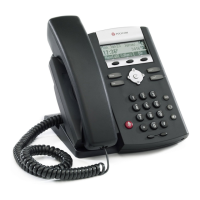
rif. ELEMENT DESCRIPTION
1 led “new messages” indicates one or more new voice mail messages
2 lines icons
• registered line
• unregistered line
• voice-mail/mesages
• ringing
• call forward
• do not disturb
3 software keys automatically labeled to identify their context-sensitive functions
4 individual multi-colour LEDs display
• solid green: active call in progress
• fast flashing green: incoming (outgoing) call
• flashing red: call on hold
• red: line busy (shared lines)
5 line keys to activate up to two lines that can be assigned to phone
6 hold holds an active call or resumes an held call
11 headset allow you to place and receive calls through an headset (optionally)
8 speaker-phone allow for hands-free communication during calls
9 hands-free microphone picks up audio during hands-free calls
10 volume keys adjust the volume of the handset, headset, speaker, and ringer
11 microphone mute mutes audio transmission during calls and conference
12 dial pad provides the 10 digits, star key, the alphabetic characters, and special
characters available in context-sensitive applications
13 feature keys
dials phone numbers or allows you to view the placed call list
access features of your phone
14 arrow keys
Go to Table of Content
3 / 10









 To Next Page

