User Guide for the Polycom
®
SoundStation
®
IP 5000 Phone
4
Phone Status Indicators
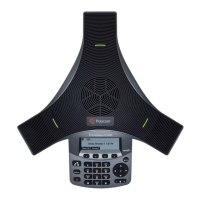
Phone status is indicated by three bi-color LEDs located above the phone’s
microphones, and by a line and call icon located on the display screen next to
the directory number.
LED Status Indicators
The LEDs illuminate to indicate the following call states:
• Solid red—A muted call.
• Flashing red—A held call.
• Solid green—A dial-tone is available, dialing is in progress, or a call is in
progress.
• Flashing green—An incoming call.
LED
Indicators
LED
Indicators
Line and
Call Icon












 To Next Page