Tip: Returning to Your Calls
Entering Data
Use the onscreen keyboard or the dialpad keys to enter information. To backspace,
tap .
To use the onscreen keyboard, tap .
To type with the dialpad keys, press a key repeatedly to view the character options
and stop to select.
To type other characters, tap Encoding or Mode. When using the dialpad keys, use
the 1, *, 0, and # keys.
About Calls
Only one call can be active at one time.
You can use the handset, speakerphone, or headset for calls. During a call, you can
change modes by picking up the handset, or by pressing or .
If you navigate away from your call(s), tap to see Active Call or Calls
View
again.
Placing Calls
Enter the phone number,
Pick up the handset, or press
Calls View
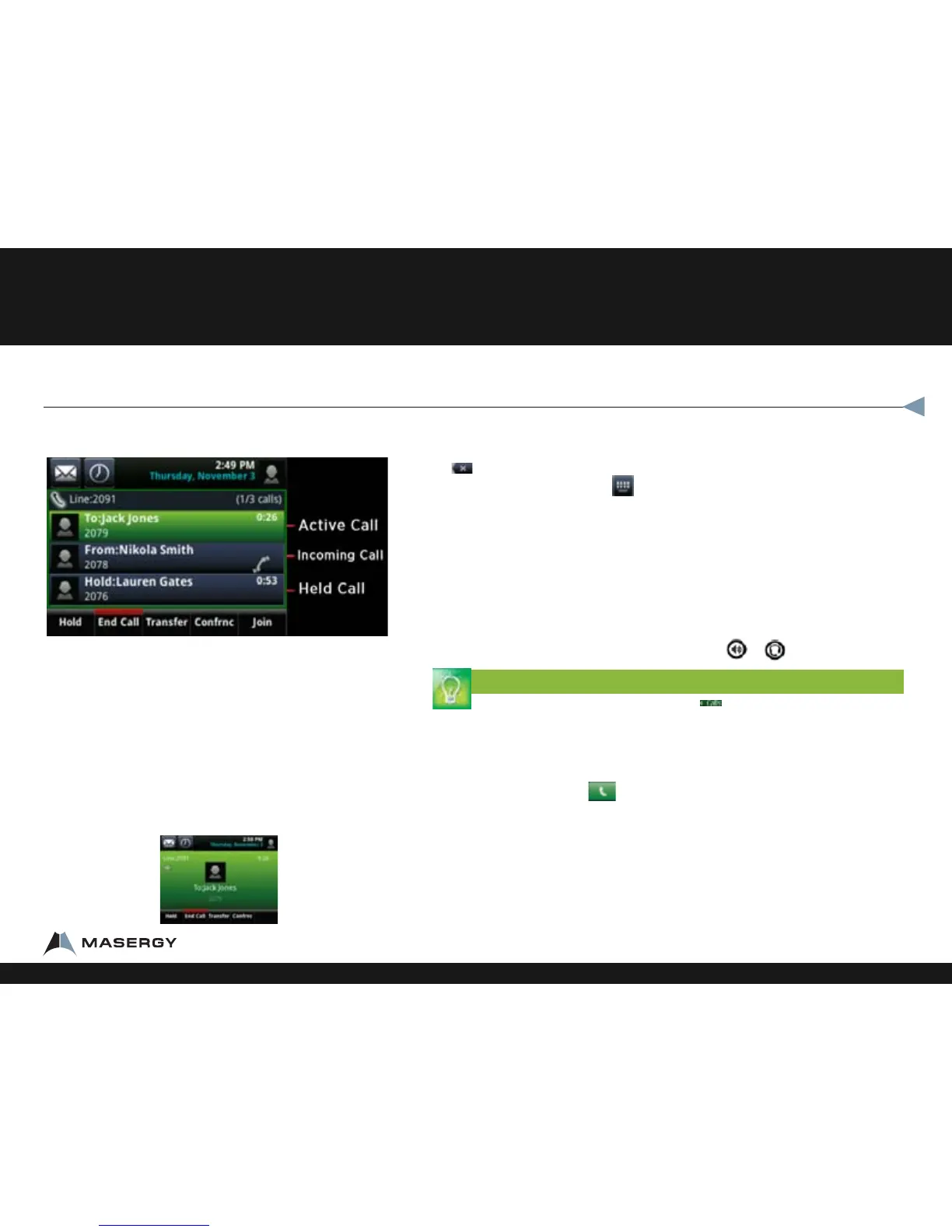
Calls View displays a list of all your calls.
Call color indicates status:
•Dark green Acve call.
•Dark blue Incoming and held calls.
•Bright green Acve call is highlighted.
•Bright blue Incoming or held call is highlighted.
Tap a call to highlight it. The soft keys apply to the
highlighted call.
Active Call View
If a phone Line has only one call—and it’s active—you can
access Active Call View.
Polycom® VVX® 500 Performance Business Media Phone
1-800-942-4700 masergy.com

















 To Next Page