26 | EN
The system’s settings can be checked via the remote control by following these steps
Step 1: Press DOWN for 3s to enter the settings verication mode.
Step 2: Press UP and DOWN to browse the parameters.
Step 3: Press ON/OFF to exit the parameter check mode.
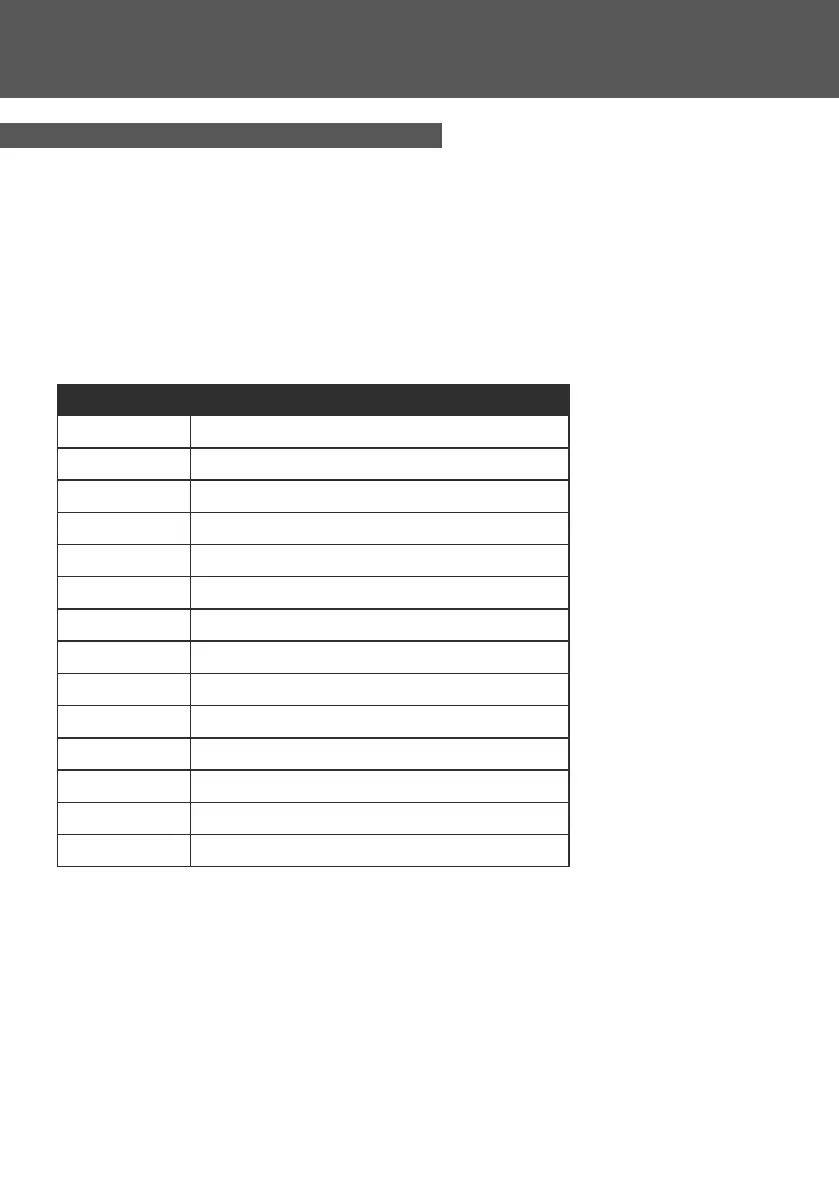
Parameters table
4. USE
Parameters Indicaon
A01 Water inlet temperature
A02 Water outlet temperature
A03 Ambient temperature
A04 Exhaust temperature
A05 Sucon temperature
A06 Heang coil temperature
A07 Cooling coil temperature
A08 Main EEV Steps
A09 Reserved
A10 Compressor current
A11 IPM temperature
A12 DC bus voltage value
A13 Actual speed of compressor
A14 DC fan speed
4.5 Viewing running parameters



 To Next Page