www.powerbox-systems.com
11
e) Expo
The purpose of the Expo button is to adjust the exponential factor. If you select nothing for Transmitter control
expo, the value is xed. If you assign a transmitter control to Transmitter control expo, you can use it to set
different values on three levels. The level initially selected using the transmitter control you have selected is
shown in green. If you select a proportional control as transmitter control, the values are applied in a linear
fashion within the three levels.
f) Curve editor
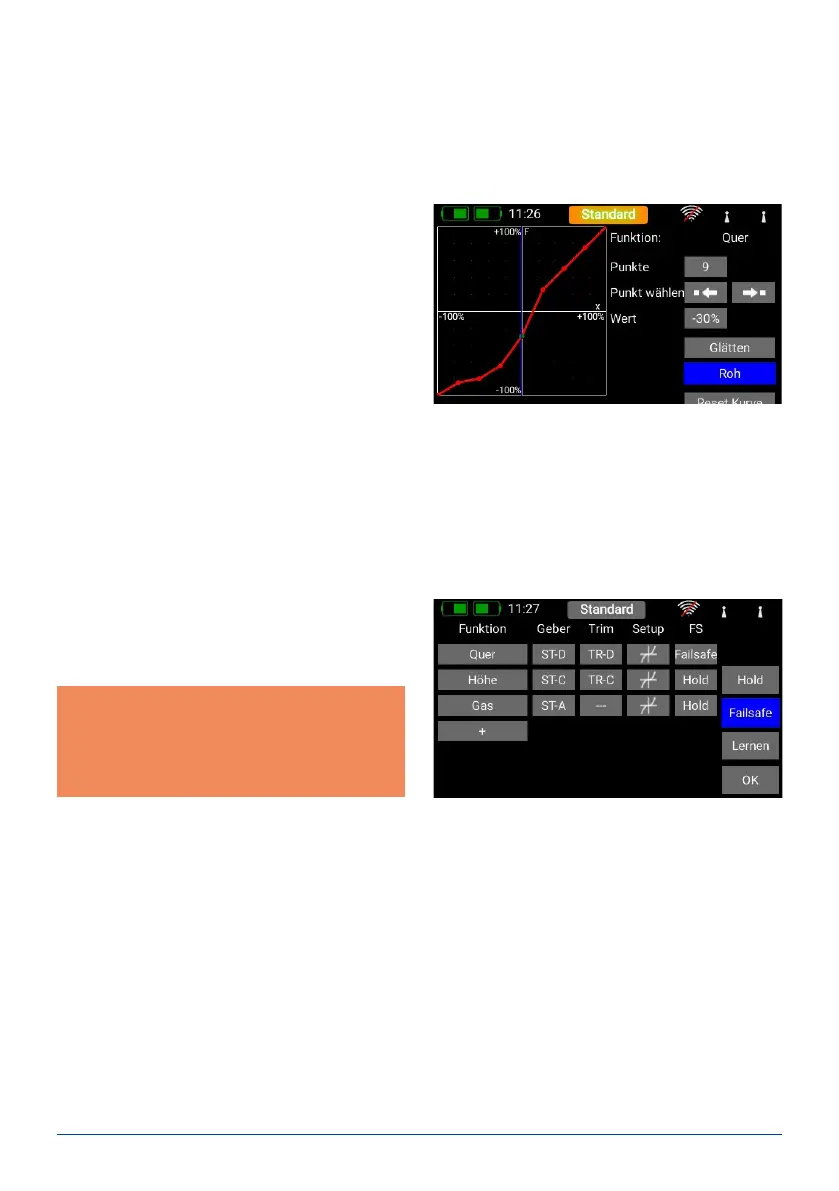
The curve editor is used to set up special curves.
- The rst step is to select the number of points: up
to 17 can be specied.
- Use the arrow buttons to select the point which you
wish to move; the selected point changes colour to
green.
- Adjust the percentage value to shift the point up
or down.
- The Smooth option can be used to even out the
curve, and thereby avoid jerks in the servo’s res-
ponse.
- Raw removes the effect of the curve smoothing.
- Reset curve resets the curve to linear travel.
g) Transit time
At this point you can set two transit times: one determines the servo transit time to the left, the other to the
right. The time in seconds determines how long the servo takes to move from one end-point to the other.
E. Hold / Failsafe
If you want a servo to take up a pre-determined po-
sition in case of radio signal loss, you should select
Failsafe here. The Learn button now appears, enabling
you to store the current position in the receiver.
Note: the receiver or receivers do not need to be
bound at this point. The Failsafe positions are
repeatedly transmitted to the receivers at regular
intervals.
F. Servo
Here you will nd the assigned servos again. Up to eight servos can be assigned to each function. As already
mentioned in the Assistant, the travel and end-points of each servo can be adjusted separately here. Any adjust-
ments you make to a servo at this point have no inuence on the settings of the same servo if it is also assigned
to another function. This provides a simple means of mixing in aircraft with multi-ap wings, delta wings and
V-tails.
If you wish to adjust a servo’s travel or center position, the rst step is to touch the appropriate button; you can
now adjust the value. As soon as you move the associated stick, the Select button shifts to the corresponding
position. This means that you do not need to select Left, Right and Center when adjusting the control surface;
instead you select each point very conveniently using the transmitter stick, altering the position of the control
surface using the arrow buttons at the bottom of the screen. At the same time you can observe the effect of any
change directly on the servo.



 To Next Page