28 PowerBox-Systems − World Leaders in RC Power Supply Systems
The widget now appears at the point where you beg-
an. Note that widgets can be moved to any position:
hold your nger on the screen until the widgets be-
gin to icker; they can now be moved around on the
screen. Wait a few seconds, or press the
-button, to
lock the widgets in place again.
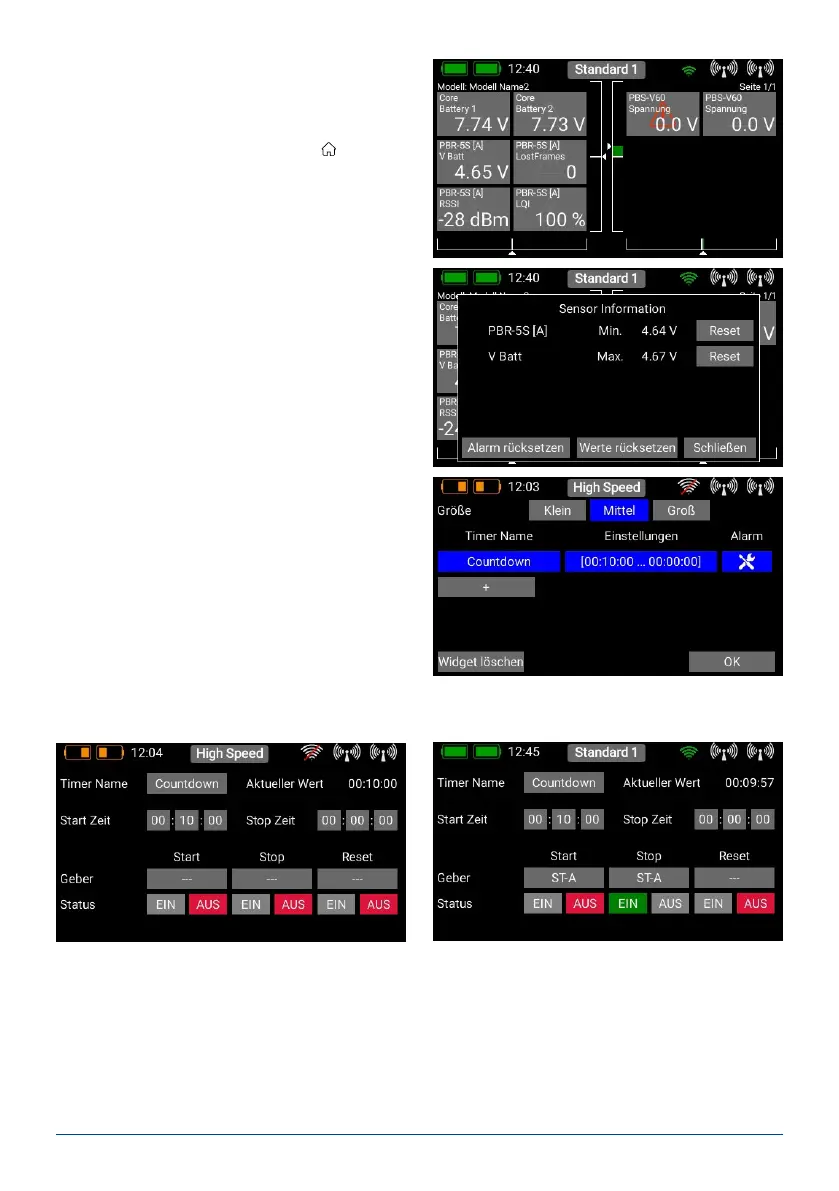
- Minimum / maximum display
Another important feature relating to telemetry data:
the CORE automatically records the maximum and
minimum values for the incoming data. You can dis-
play these values very easily simply by double-pres-
sing the widget:
b) Timer
The CORE allows you to set up eight separate, inde-
pendent timers. If you select the Timer widget type,
you will see the screen shown below, where you can
adjust the timer settings and set alarms, and add
further timers by pressing the + button. If you have
set up several timers, the widget only displays the
timer which has a light blue background:
Press the eld below Settings to congure the timer, and the following screen now appears:
You can change the Timer Name to any name you wish.
At this point you can set the Start and Stop times: if the Start time is greater than the Stop time, then the timer
counts down; if the Stop time is greater than the Start time, it counts up.



 To Next Page