12
© All rights reserved. All trademarks are property of their respective owners.
7. Battery Maintenance
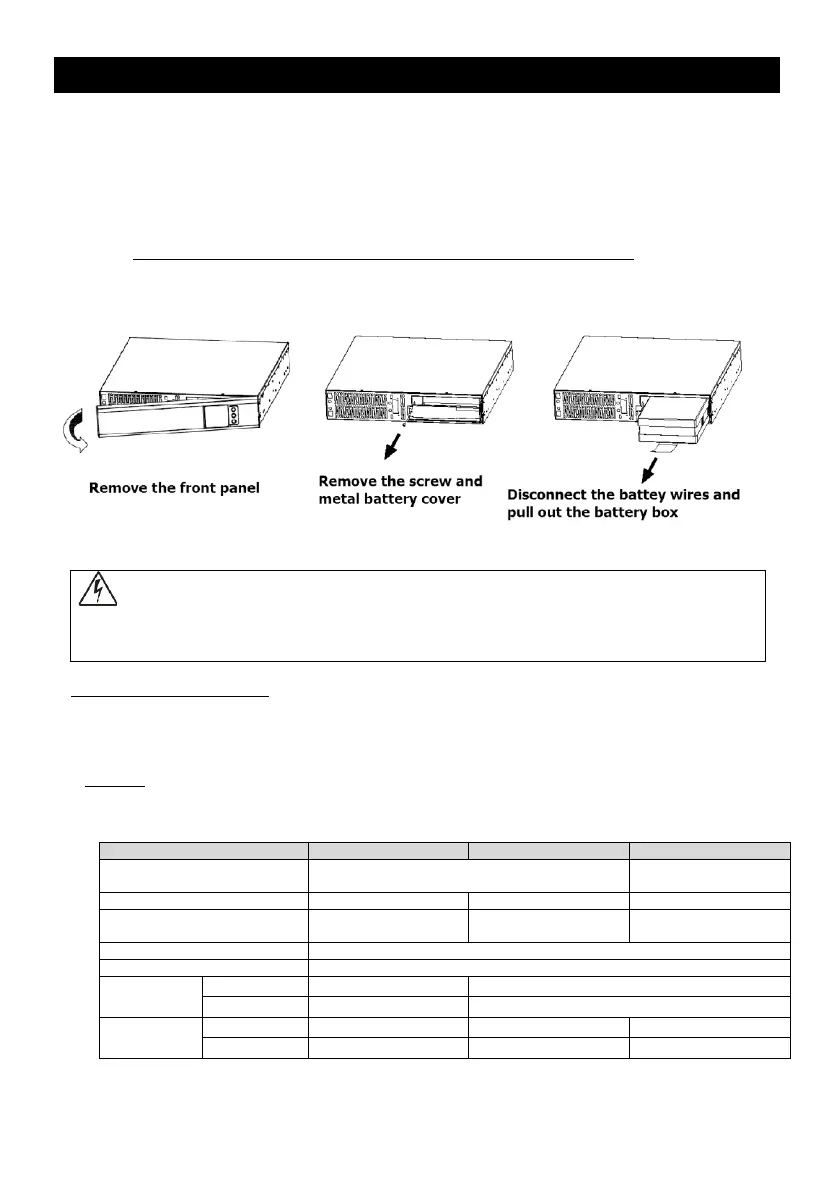
7.1 Internal Battery replacement (For Rack Mounting Model)
The following is a step by step tutorial for replacing the internal battery:
1. Remove the front panel
The front panel of UPS can be removed by pulling one side of the front panel as
the picture shows on the left:
2. Unscrew the screw and remove the metal baffle plate.
3. Disconnect the battery wires and pull out the battery box.
!!DO NOT DISCONNECT the batteries while UPS is in Battery mode!!
4. Replace the batteries with the same number and type as originally installed.
5. Replace the battery and push the battery box back into the UPS.
6. Reinstall the metal baffle plate and the front panel.
Fig.8 Replacing battery
Batteries may cause electrical shock or burn from high short circuit currents.
Please observe the following precautions:
1. Remove jewelry and metal objects such as watches and rings.
2. Use tools that have insulated handles.
3. Keep tools and other metal objects from contacting and away from the batteries.
ELECTRIC ENERGY HAZARD: Do not attempt to rewire, alter, or change any battery wiring or
connectors. Attempting to make such alterations can cause injury.
7.2 External Battery Pack
Notice!! When power is supplied by external batteries, output toward loads must be limited to
less than 90% of overall power generation."
Battery Cabinets
Backup time /Full load (min)
(Battery Pack)
Yes - ECO Mode Efficiency >94%
Specifications are for reference, actual information should base on real product.



 To Next Page