3 OPERATIONS continued
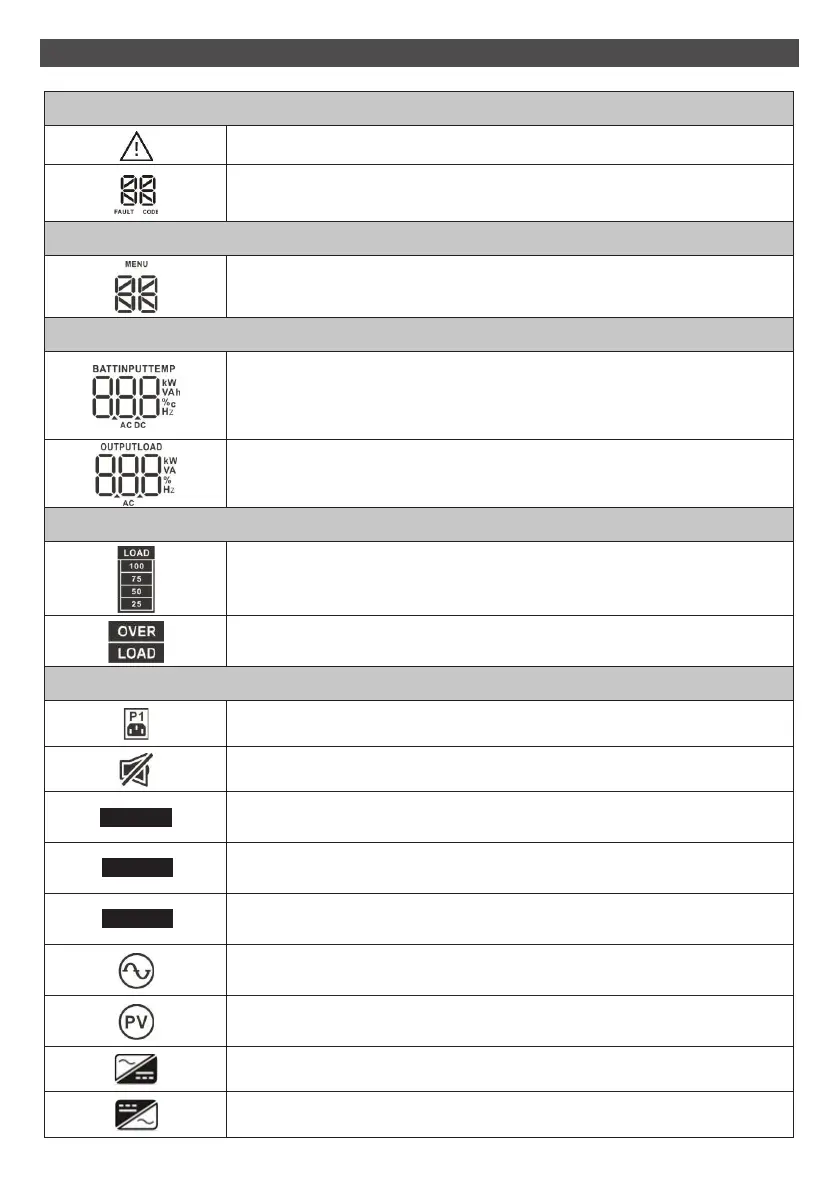
Warning & Fault Information
Indicates that the warning and fault occurs.
Indicates the warning and fault codes, and the codes are listed in details
in 3-5 section.
Setting Operation
Indicates the setting operation.
Battery, Input, Temperature, Output and Load Information
Indicates the input voltage, input frequency, battery voltage, battery
capacity and ambient temperature.
k: kilo, W: watt, V: voltage, A: ampere, %: percent, °C: centigrade degree, Hz: frequency,
AC: alternating current, DC: direct current
Indicates the output voltage, output frequency, load current and load
percentage. k: kilo, W: watt, V: voltage, A: ampere, %: percent, Hz: frequency, AC: alternating current
Load Information
Indicates the load level by 0-25%, 26-50%, 51-75%, and 76-100%.
Indicates overload.
UPS Status
Indicates that programmable management outlets are working.
Indicates that the UPS alarm is disabled.
Indicates the UPS powers the output directly from the mains.
Indicates the UPS is working in boost mode.
Indicates the UPS is working in buck mode.
Indicates the UPS connects to the mains.
Indicates the UPS connects to the PV.
Indicates the AC to DC circuit is working.
Indicates the inverter circuit is working.
12
BUCK
BOOST
ECO



 To Next Page