2 INSTALLATION AND SETUP
NOTE: Before installation, please inspect the unit. Be sure that nothing inside the
package is damaged. Please keep the original package in a safe place for future use.
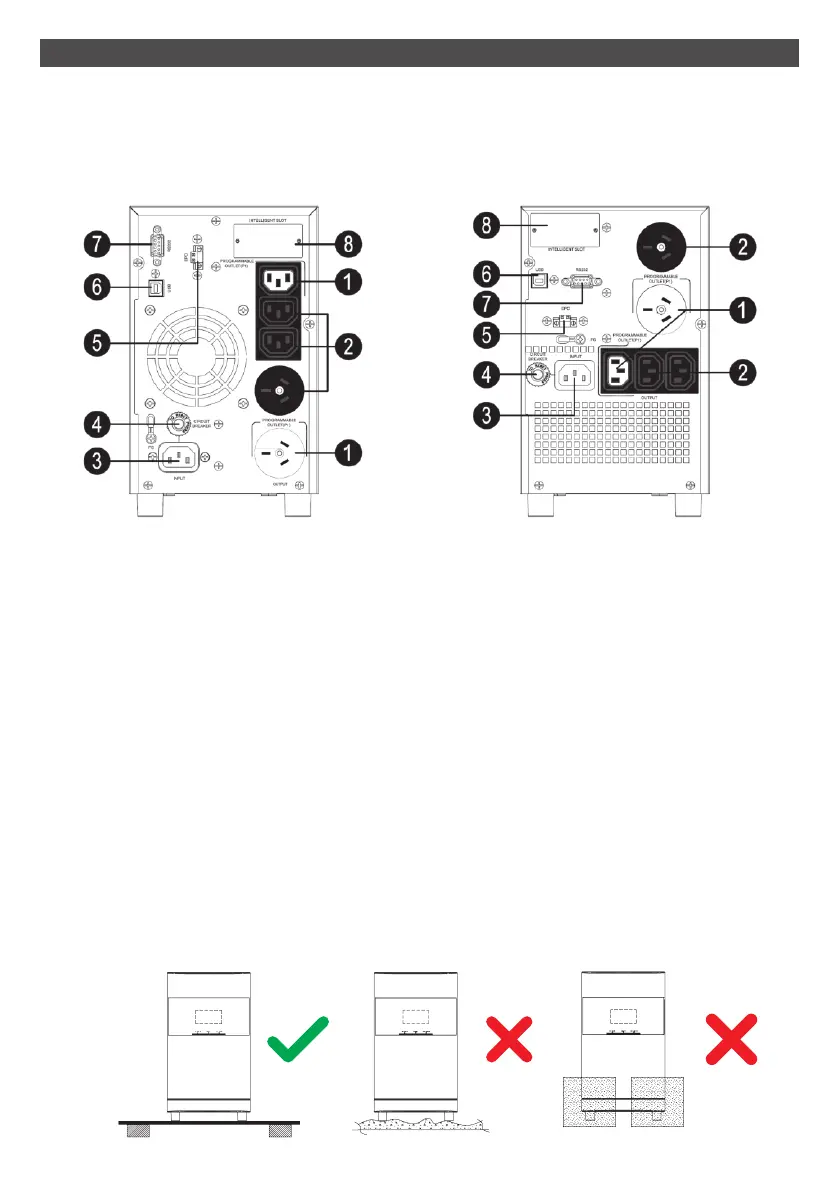
2-1. Rear Panel View
1. Programmable outlets: connect to non-critical loads.
2. Output receptacles: connect to mission-critical loads.
3. AC input
4. Input circuit breaker
5. Emergency power off function connector (EPO)
6. USB communication port
7. RS-232 communication port
8. SNMP intelligent slot
2-2. Setup the UPS
Before installing the UPS, please read below to select a proper location to install. The
UPS should be placed on a flat, clean surface. Place it in an area away from vibration,
dust, humidity, high temperature, flammable liquids, gases, corrosive and conductive
contaminants.
PSCM1100 PSCM2000
8
FLAT Floor Foam



 To Next Page