4.2.5 Shut down procedure
CAUTION!
This procedure should be followed to completely shut down the
UPS and the LOAD. After all power switches, isolators and circuit
breakers are opened, there will be no output.
◆ Open the BATTERY breaker;
◆ Open the UPS door to easily access to the main power switch;
◆ Switch OFF the input breaker.
◆ Open the OUTPUT power switch. The UPS shuts down;
◆ To completely isolate the UPS from AC Mains, all input switches of Utility shall
be completely off, which includes the ones for rectifier and bypass.
◆ The primary input distribution panel, which is often located far away from the
UPS area, so a label should be posted to advise service personnel that the
UPS circuit is under maintenance。
WARNING!
Wait for about 5 minutes for the internal D.C. bus bar
capacitors to be completely discharged.
4.2.6 Parallel setting
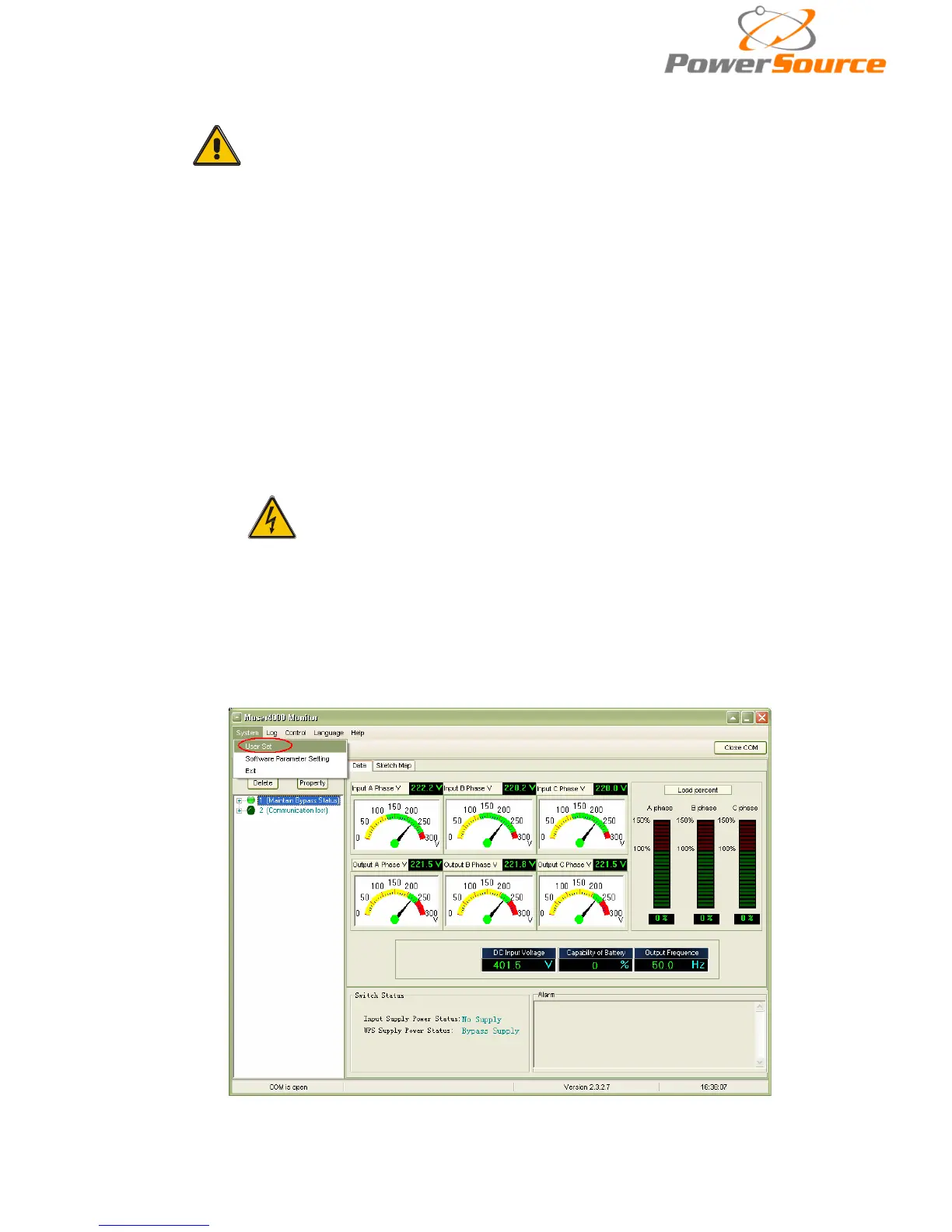
◆Connect the UPS with computer. Power on the U
PS.
◆ Open Muser4000 software, after connecting with the UPS successfully, click
“System”->“User Set”


 To Next Page