28 BEST BOY
®
HP SPOT LUMINAIRE USER MANUAL
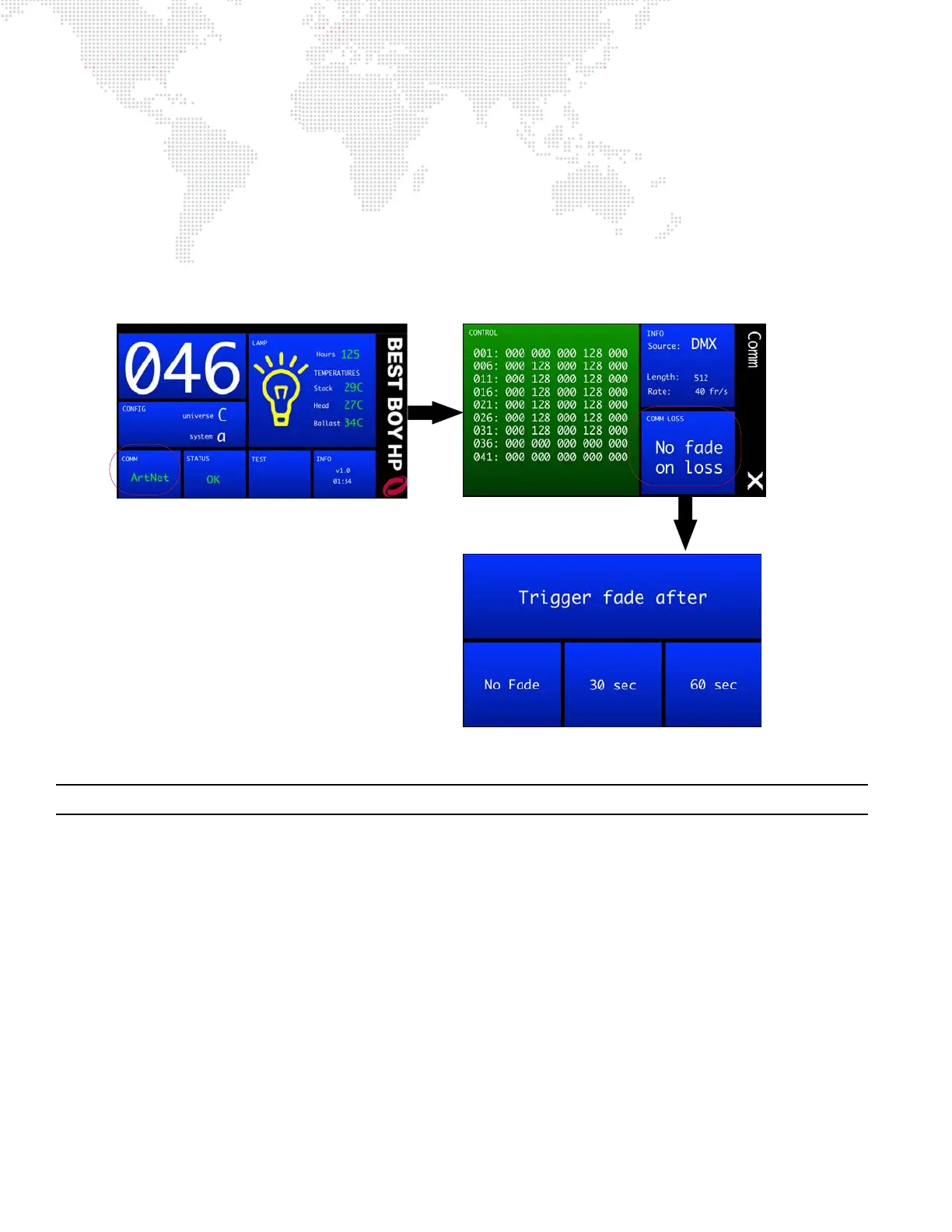
Configuring Comm Loss Setting
The Communication screen includes a "Comm Loss" setting. This setting will configure how long to wait before the
fixture fades to black upon loss of comm data.
To configure the Comm Loss setting:
Step 1. At Home screen, press COMM panel.
Step 2. At Communication screen, press COMM LOSS panel.
Step 3. Set Trigger Fade After to No Fade, 30 Seconds or 60 Seconds.
Step 4. Exit Communication screen by pressing (X).
Figure 2-19: Configuring Comm Loss Setting
Note: Comm Loss can also be configured with Control Channel commands. Refer to "Control Channels" on page 45.
Configuring Universe, Comm, and Other Options
Other luminaire configurations can be set using the menu screens available at the Menu Touchscreen. Refer to "Menu
System" on page 30 for complete instructions on using these features.



 To Next Page