BEST BOY
®
HP SPOT LUMINAIRE USER MANUAL 71
Cleaning the Lenses
Tools:
(2) Micro Fiber cloths (06.6085.0001.0)
OptiMax™ Ultra Pure Cleaning Solution (06.6084.0001.0)
Cotton gloves or finger cots
#2 Phillips screwdriver
3/16" flat screwdriver
To clean lenses:
CAUTION: Use caution when handling lenses. Avoid scratching optical surfaces.
CAUTION: Use ONLY OptiMax™ Ultra Pure Cleaning Solution to clean optical components. DO NOT use
Window Cleaner on lenses! Wear cotton gloves or finger cots when handling lenses/glass.
Step 1. Apply power to luminaire and set intensity to 20%. (A beam will be necessary to see dirt and dust on the
lenses.)
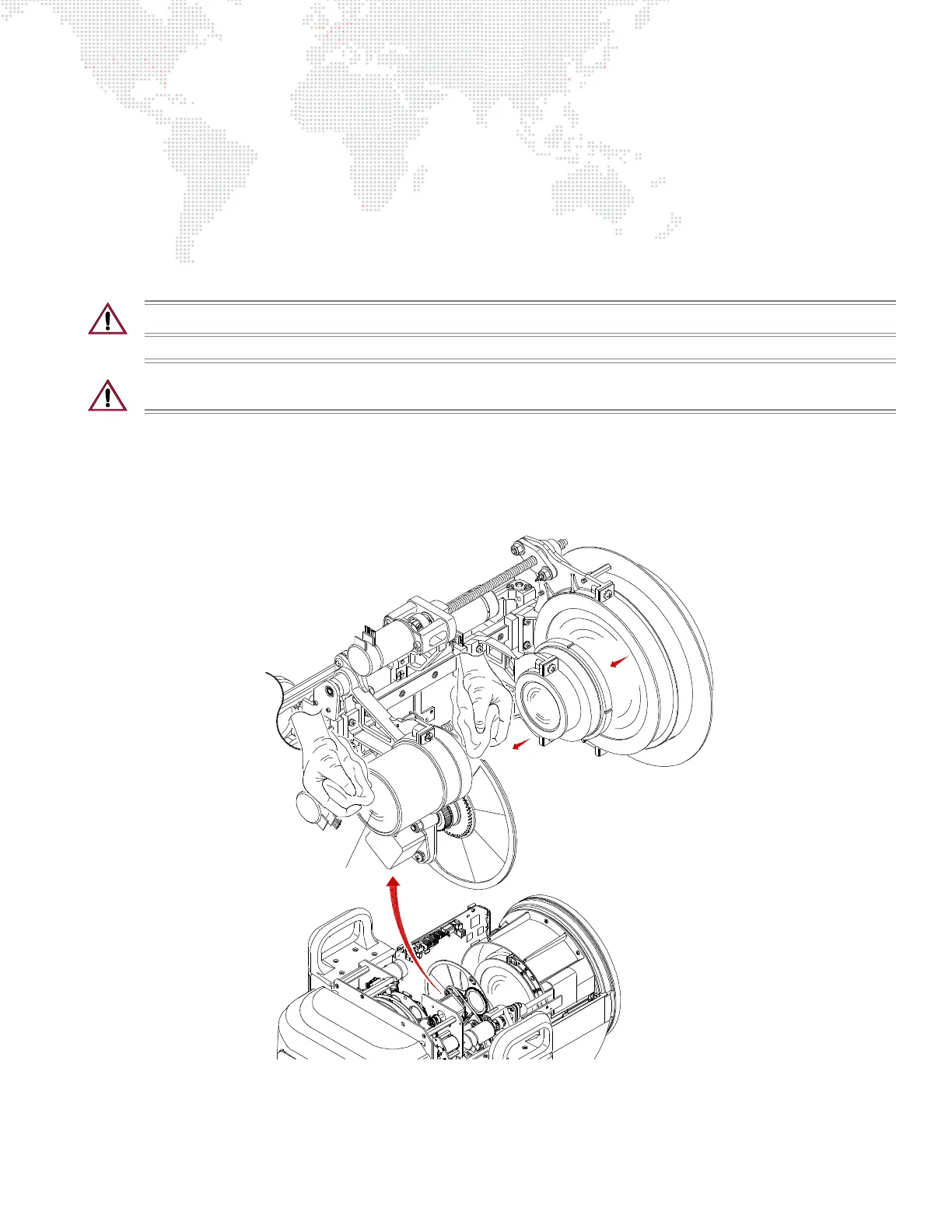
Step 2. Remove R2/Designer Head Cover to access Zoom Lens Assembly. (Refer to "Removing Head Covers" on
page 69.)
Figure 4-6: Accessing Zoom Lens Assembly
ZOOM LENS ASSEMBLY DETAIL
Lenses



 To Next Page