14
PRICE PRODIGY
®
- Manual
|
priceindustries.com
PRODIGY
®
- DIGITAL VAV DIFFUSERS
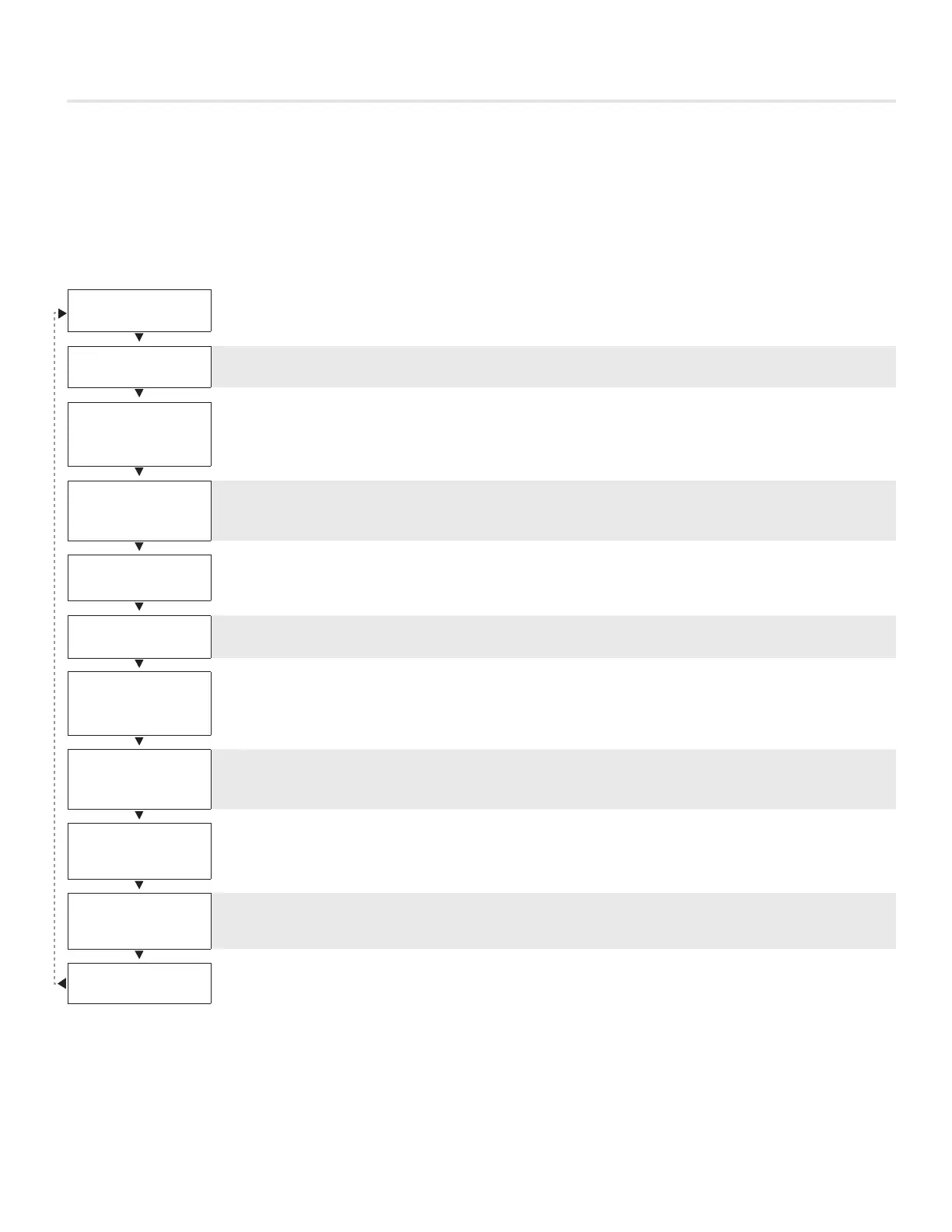
DISPLAY NAVIGATION
Information Menu
LCD Stats Only
The info menu shows information about the controller status regarding room load, damper position and BACnet address info. No
values can be changed from this menu and it is not locked or protected in any way.
The User Menu is accessed by pressing the Menu button, scroll through with Up and Down buttons.
CONTROL MODLEX
PPD
1. Manual Adjustment at Diffuser
2. Adjustment at Thermostat
OCCUPANCY
ON-CONTACT
Occupancy – The Occupancy can be determined by contact closure, motion or by a user pressing a button.
COOLING MODE
LOAD -100%
Room Load
· Cooling Mode is shown as a load from -1 to -100%. (-100% = max).
· Heating Mode is shown as a load from 0 to 100%. (+100% = max).
· Dead band Mode will be shown as 0%, where the room is satisfied.
SUPPLY AIR TEMP
85.0 °F
Duct Temp (S.A.T)
· If no supply probe is present, LCD will display No Probe.
· If supply probe present, LCD will display temperature.
DAMPER POS.
50%
Damper Position
· This indicates the current position of the damper in percent (%).
· Range is 0-100% (100% = full open or maximum air).
DAMPER TARGET
50%
Target (damper target % in VVT mode)
· Shows the current flow target in % (VVT).
MAC ADDRESS
10
MAC Address (MAC address must be unique on the network segment)
· Shows the BACnet MAC address. Range 1-99.
· MAC Address can be set via dip switch.
· If no BACnet module attached, LCD will display MAC address None.
DEVICE INST.
210
Device Instance (Instance must be ‘globally’ unique on your site)
· Displays controller’s BACnet Device Instance (if BACnet is attached).
· Device Instance can range from 0 – 4,194,303.
POWER FREQ
60 HZ
Device Power Frequency Setting
· Displays controller frequency setting.
· Must be set to match frequency of the supply power.
PRODIGY APP
SQUARE
Prodigy Application Model
· Displays model (geometry) of Prodigy diffuser.
PRESS MENU
TO EXIT
Exit – This will exit the info menu if you select Yes.
Note: Info menu will automatically time out after 60 seconds.


 To Next Page