4
PRODIGY
®
- DIGITAL VAV DIFFUSERS
PRODUCT OVERVIEW & INSTALLATION INSTRUCTIONS
PRICE PRODIGY
®
- Manual
|
priceindustries.com
Thermostat Options
The Prodigy Master uses a wall
thermostat to accurately sense room
temperature in both cooling and heating
modes. Each thermostat comes
complete with a 35ft plenum rated cable
for connection to the Prodigy Master.
The thermostat is available in six
options:
• Room Sensor (Blank Face).
• Dial Thermostat
• LCD Thermostat
• LCD Thermostat with motion sensor
for occupancy
• LCD Thermostat with CO2 and
humidity sensors
• Wireless Thermostat
The LCD thermostats are used to adjust
set points, display room temperature,
and configure the different parameters of
the diffuser.
NOTE When using the Room Sensor
or Dial Thermostat order a LCD-
SET (minimum of one per project) to
configure the diffuser.
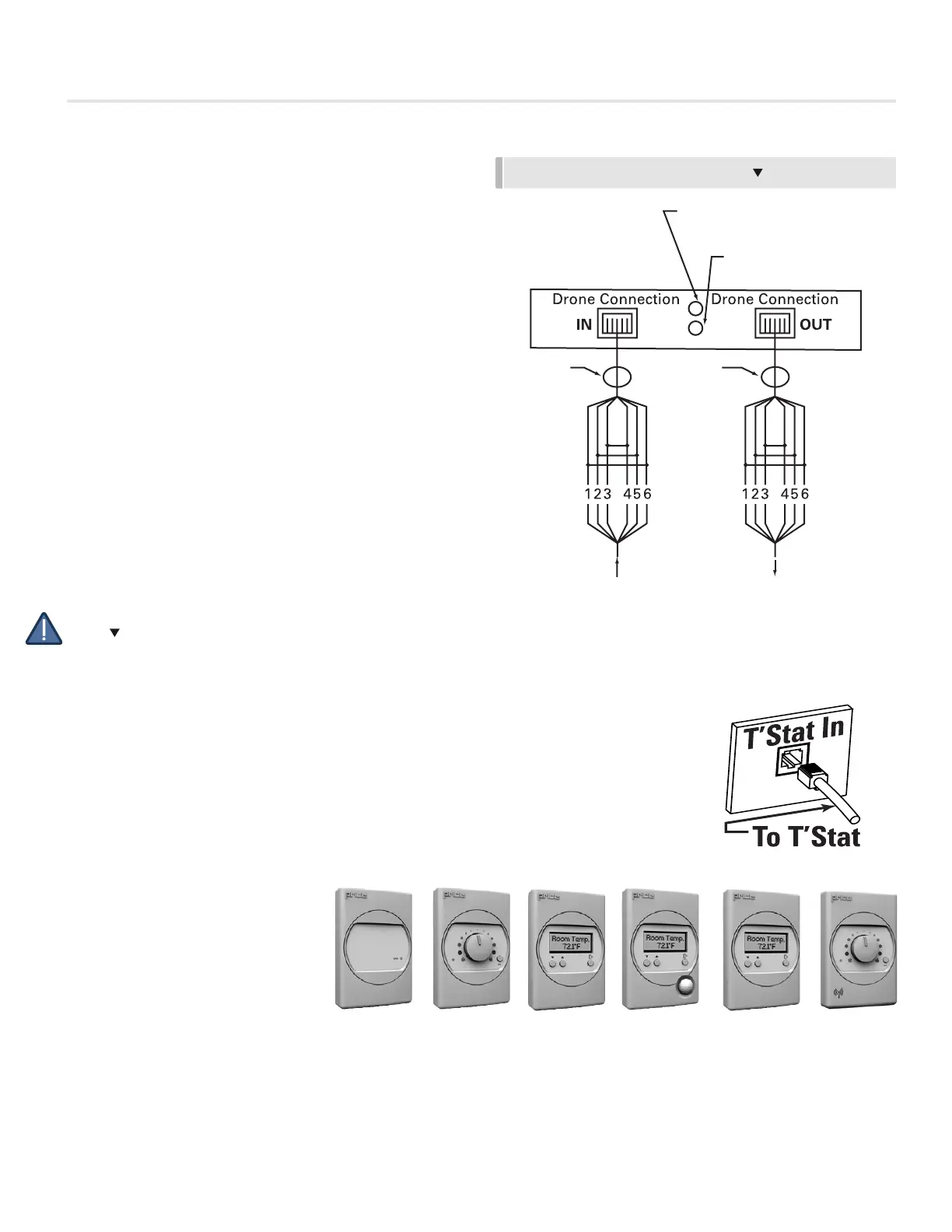
Thermostat Adjustment
VAV Cooling, VAV Heating - Connecting
a wall mounted T’stat activates the
Prodigy. Connect the T’stat to Prodigy
using a supplied NETC35 (35’ plenum
rated cable) by snapping one side of
the plug into jack inside of thermostat,
and the other side into the T’Stat In
jack. Setpoint is adjusted using the wall
mounted sensor.
See page 10 and 11 for more
thermostat details.
ROOM SENSOR DIAL THERMOSTAT LCD THERMOSTAT LCD THERMOSTAT WITH
CO2 AND HUMIDITY
LCD THERMOSTAT
WITH MOTION
SENSOR
WIRELESS
THERMOSTAT
FIGURE 8 - DRONE WIRING DIAGRAM
DC SIGNAL STATUS TO DRONE
GREEN LED
24 VAC SIGNAL STATUS
1 & 6 = 2 -10VDC
2 & 5 = COMMON
FROM PREVIOUS
DIFFUSER
CABLE CABLE
TO NEXT
DIFFUSER
INTERNAL WIRING


 To Next Page