5. CONNECTIONS
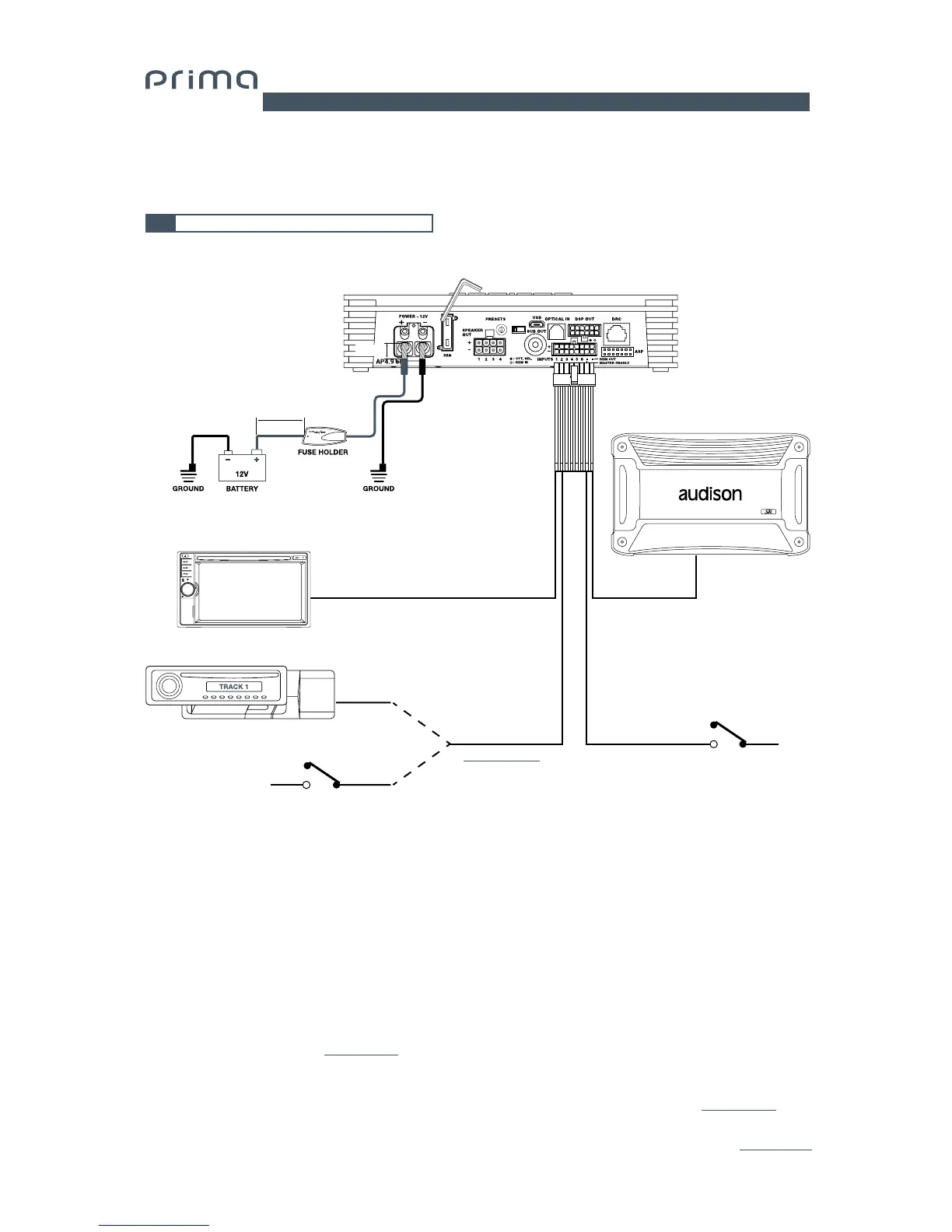
5.1 POWER SUPPLY AND REMOTE TURN ON
AP4.9 bit is on when the logo is lit blue. It can be turned on/off using the following methods:
1. By pressing on the main DRC control knob (ON). By holding down the main control knob on the DRC (OFF).
In this case, no other Remote In connections are needed, but they can co-exist.
2. By connecting the REMOTE IN terminal with a Remote Out signal coming from an after market audio source.
3. Through the Hi Level MASTER (FL - FR) input. The AUTO TURN ON (ART) function is activated by connecting
the output of an amplified source to the INPUT FL - FR input channel. This function can be enabled/disabled
using AP4.9 bit PC software
(see sec. 7.3.4.7).
4. Using the Low Level (Pre Out) input. The AUTO TURN ON (AST) function is activated by connected the outputs on a
preamplified source to the input channels to the AP4.9 bit input channels. This function can be enabled/disabled
using AP4.9 bit PC Software. This turn on control is available on the FL FR RL RR IN1 IN2 inputs
(see sec. 7.3.4.7).
5. By connecting the OPTICAL SELECT / AUX IN SELECT terminal with a Remote Out signal coming from an auxiliary
source, or connecting to terminal to 12V. This function can be enabled/disabled using AP4.9 bit PC Software (see sec. 7.3.4.7).
Turn AP4.9 bit on and off
5
0
1
2
3
4
5
6
7
UPGRADE
OFF ON
(Not provided.
Suggested Fuse
30 A delayed)
Max 20 cm / 7.9 in.
15 mm
/ 0.6 in.
8 AWG Max
SD
REMOTE OUT
REMOTE OUT
pink OPTICAL SELECT
AUX SELECT
blue REM IN blue/white REM OUT
REM IN
HEX KEY 2,5 mm
OPTICAL SOURCE
HEAD UNIT
brown MASTER ENABLE
+ 12 V
+ 12 V
*
(vedi sez. 7.3.4.7)
EXTERNAL AMPLIFIER
(Optional)


 To Next Page