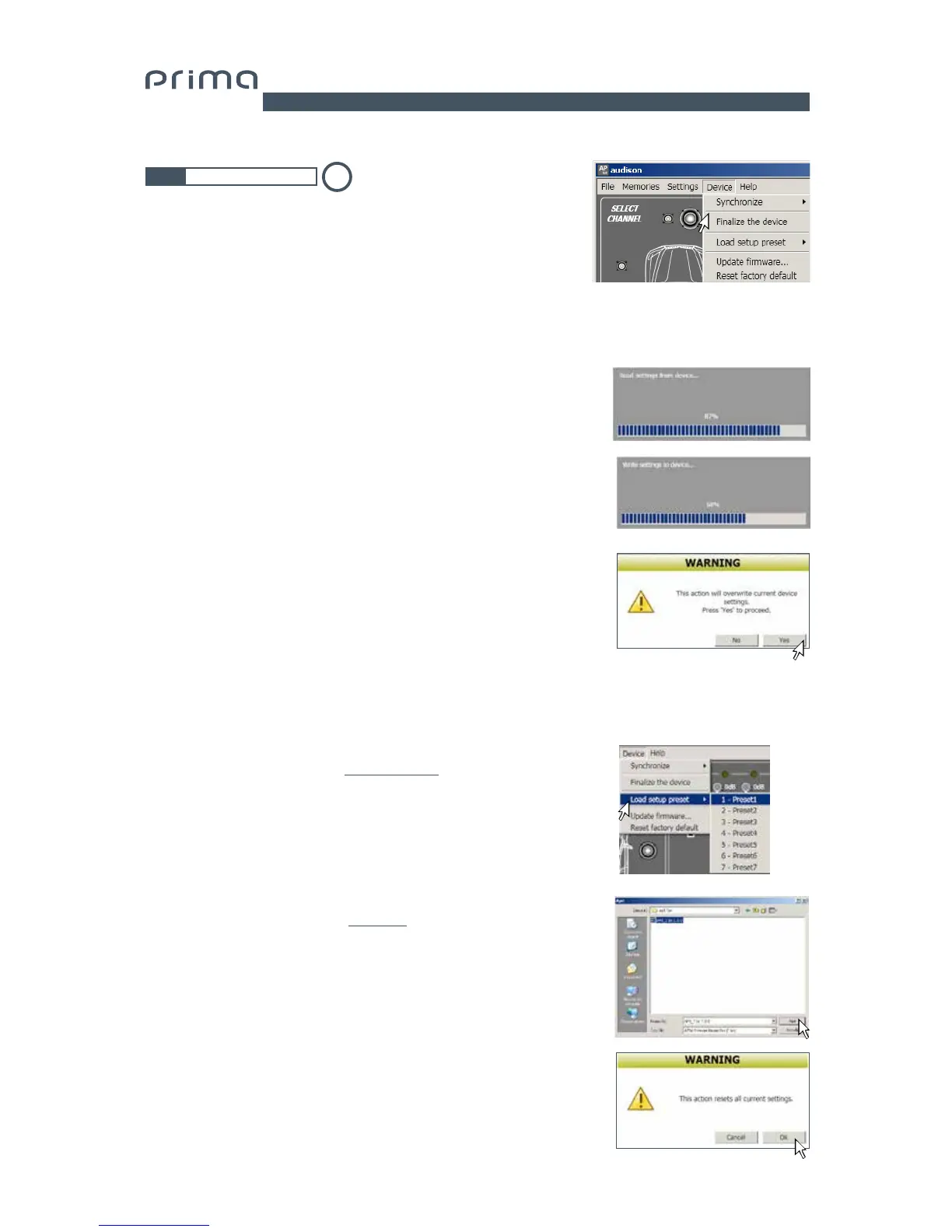
By clicking on this item, a drop-down menu appears with the entries
shown in the image:
7.3.5 DEVICE MAIN MENU
1. Synchronize: This function synchronizes the PC with AP4.9 bit
and vice versa due to communication losses caused by the
device shutting down or for other reasons.
Read from Device: The PC loads the settings present
in AP4.9 bit memory to the PC Software.
Write to device: The PC loads the current settings
to AP4.9 bit memory.
3. Load setup preset: loads one of the 7 “PRESETS” in the AP4.9 bit
preset 0 memory, to be editable (see sec. 5.4.2 - 5.4.8).
4. Update firmware: This allows
firmware updates on AP4.9 bit
(see sec. 8.3).
5. Reset factory default: Performs full reset of AP4.9 bit
returning the product to its original conditions, deleting all
previously saved data from the processor memory.
2. Finalize the device: Lets you load all of the parameters set during
system calibration in the internal memory, letting the AP4.9 bit
operate without being connected to the PC.
When Finalize to AP4.9 bit is performed, the software gives a warning
that the previously saved data in AP4.9 bit will be overwritten.
- Click on YES to load the data.
- Click on NO to interrupt the procedure.
5
1
2
3
4
5
7


 To Next Page