EasyManua.ls Logo

Prima audison AP4.9 bit - Digital Optical in Input Signals

Prima audison AP4.9 bit
59 pages
Print Icon
To Next Page IconTo Next Page
To Previous Page IconTo Previous Page
Loading...
USER’S MANUAL
13
AP4.9 bit /
0
1
2
3
4
5
6
7
UPGRADE
OFF ON
0
1
2
3
4
5
6
7
UPGRADE
OFF ON
0
1
2
3
4
5
6
7
UPGRADE
OFF ON
0
1
2
3
4
5
6
7
UPGRADE
OFF ON
0
1
2
3
4
5
6
7
UPGRADE
OFF ON
SD
SD
SD
1. Using the DRC, selecting the OPTICAL input.
2. Using the appropriately set OPTICAL IN terminal
(see sec. 7.3.4.7).
This command is active connecting the terminal to + 12V.
How to select OPTICAL input:
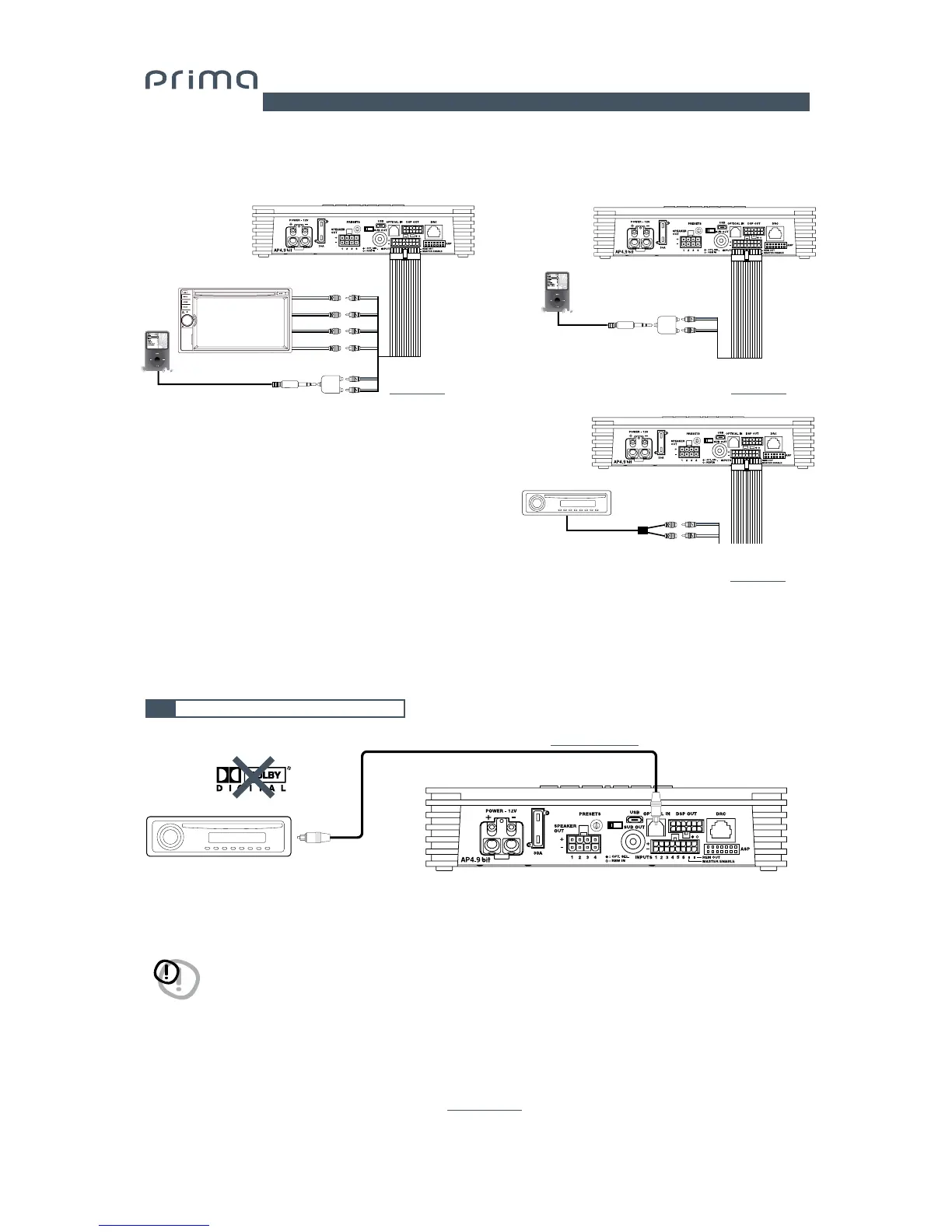
5.3 DIGITAL OPTICAL IN INPUT SIGNALS
WARNING: The digital inputs accepts up to 96 kHz / 24 bit stereo PCM signals. So DOLBY DIGITAL (AC3) multi-channel signals
coming from audio/video sources (such as the audio of a film in DVD) or DTS can not be reproduced. The output of
these devices will therefore have to be set in STEREO mode for the signal to be reproduced. If digital signals at
frequency higher than 96kHz (Ex. 192 kHz) are supplied, the AP4.9 bit will not be able to reproduce them.
5
7. MASTER PRE IN FRONT + REAR + AUXILIARY STEREO SOURCE 8. AUX IN L/R
ACP 2
(optional)
(see sec. 10.3)
ACP 6
(optional)
(see sec. 10.3)
ACP 2
(optional)
(see sec. 10.3)
OPTICAL FIBER (see sec. 10.7; 10.8)
0
1
2
3
4
5
6
7
UPGRADE
OFF ON

0
1
2
3
4
5
6
7
UPGRADE
OFF ON
0
1
2
3
4
5
6
7
UPGRADE
OFF ON
0
1
2
3
4
5
6
7
UPGRADE
OFF ON
0
1
2
3
4
5
6
7
UPGRADE
OFF ON
SD
SD
SD
AUXILIARY STEREO
PREAMPLIFIER SOURCE
AUXILIARY STEREO
PREAMPLIFIER SOURCE
MP3 PLAYER
IN1
IN1
FRONT LEFT
FRONT right
REAR LEFT
REAR RIGHT
FL
RL
FR
RR
IN2
0
1
2
3
4
5
6
7
UPGRADE
OFF ON
0
1
2
3
4
5
6
7
UPGRADE
OFF ON
0
1
2
3
4
5
6
7
UPGRADE
OFF ON
0
1
2
3
4
5
6
7
UPGRADE
OFF ON
0
1
2
3
4
5
6
7
UPGRADE
OFF ON
SD
SD
SD
AUXILIARY STEREO
PREAMPLIFIER SOURCE
MP3 PLAYER
IN1
IN2
IN2
0
1
2
3
4
5
6
7
UPGRADE
OFF ON
TOSLINK connector
PCM Stereo signal, max 96 kHz / 24 bit

Table of Contents