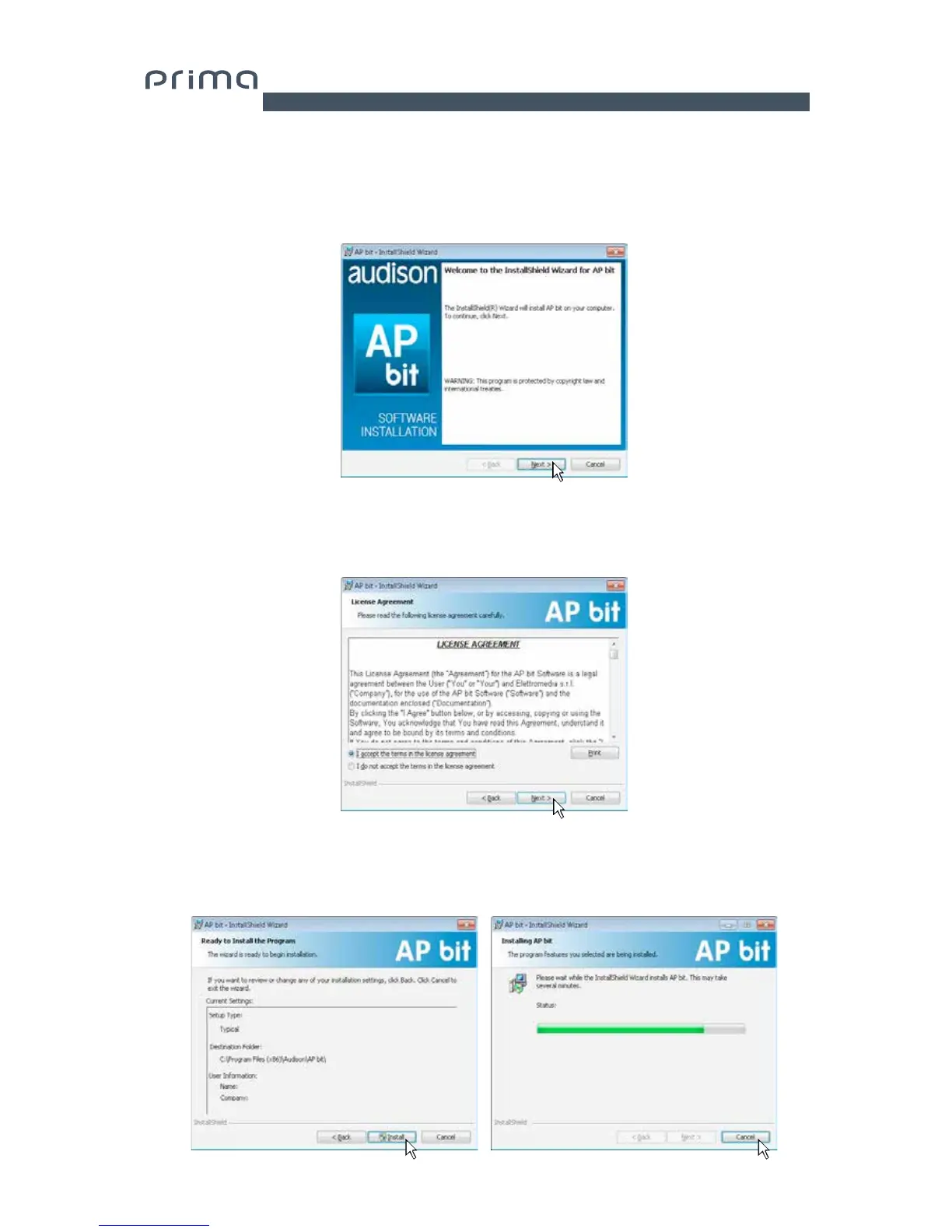
5. Windows XP: select NEXT to continue with the installation or CANCEL to interrupt it;
Windows Vista: select NEXT to continue with the installation or CANCEL to interrupt it;
Windows 7: select NEXT to continue with the installation or CANCEL to interrupt it;
Windows 8: select NEXT to continue with the installation or CANCEL to interrupt it;
6. Windows XP: Select I accept the terms in the license agreements on the tab and then NEXT;
Windows Vista: Select I accept the terms in the license agreements on the tab and then NEXT;
Windows 7: Select I accept the terms in the license agreements on the tab and then NEXT;
Windows 8: Select I accept the terms in the license agreements on the tab and then NEXT;
7. Windows XP / Vista / 7 / 8: select
- Install to proceed with the installation;
- Back if you wish to return to the previous page;
- Cancel to exit installation;
Then click NEXT.
6


 To Next Page