Connections (continued)
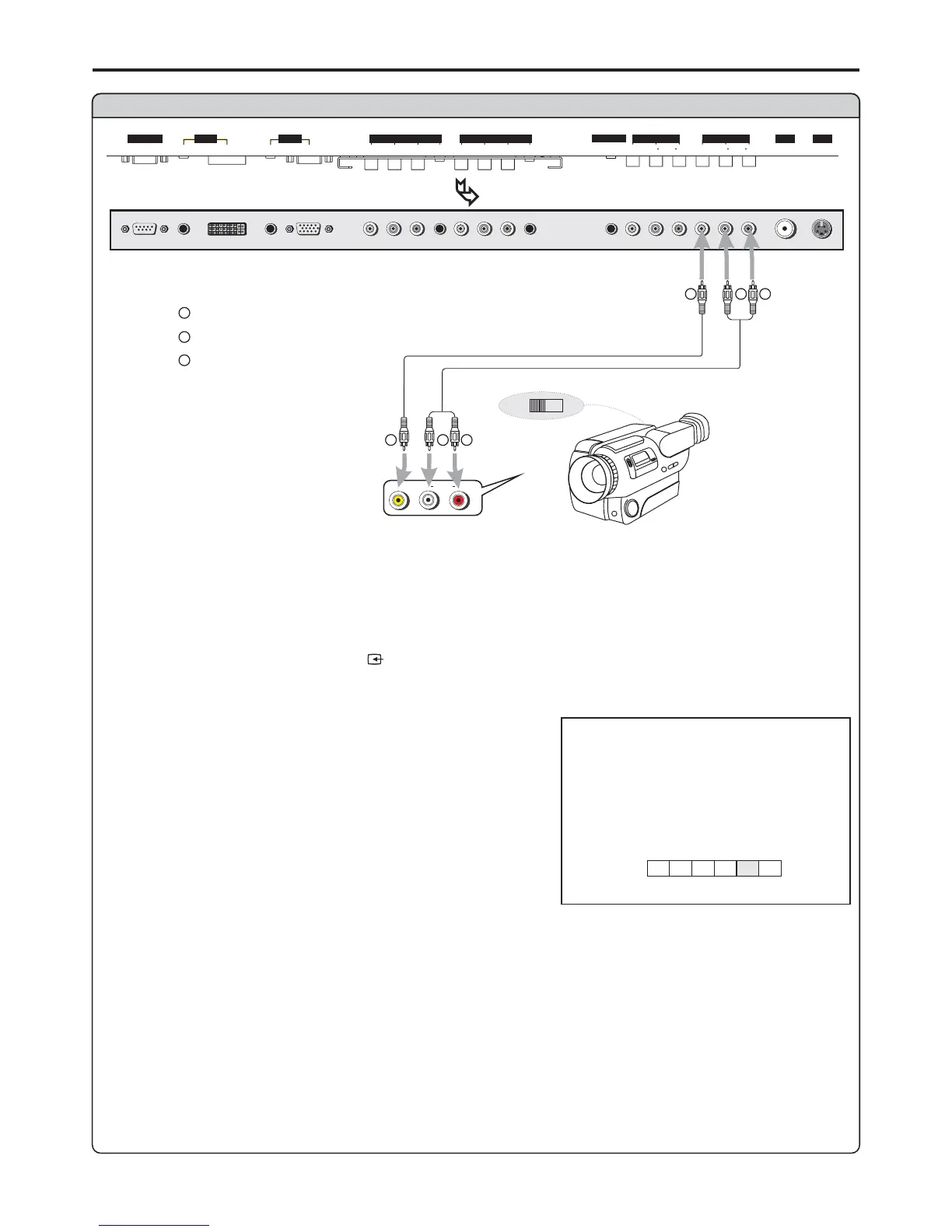
Connect a Camcorder
Yellow (VIDEO)
White (AUDIO L)
Red (AUDIO R )
W
Y
R
Connect the / cables between the Audio (L/R)/Video jacks on the unit and camcorder.Audio Video
How to connect:
1. Turn on your PDP TV , press button on the remote control.
2. Press to select .
3. Turn on your camcorder and set it to output mode. (For details, refer to your camcorder user
manual.)
SOURCE
VOL+/- AV (VIDEO) and press to confirmENTER
To playback Camcorder
RLVIDEO
AUDIO
Note:
The operations of the camcorder may be different and is
dependant on your model. Please read the user manual of
OUT
IN
W
Y
R
W
Y
R
Audio
cable
Video
cable
D-SUB
SVHS
HEADPHONE
RF
PIC
AUDIO
PIC
AUDIO
DVI AVOUTPUT
AV INPUT
CONTROL
COMPONENT INPUT 1COMPONENT INPUT 2
D
-
SUB
AUDIO
AUDIO
C/P
rr
C/P
rr
C/P
bb
C/P
bb
Y
Y
VIDEO VIDEO
RL AUDIO RL AUDIO
BOTTOM VIEW
VIDEO
A
D
C1C2
TV
AV
source
13


 To Next Page