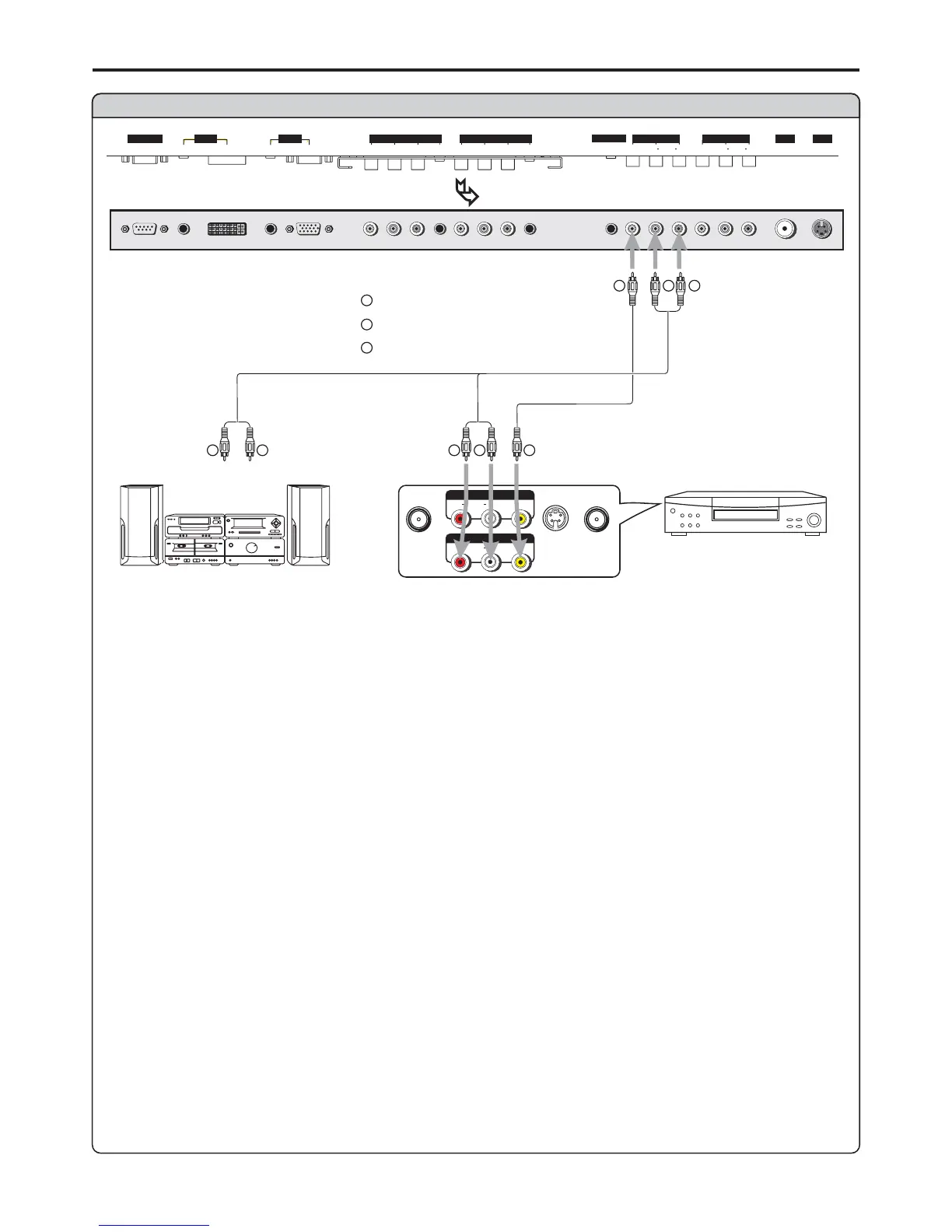
Connect a VCR (for recording) or external amplifier
W
Y
R
VCR forrecording
W
Y
R
Yellow (VIDEO)
White (AUDIO L)
Red (AUDIO R )
W
Y
R
AVOUT
RLVIDEO
AUDIO
S
-
VIDEO
ANT INANT OUT
AV IN
RLVIDEO
AUDIO
Rear of the VCR
Connect the / cables between the Audio (L/R)/Video jacks on the unit and VCR.Audio Video
How to connect:
1. Turn on your PDP TV, select a program you wish to record.
2. Turn on your VCR, insert a videotape for recording.
3. Press the Record button to begin recording.
To record program
Audio
cable
Video
cable
External Amplifier
W
R
Audio
cable
Connect the Audio cables between the Audio (L/R) jacks on the unit and external amplifier.
- or -
To Audio inputs
1. Turn on your PDP TV, select a program.
2. Turn the main volume of the amplifier to minimum.
3. Turn on the amplifier and adjust for a proper volume.
Note:
The operations of the amplifier may be different depending on model. Please read the user manual of
your amplifier to confirm proper operation.
The AV output terminals output audio/video signal inputted from Antenna input or AV inputs.
Connections (continued)
D-SUB
SVHS
HEADPHONE
RF
PIC
AUDIO
PIC
AUDIO
DVI AVOUTPUT
AV INPUT
CONTROL
COMPONENT INPUT 1COMPONENT INPUT 2
D
-
SUB
AUDIO
AUDIO
C/P
rr
C/P
rr
C/P
bb
C/P
bb
Y
Y
VIDEO VIDEO
RL AUDIO RL AUDIO
BOTTOM VIEW
17
To enjoy high-quality sound through an external amplifier


 To Next Page