AUDIOCOMPONENT
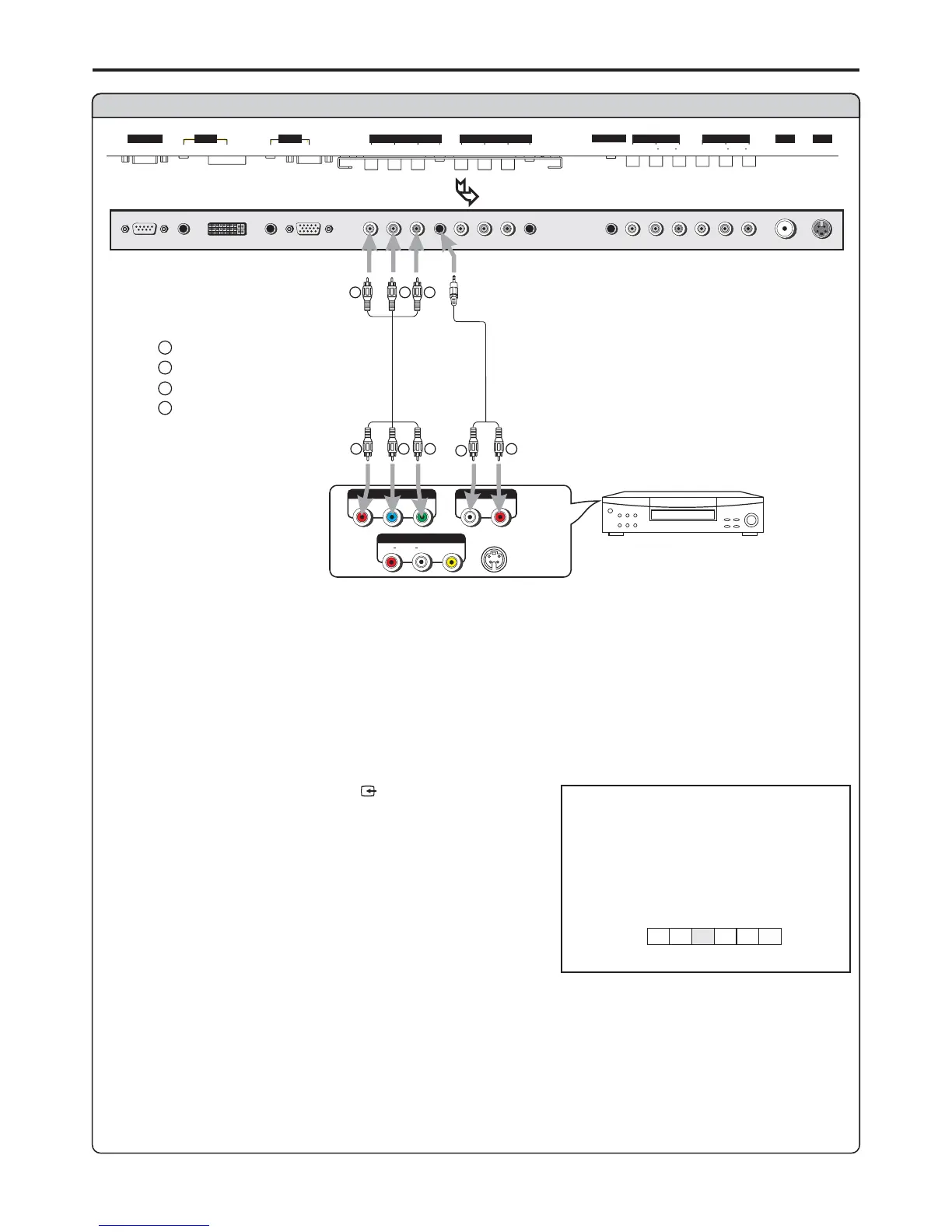
Connect a DVD player
DVD player
W
R
S
-
VIDEO
AVOUT
RLVIDEO
AUDIO
Rear of the DVD player
Connect the Video cable between the Y, Cb, Cr input jacks on the unit and
DVD player.
Y, Cb, Cr output jacks on
the
1. Turn on your PDP TV , press button on the
remote control.
SOURCE
4. Turn on your DVD player, insert a DVD disc and press the
To play DVD
Audio
cable
LR
AUDIO
P
b
P
r
Y
Video
cable
W
R
G
B
white (audio L)
red (audio R, P /C )
Green (Y)
Blue (P /C )
r
b
R GB
RG B
Connections (continued)
D-SUB
SVHS
HEADPHONE
RF
PIC
AUDIO
PIC
AUDIO
DVI AVOUTPUT
AV INPUT
CONTROL
COMPONENT INPUT 1COMPONENT INPUT 2
D
-
SUB
AUDIO
AUDIO
C/P
rr
C/P
rr
C/P
bb
C/P
bb
Y
Y
VIDEO VIDEO
RL AUDIO RL AUDIO
BOTTOM VIEW
source
A
D
C1C2
TV
AV
14
YPbPr1/YCbCr1
Note:
This unit identifies the type of component video terminals automatically. If you connect
the screen displays on the bottom-right corner. Similarly, if the componentterminals,
Y, Cb, Cr
YCbCr detected
r
b
How to connect a DVD Player using Component Video Connections:


 To Next Page