Preparations (continued)
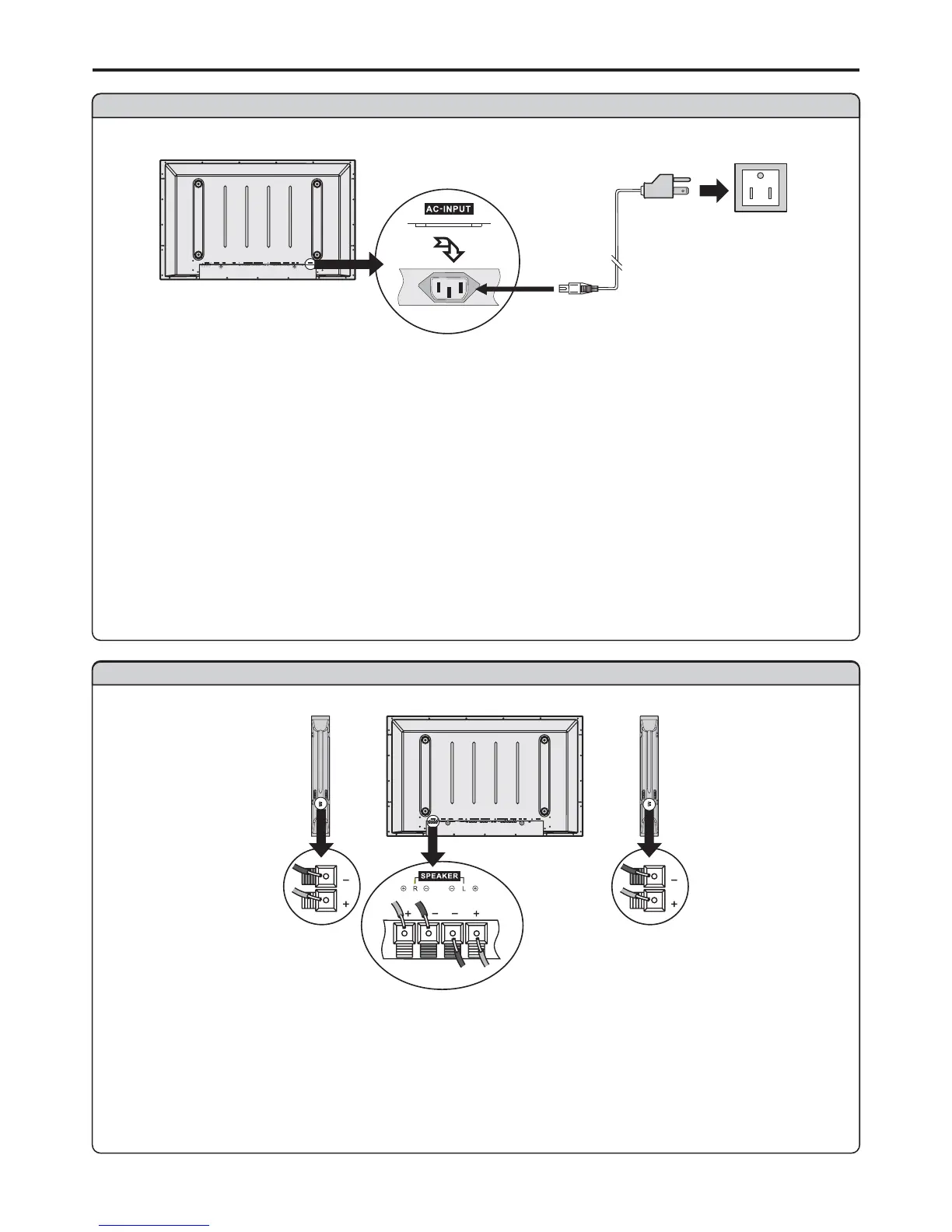
Speaker connection
Connect the speaker audio
cable to the external
speaker output jack on the
unit matching the "+" and "-"
ends of the cable with color.
SVHS
HEADPHONE
RF
R
L
PIC
AUDIO
PIC
AUDIO
SPEAKER DVI AVOUTPUT
AVINP UT
CONTROL
COMPONENTINPUT 1COMPONENTINPUT 2
D
-
SUB
AUDIO
AUDIO
C/P
rr
C/P
rr
C/P
bb
C/P
bb
Y
Y
VIDEO VIDEO
AC
-
INPUT
RLAUDIO RL AUDIO
ラメマ
Power connection
SVHSS VHS
HEADPHONEHEADPHONE
RF
R
L
PIC
AUDIO
PIC
AUDIO
SPEAKERSPEAKER DVIDVI AVOUTPUTAVO UTPUT
AVINP UTAVINP UT
CONTROLCONTROL
COMPONENTINPUT 1COMPONENTINPUT 1 COMPONENT INPUT2COMPONENT INPUT2
D
-
SUBD
-
SUB
AUDIO
AUDIO
C/P
rr
C/P
rr
C/P
rr
C/P
rr
C/P
bb
C/P
bb
C/P
bb
C/P
bb
Y
Y
VIDEO VIDEO
AC
-
INPUT
RLAUDIO RL AUDIO
1. Connecting the female plug to the AC socket on the unit.
2. Connecting the male plug to the wall outlet as illustrated.
Note:
<
<
This product should be operated only from the type of power source indicated on the marking label.
Always unplug the AC cord from power outlet when not using for a long period of time.
Plug into AC outlet.
AC cord
Household
power
6
(Black)
(Red)
(Black)
(Red)
Right
speaker
Left
speaker


 To Next Page