Advanced use: EAGLE ASCOM drivers
The EAGLE includes ASCOM drivers in order to allow third party softwares to connect to EAGLE’s ports and sensors:
•
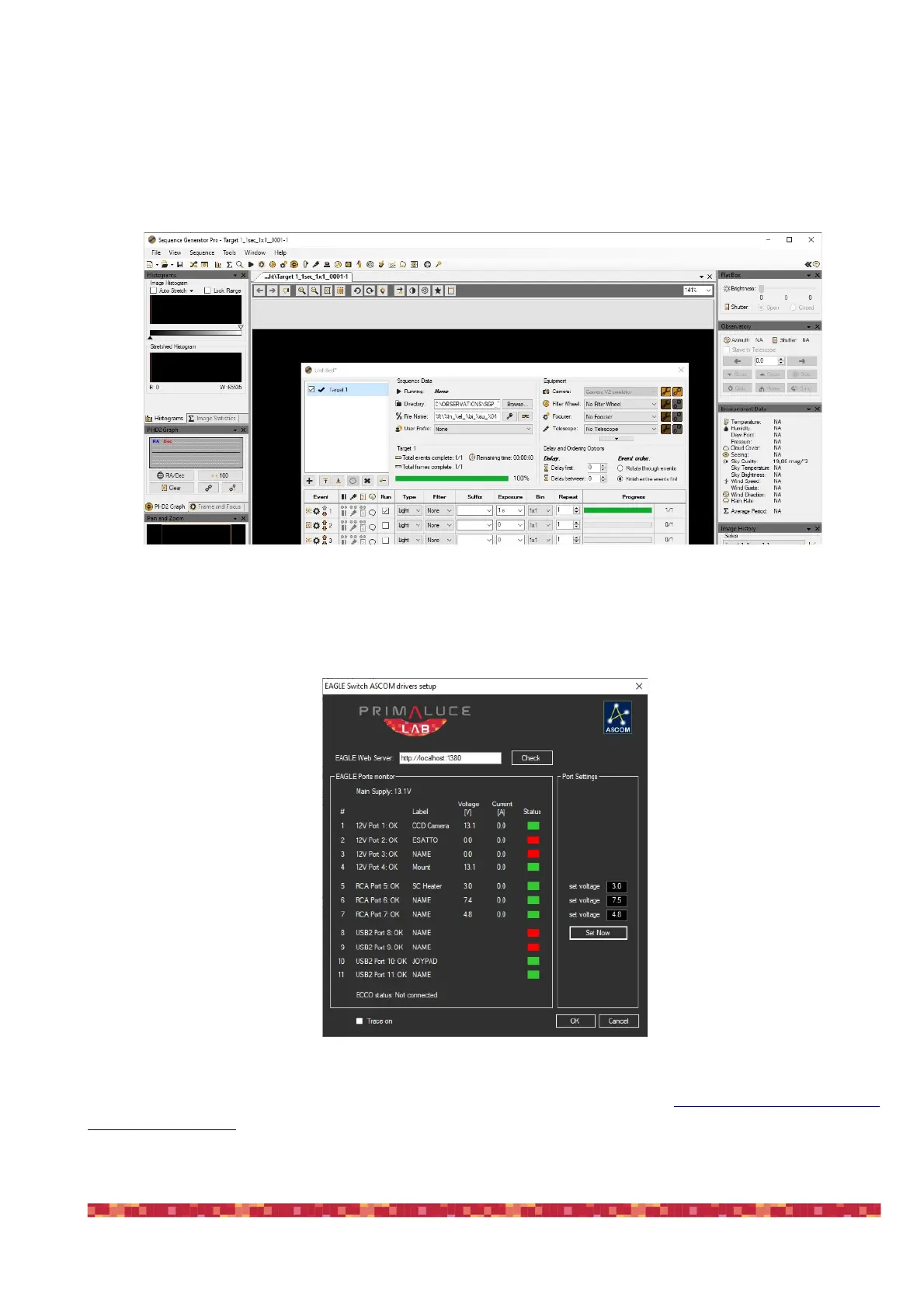
EAGLE Environmental Conditions ASCOM driver: this allows third party softwares to access to the EAGLE EYE sensor data,
for example to save the sky darkness data in your astrophotography image (image 44).
•
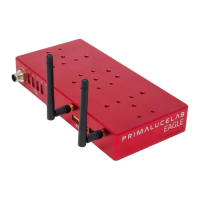
EAGLE Switch ASCOM driver: this allows third party softwares (that supports power switches control) to take control of
the EAGLE’s power and USB 2.0 ports A, B, C and D in order to automate ports management (Image 45).
EAGLE’s ASCOM drivers are already installed in your system. Updates can be found at https://www.primalucelab.com/
astronomy/downloads. EAGLE's ASCOM drivers require at least ASCOM platform 6.4 that is already installed on your sy-
stem.


 To Next Page