SETTING UP THE SPEAKERS
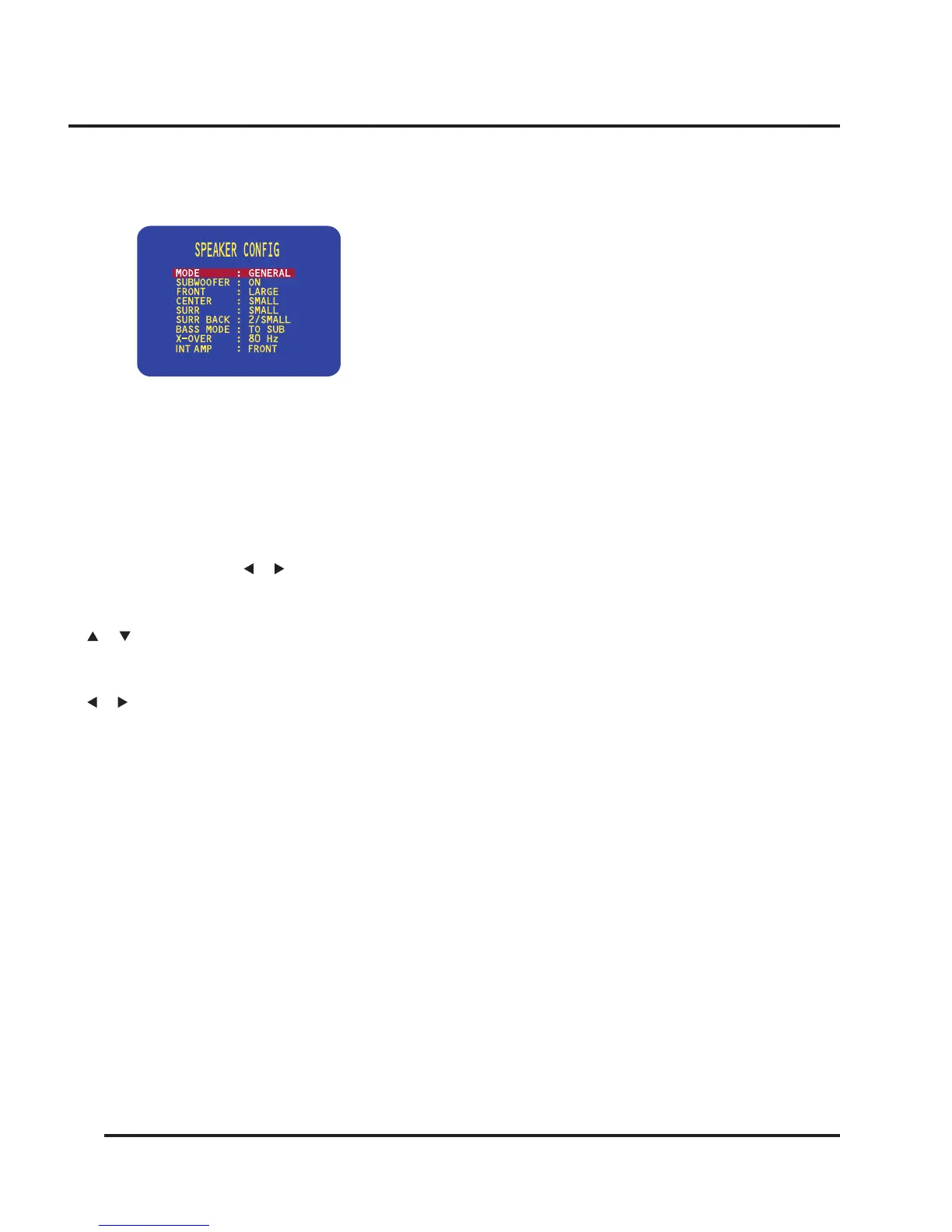
The SPEAKER CONFIG menu will be displayed:
To dene the GENERAL layout
First dene the GENERAL layout; the other layouts
will all be based on this.
• With MODE highlighted use the VOLUME control
on the front panel or the or buttons on the
remote control to select GENERAL.
• Use the SELECTOR on the front panel or the
or buttons on the remote control to highlight
each menu option in turn.
• Use the VOLUME control on the front panel or the
or buttons on the remote control to select the
appropriate value for each option.
If you select SMALL for a channel, frequencies below
the X-OVER setting are sent to the speaker(s) specied
by the BASS MODE option.
The options are explained in the following table:
Option Description
SUBWOOFER Select OFF or ON to specify whether the
layout should include a subwoofer.
FRONT Select SMALL or LARGE to specify whether
the front speakers can handle bass.
CENTER Select NONE, SMALL, or LARGE to specify
whether there is a center speaker in the
system, and whether it is small or large.
SURR Select NONE, SMALL, or LARGE to specify
information about the surround speakers.
SURR BACK Select NONE, 1/SMALL, 1/LARGE,
2/SMALL, or 2/LARGE to specify the number
and sound of the surround back speakers.
BASS MODE Species how to handle the bass from
channels dened as SMALL. TO SUB sends it
to the subwoofer, along with the LFE channel.
TO LARGE divides it between the channels
dened as LARGE. TO BOTH sends the bass
information to both TO LARGE and TO SUB.
EXTRA sends all bass information below the
X-OVER setting to the subwoofer, along with
the LFE channel.
X-OVER Allows you to dene the crossover frequency
(40-200 Hz) used for speakers dened as
SMALL, and by the BASS MODE EXTRA
setting.
INT AMP Select FRONT or S-BACK to specify which
speakers should be supplied by the internal
amplier.
• Press the MENU button on the front panel or remote
control to return to the SETUP MENU.
To dene other layouts
You can now optionally dene layouts DOLBY DIGITAL,
DTS, and OTHER which modify the GENERAL layout
when the source is Dolby Digital, DTS, or two-channel.
For example, you can add a subwoofer to the Dolby Dig-
ital layout for use with movie soundtracks.
Setting the speaker delays
The next step in setting up the loudspeakers is to set the
speaker delays to ensure that the sound image is correctly
focused.
Delaying the sound from a speaker by 1 milli-second is
equivalent to moving the speaker one foot (0.3 m) further
away from the listener.


 To Next Page