25
SPA21 SURROUND AMPLIFIER USER GUIDE
SETTING UP THE SOURCES
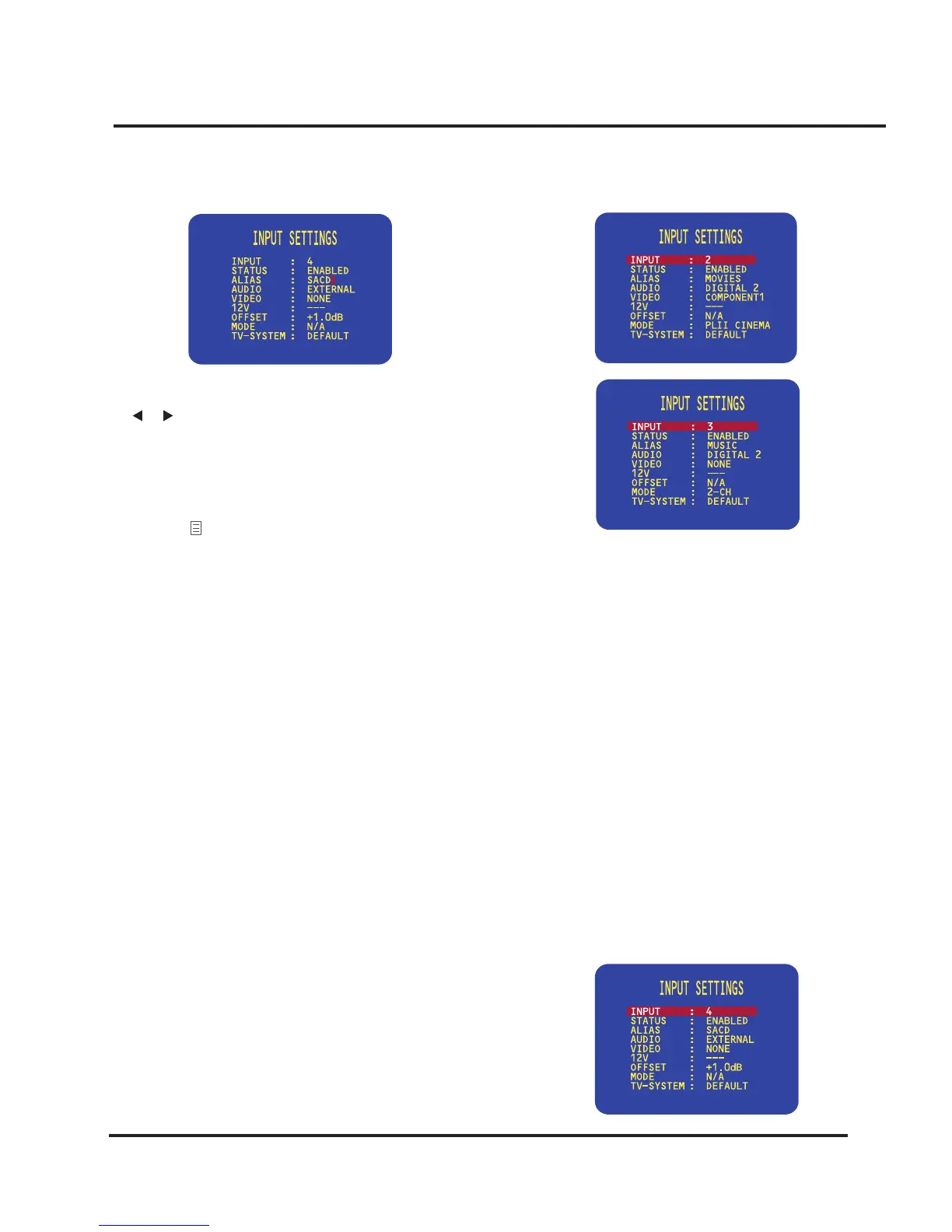
The currently selected character is shown highlighted with
a block:
The denition of each of the two sources are shown in the
following screen displays:
Dening a multi-channel source
If you have a source that provides multi-channel analog
outputs, such as a DVD Audio or SACD player, you can
dene a source that allows you to connect this to the
SPA21, bypassing the internal surround processor.
• Connect the multi-channel inputs to the eight-channel
external inputs as shown in the following table:
• Use the VOLUME control on the front panel or the
or buttons on the remote control to change the
currently selected character.
Each key press steps the character through the sequence:
space, upper-case letters, lower-case letters, digits, and
symbols.
• Press the button on the front panel or remote control
when you have nished entering the alias.
To add a new source
• Proceed as for editing a source, but select an unused
source as the starting point.
Examples of sources
The following examples show how to set up sources to
cater for more advanced applications.
Dening two sources that use the same input
Usually each source you dene will correspond to a differ-
ent input on the back panel. However, there are occasions
when it is useful to be able to dene two sources using the
same input, and the SPA21 allows you to do this.
The following example shows how to dene two sources,
with aliases MOVIES and MUSIC, designed for use with
a DVD player. Choosing the MOVIES source selects the
DOLBY PRO LOGIC II CINEMA surround mode,
which is ideal for movie soundtracks. Choosing the MU-
SIC source selects the 2-CH surround mode, for the best
possible reproduction of audio CDs.
• Dene a source with the AUDIO option set to
EXTERNAL and the VIDEO option set to the video
input used for the DVD audio or SACD player.
Input Left Right
Front Ex 1 Front L Front R
Surr Ex 2 Surr L Surr R
Cent Ex 3 Cent Sub
Surr back Surr L Surr R
You can use the OFFSET option to adjust the relative
level of the multi-channel source compared with the other
analog sources:


 To Next Page