Eureka3 User Manual
Eureka3 Page 13
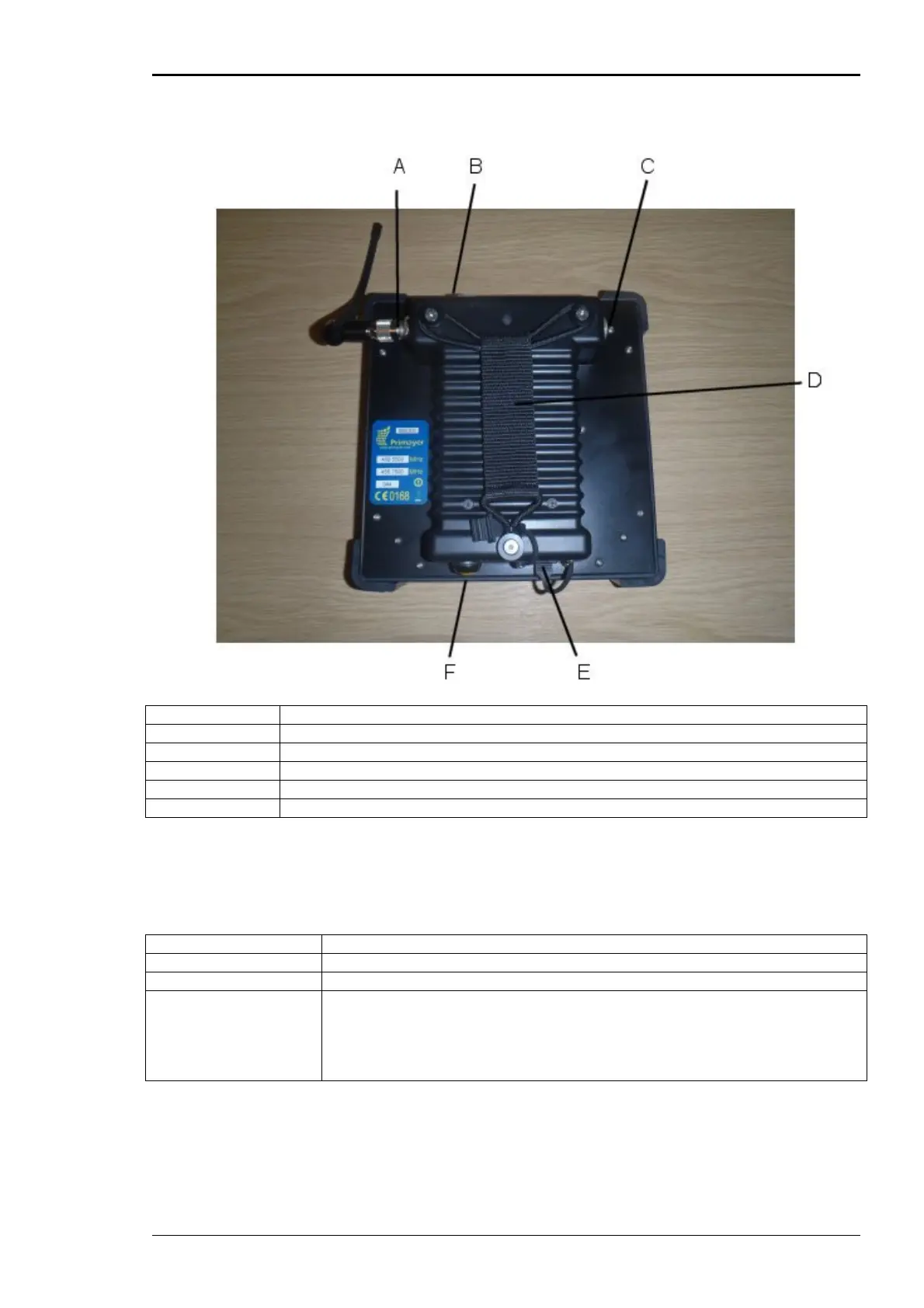
3.2.2 PrimeTouch Rear View
A Antenna Socket
B External Sensor/Charge Socket
C Headphone Socket
D Hand Strap
E USB Connector
F On/Off Switch (Yellow)
3.2.2.1 On/Off Switch
The on/off button has several functions:-
On A long press of the button when the unit is off will turn the unit on
Off A long press of the button when the unit is on will turn the unit off
Power Save A short press of the button when the unit is on will put the unit into power
save mode, the home button LED will come on for a few seconds then start
to double flash every 5 seconds. A short press of the button when the unit is
in power save mode will put the unit back into normal mode, the home
button LED will come on for a few seconds.
3.2.2.2 Charging LED
The charging LED is on when PrimeTouch is charging. When charging is complete this light will switch
off.


 To Next Page