Eureka3 User Manual
Eureka3 Page 19
5 Eureka3 Application
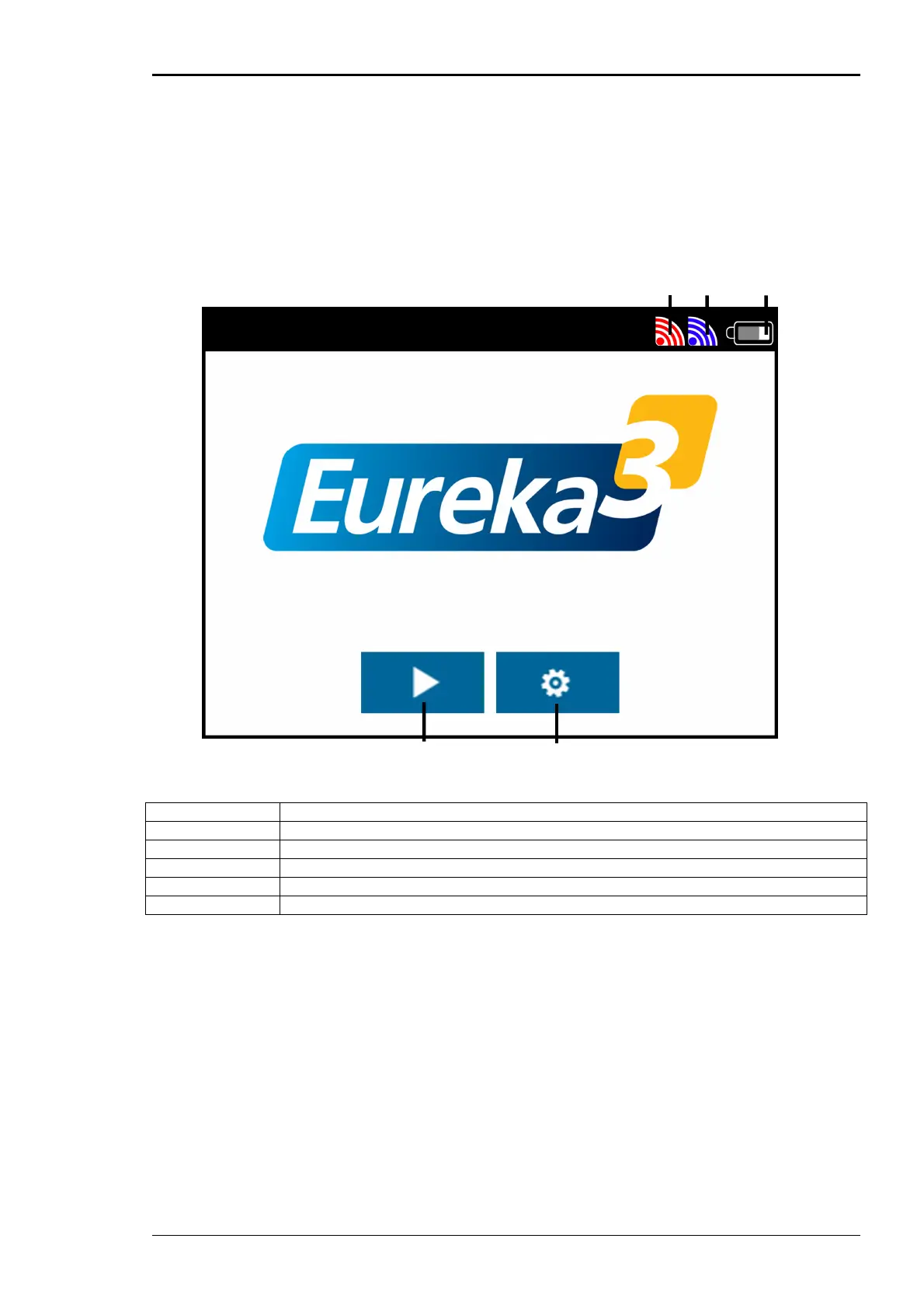
Switch on PrimeTouch; the Eureka3 software will load and after a short time the introduction screen
will display.
5.1 Introduction Screen
A Red transmitter power icon
B Blue transmitter power icon
C Battery charge indicator
D Settings button
E Correlation button
5.1.1 Red Transmitter Power Icon
This icon shows the received signal strength from the red transmitter. The icon will flash if no signal is
received. The larger the icon the stronger the received signal.
5.1.2 Blue Transmitter Power Icon
This icon shows the received signal strength from the blue transmitter. The icon will flash if no signal is
received. The larger the icon the stronger the received signal.
5.1.3 Battery Charge Indicator
The indicator shows the charge status of PrimeTouch, the white part of the battery shows the amount
of charge remaining.
A B C
E D


 To Next Page