Eureka3 User Manual
Eureka3 Page 20
A lightning symbol is shown in the battery icon when PrimeTouch is charging. If this symbol is flashing
when the charger is attached there is a charging issue. This could be due to high temperature. Unplug
the charger for at least an hour. If this problem persists then please contact Primayer Customer
Support.
5.1.4 Settings Button
Tapping on the settings button will open the Settings Screen.
5.1.5 Correlation Button
Tapping on the correlation button will open the Correlation Screen.
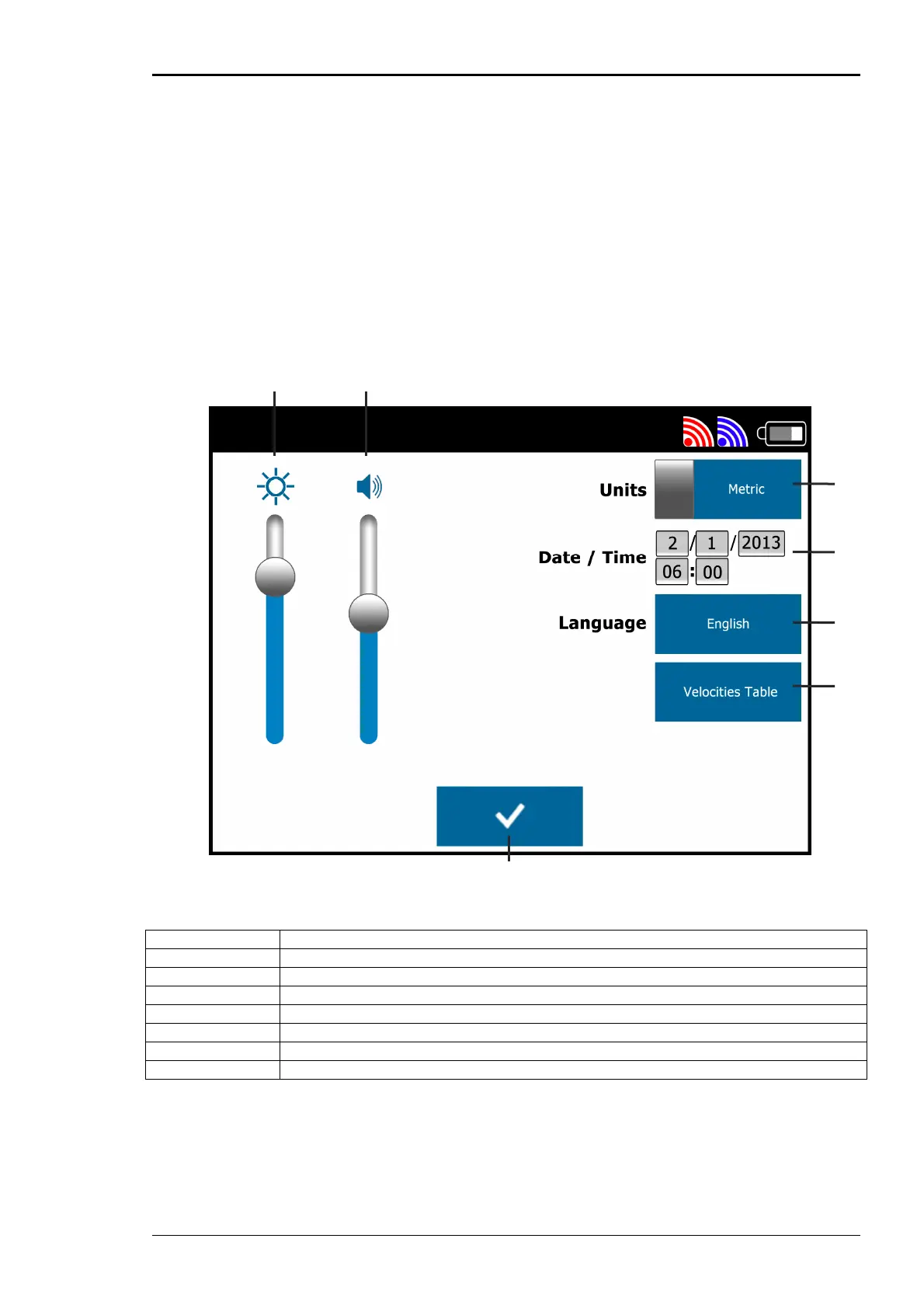
5.2 Settings Screen
A Brightness Slider
B Volume Slider
C Units
D Date/Time
E Language
F Velocities Table
G Tick Button
5.2.1 Volume Slider
This slider controls the volume of the sound in the headset. Move the slider up to increase the volume
and down to decrease the volume.
A B
C
D
E
F
G


 To Next Page