Eureka3 User Manual
Eureka3 Page 9
3 System Components
3.1 Transmitters
Eureka3 has two transmitters, one red and one blue. They both listen to noise which is transmitted to
PrimeTouch via an internal radio transmitter. The transmission frequency of each transmitter is
different to distinguish the different noise signals.
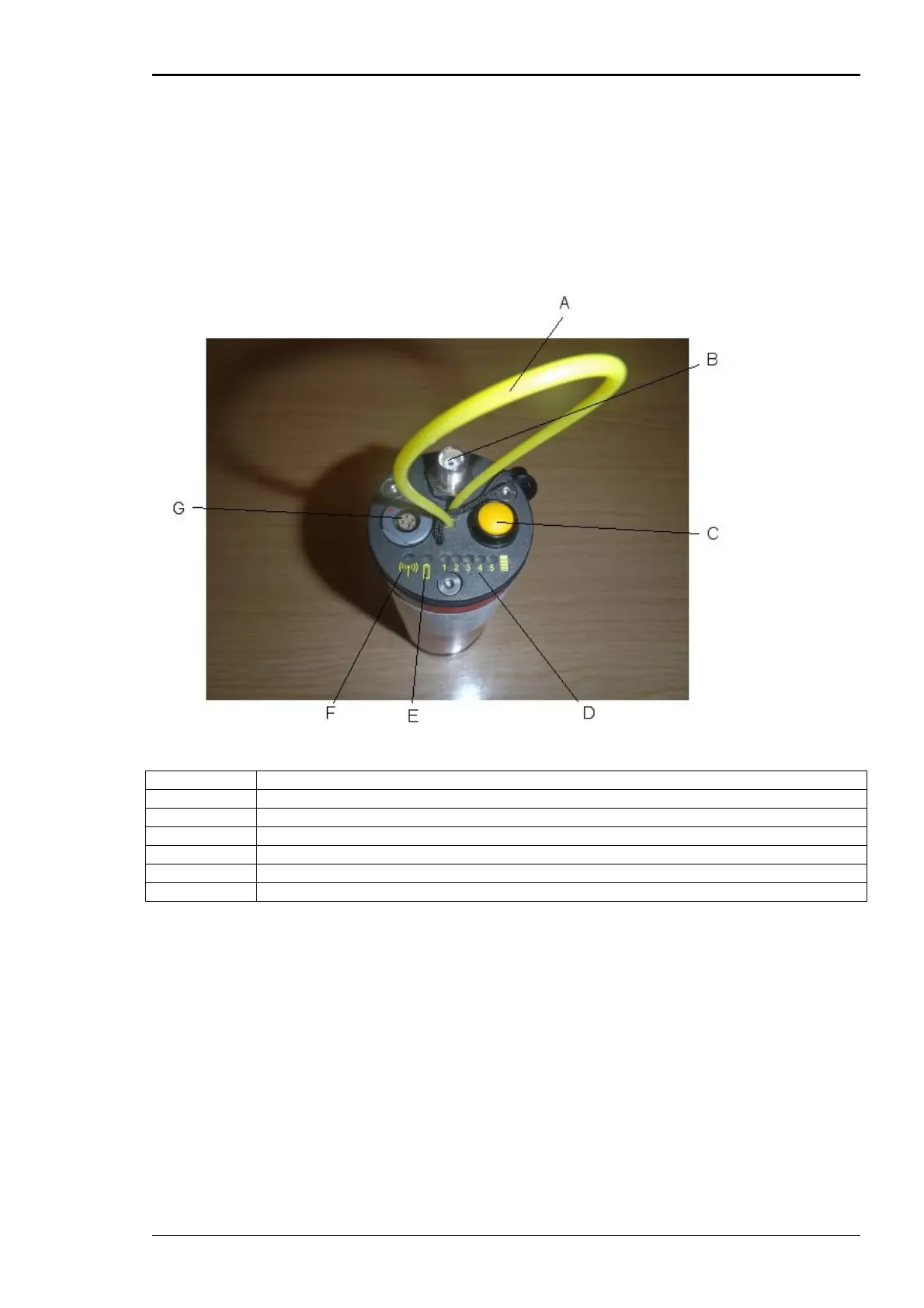
A Handle
B Antenna Socket
C Pushbutton Switch
D Level Indicator LEDs (5)
E Battery Indicator
F Transmit Power Level Indicator
G External Sensor/Charging Socket
3.1.1 Handle
The handle is a simple plastic loop.
3.1.2 Antenna Socket
The antenna socket allows the connection of the antenna.
3.1.3 Pushbutton Switch
The pushbutton switch has several functions.
When the transmitter is off:
• Short press will show the battery charge on the LED Level Indicator.
• Long press (2 seconds) will turn on the transmitter (the battery charge and transmitter LEDs
will come on, then the LED level indicator will show received noise level).


 To Next Page