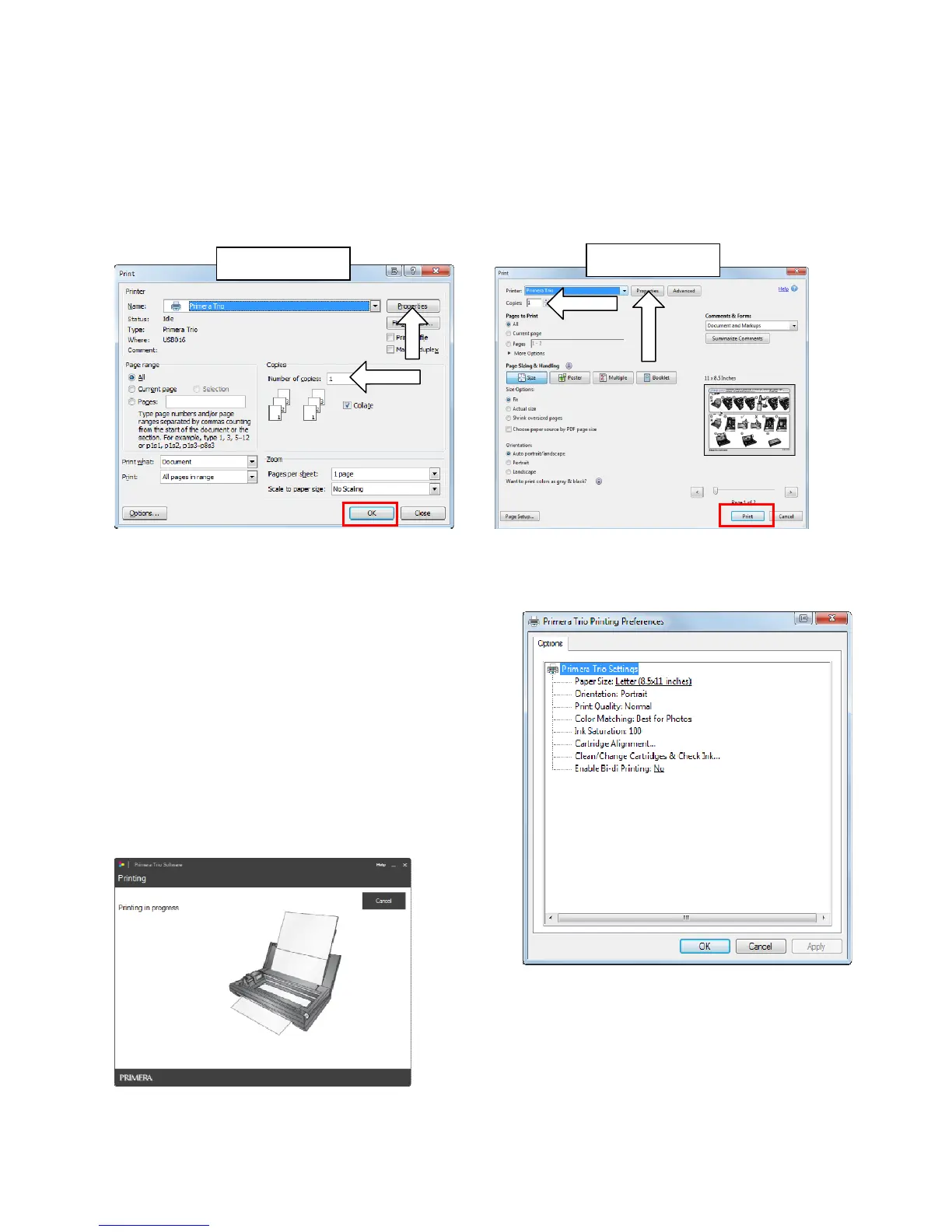
5B.PrintfromOtherApplications
YoumayalsoprintfromanyapplicationincludingAdobeReader,MSWord,MSExcel,MSPowerPoint,
andwebbrowserssuchasChrome,Firefox,orInternetExplorer.
1.FindthefilemenuandchooseprinterorholddowntheCTRLkey+P.Aprintdialogwindowwill
appear.
Page|18
2.Setthenumberofcopies.Uptotensheetscanbeplacedinthesheetfeeder.Youmayprintmore
copiesbutyouwillreceiveaprompttorefillthesheetfeederifyouprintmorethantencopies.
3.(Optional)Youcanadjustprinterqualitysettingsor
pagesizebyclickingthe“Properties”button.See
section5Cformoreinformationonprinting
preferences.Youmayalsoaccesstheprinting
preferencesviathePrimeraTrioApplication.Thesame
settingsareavailableinbothlocations.
4.Whenyouarereadytoprintclickthe“Print”or“OK”
button.TheTrioApplicationwillopenandthe“Printing
inProgress”messagewillappear.
AdobeReader
MSWord



 To Next Page