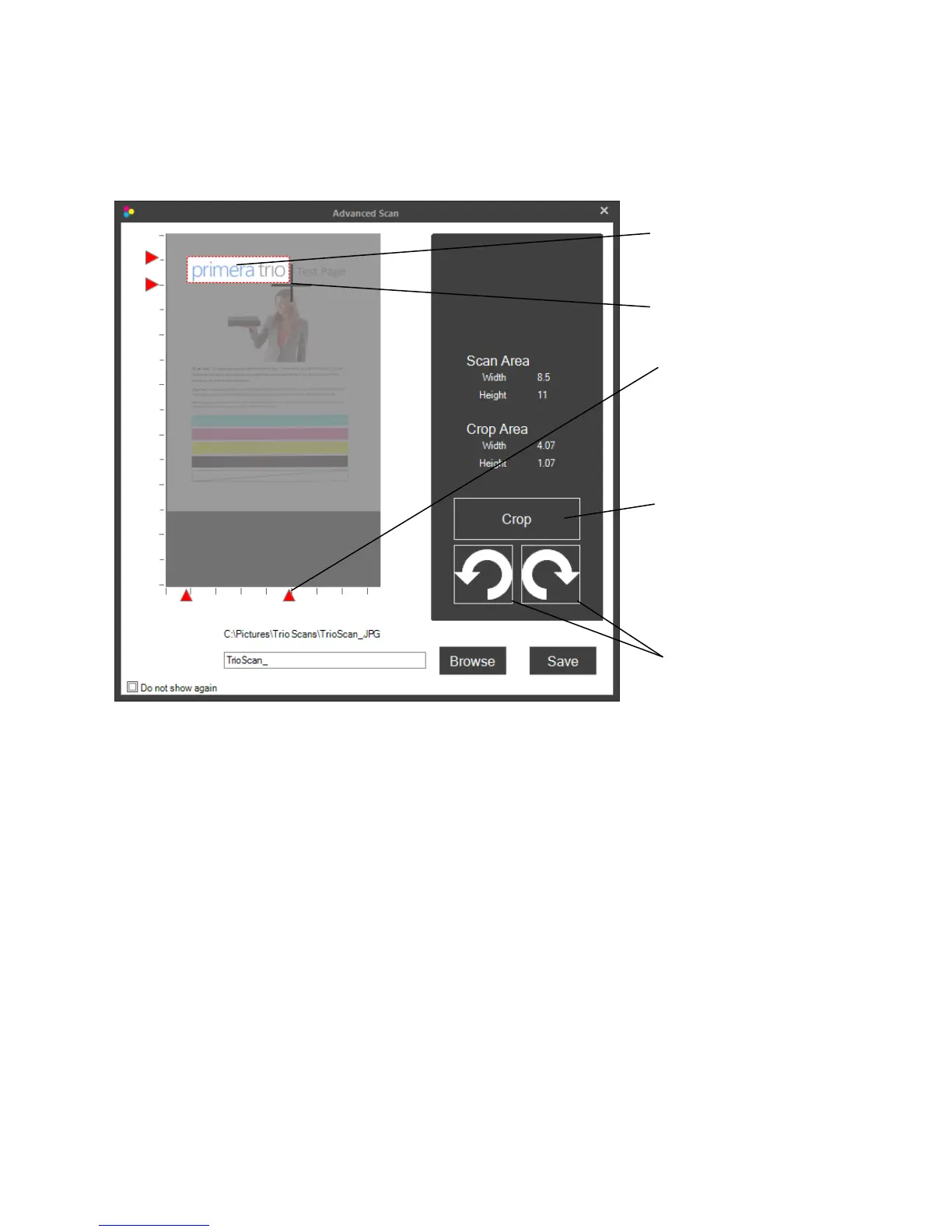
6D.EditingaScanbeforeSaving
Ifyouchoose“Showadvancedscandialogaftereveryscan”theeditingwindowwilldisplayaftereach
scan.Thiswillallowyoutocrop,rotateandnamethescanfilebeforeitissaved.
Page|34
CropArea
MarqueeSelector
Clickanddragthe
selectorarrows
Rotate.Torotatetheimageclick
eithertherightorleftrotationbuttons.
Crop.Tocrop,usethemarqueeselectortodrawa boxaroundtheareayouwouldliketocrop.Tostart
drawingthebox,pressandholdtheleftmousebutton.Continuetoholdtheleftmousebuttonand
movethemousetodrawthebox.Whenyouaresatisfiedwiththelocationofthebox,letgooftheleft
mousebutton.Ifyouwanttotryagainsimplyrepeattheprocess.Youmayalsoclickanddragthered
arrowstocroptheimage.Onceyouarereadytocroppressthe“Crop”button.
Save.Tosavetheimagefirstbrowsetothelocationyouwouldliketosaveit.Thedefaultlocationis
displayedabovethesavenamebox.Next,typeanameintheboxandclick“Save”.
CropButton
RotateButtons



 To Next Page