7B.CopySettings
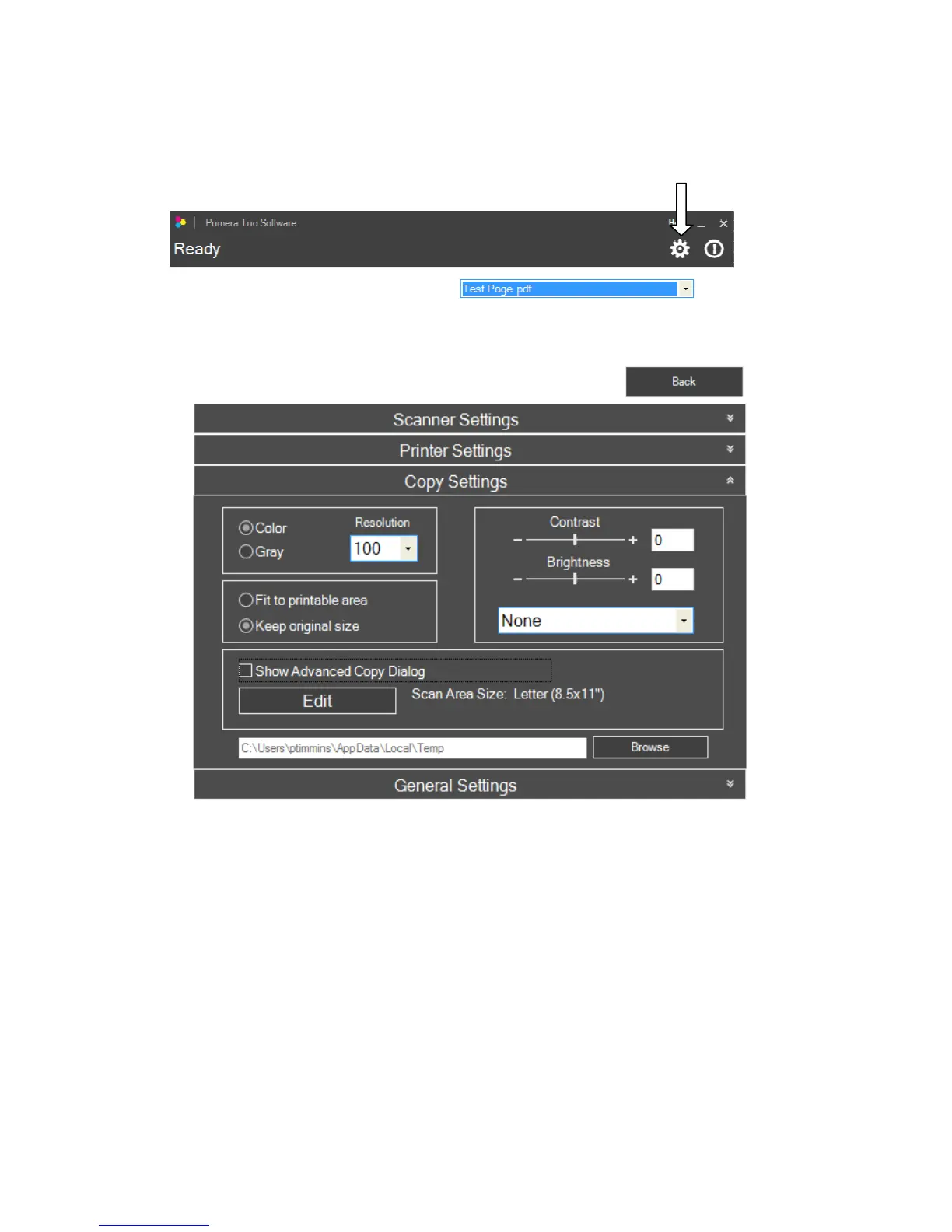
ToaccesscopysettingsclickonthegeariconatthetopofthePrimeraTrioapplication.
Page|42
ClickontheCopySettingsribbon.TheCopySettingswindowwillopen.ClicktheBackbuttontogo
backtothemainwindow.
ScanColorMode.YoumaychooseColororGray.Coloristhedefaultsettingandre commendedunless
youwouldliketoreducethefilesizeofyourscannedimage/document.UseGraytocreateagrayscale
imagethatusesmultipleshadesofgrey.
Resolution.HigherResolutionwillincreasequalityandincreasethetimeittakestoscananimage.
Lowerresolutionwilldecreasethequalityanddecreasethetim eittakestoscananimage.
Brightness/Contrast.Enternegativeorpositivevaluebetween‐100and100orusethesliderbar.
TemporaryScanfilelocation.ClickBrowsetochangethetemporarylocationwherethescanfilewillbe
located.


 To Next Page