6B.ScannerSettings
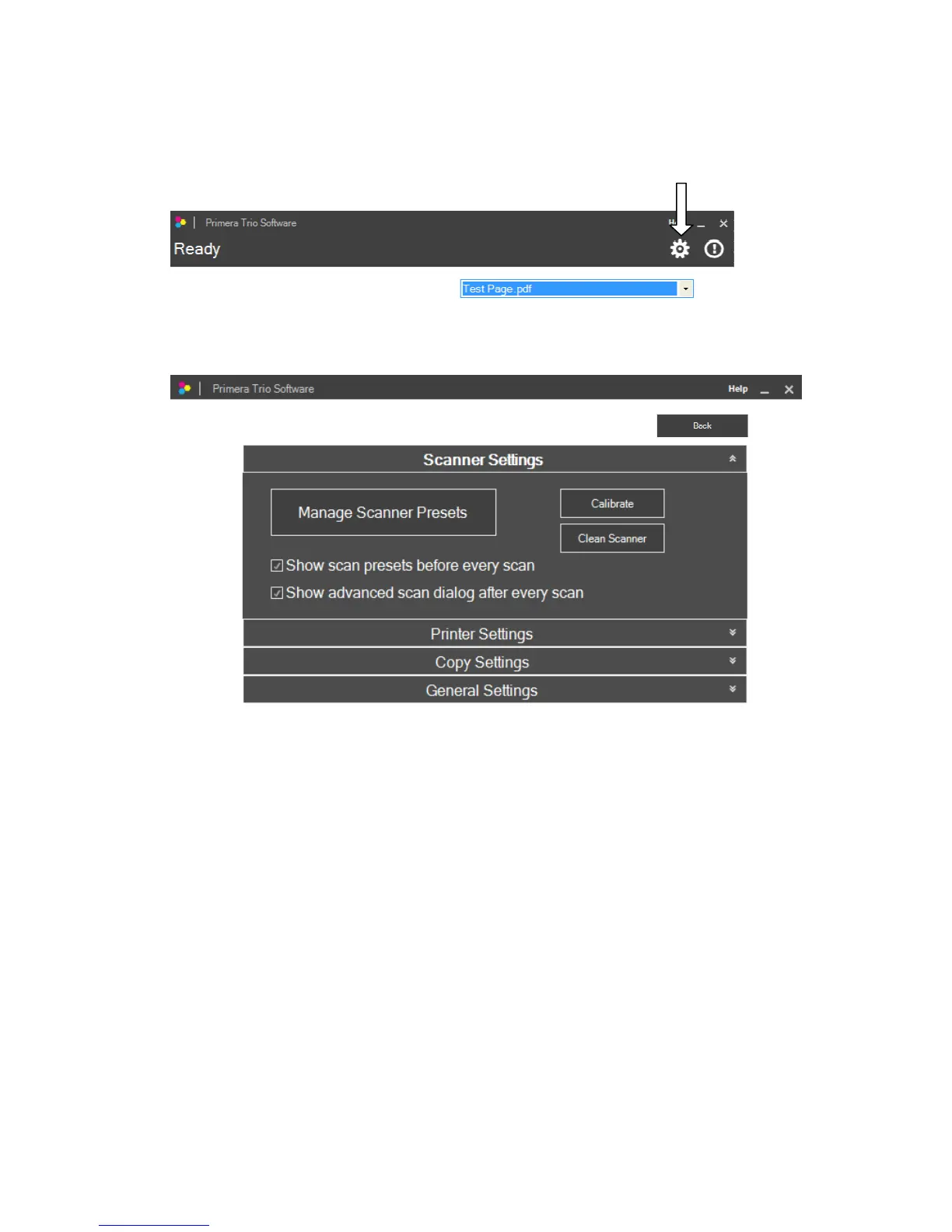
ToaccessscannersettingsclickonthegeariconatthetopofthePrimeraTrioapplication.
Page|28
TheScannerSettings windowwillopen.Clickthebackbuttontogoback.
• ManageScannerPresets.This opensanewwindowwhichallowsyoutochangethedefault
scannersettingsorcreateandsavepresets.Apresetcouldbeaco mbinationofallthescanner
settingsthatyoupreferforscanningaspecifictypeofimageordocument.
• Showscanpresetsbeforeeveryscan.Whencheckedthiswilldis playthescannerpresetsevery
timeyoupresstheScanbutton.Thiswillgiveyoutheopportunitytochangesettingsbefore
everyscan.
• Showadvancedscandialogaftereveryscan.Whencheckedthiswilldisplaytheediting
windowaftereachscan.Thiswillallowyoutocrop,rotateandnamethescanfilebeforeitis
saved.
• Calibrate.ClickCalibratetorunascannercalibration.Youwill needthescannercalibration
card.
• CleanScanner.Clicktocleanthescannerifink,adhesiveorothermatterhasbecomelodgedin
thescannerslot.Youwillneedscannercleaningsheets whichareavailableonlineoratmost
officesupplystores.



 To Next Page