Chapter 2 Install Basic Components
44
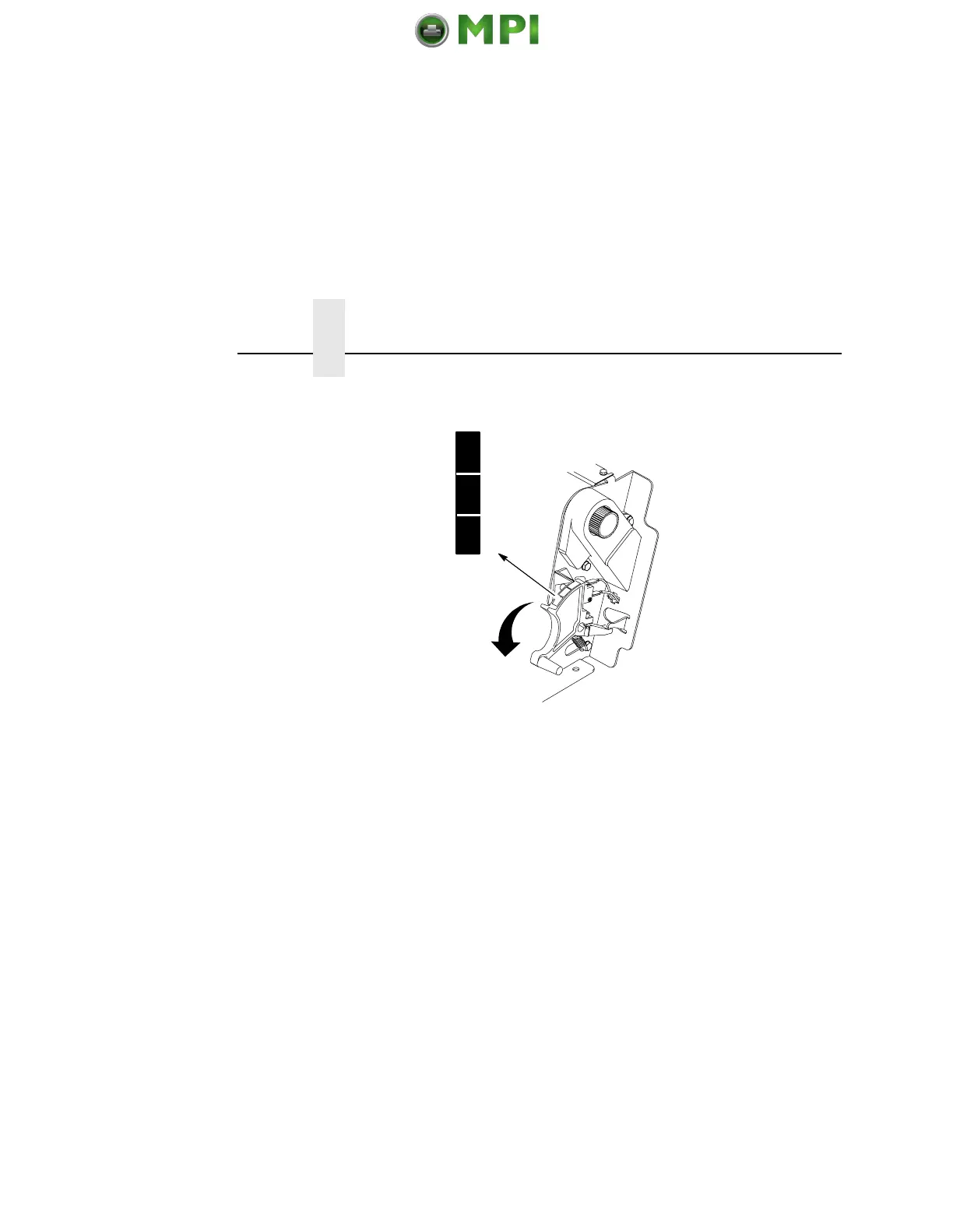
9. Lower the forms thickness lever. Set it to match the paper
thickness.
(The A-B-C scale corresponds approximately to 1-, 3-, and 6-
part paper thickness.)
NOTE: Do not set the forms thickness lever too tightly; excessive
friction can cause paper jams, ribbon jams (with potential
for ribbon damage), smeared ink, or wavy print.
10. For pedestal models with the Quick Access Cover, see “Quick
Access Cover (Pedestal Model)” on page 50 for paper exiting
options. For all other pedestal models, manually feed the paper
through the rear paper exit by using the vertical position knob,
then go to “Set The Top-of-Form” on page 51.
11. For cabinet models with the power paper stacker installed, go
to “SureStak Power Paper Stacker”, below. For all other
cabinet models, go to “Set The Top-of-Form” on page 51.
A
B
C
Mantenimiento Periféricos Informáticos SL C/Canteras, 15 28860 Paracuellos de Jarama Tel: 00 34 917481604 WEB: https://mpi.com.es












 To Next Page