
 To Next Page
T
Timothy GarrettAug 30, 2025
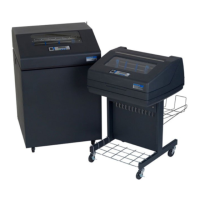
What does 'PLATEN OPEN TIMEOUT' mean on my Printronix Printer and how to fix it?
- CCynthia GarnerAug 30, 2025
If your Printronix Printer displays a 'PLATEN OPEN TIMEOUT' message, close the platen lever.



What does 'PLATEN OPEN TIMEOUT' mean on my Printronix Printer and how to fix it?
If your Printronix Printer displays a 'PLATEN OPEN TIMEOUT' message, close the platen lever.
Why does my Printronix Printer say 'POWER SUPPLY HOT'?
If your Printronix Printer displays 'POWER SUPPLY HOT', check the printer's environment. If it is hot or dusty, relocate the printer. If this occurs frequently, contact your authorized service representative.
What to do if my Printronix Printer says 'PAPER JAM TIMEOUT'?
If your Printronix Printer displays a 'PAPER JAM TIMEOUT' message, clear the paper jam and then reload the paper.
What to do if my Printronix Printer displays 'STACKER JAM'?
If your Printronix Printer displays 'STACKER JAM': 1. Open the cabinet rear door and check for obstructions preventing elevator movement. Remove any obstructions. 2. Run the print job again. If the message appears again, contact your authorized service representative.
What does 'HMR BANK FAN FLT' mean on my Printronix Printer and how do I fix it?
If your Printronix Printer displays 'HMR BANK FAN FLT', check for obstruction of vents and fan airway and remove any obstructions. Also, check for items beneath the printer blocking cabinet vents. Power cycle the printer. If this message recurs, contact your authorized service representative.
How to troubleshoot 'SHUTTLE JAM' on a Printronix Printer?
To troubleshoot a 'SHUTTLE JAM' on your Printronix Printer, check for any obstructions to the shuttle, a twisted ribbon, or a platen lever closed too tightly. If the fault source is not apparent, contact your authorized service representative.
What does 'E NET TEST UNAVAILABLE' mean on my Printronix Printer and how to fix it?
If your Printronix Printer displays 'E NET TEST UNAVAILABLE', cycle the power. Wait for 'E Net Ready' to display, then retry the operation. If the fault message appears again, contact your authorized service representative.
What does 'EXHAUST FAN FLT' mean on my Printronix Printer and how can I fix it?
If your Printronix Printer displays 'EXHAUST FAN FLT', power off the printer and remove the paper path. Check that the fan cable connector is connected. Check for obstruction of vents and fan airway, and remove any obstructions. Check for items beneath the printer blocking cabinet vents. Power back on the printer. If this message appears again, contact your authorized service representative.
What does 'RIBBON NOT RECOGNIZED' mean on my Printronix Printer?
If your Printronix Printer displays 'RIBBON NOT RECOGNIZED', use the ribbons specified for the printer.
What does 'UNKNOWN RBN1' mean on my Printronix Printer and how to fix it?
If your Printronix Printer displays 'UNKNOWN RBN1', install a new ribbon.
Lists MTBF for various printer models under specific print conditions.
Specifies the average time required for installation and repair tasks.
Outlines the requirements for routine preventative maintenance.
Lists specific spare parts for the P7X05 model.
Lists specific spare parts for the P7X10 model.
Lists specific spare parts for the P7X15 model.
Lists specific spare parts for the P7X20 model.
Lists specific spare parts for the P70XX ZTP model.
 General
| Print Technology | Line Matrix |
|---|---|
| Resolution | 180 x 144 dpi |
| Print Width | 13.6 inches |
| Weight | 145 lbs |
| Connectivity | Parallel, Serial, Ethernet, USB |
| Paper Handling | Continuous form |
| Noise Level | 55 dBA |