Slim Panel Connections
46
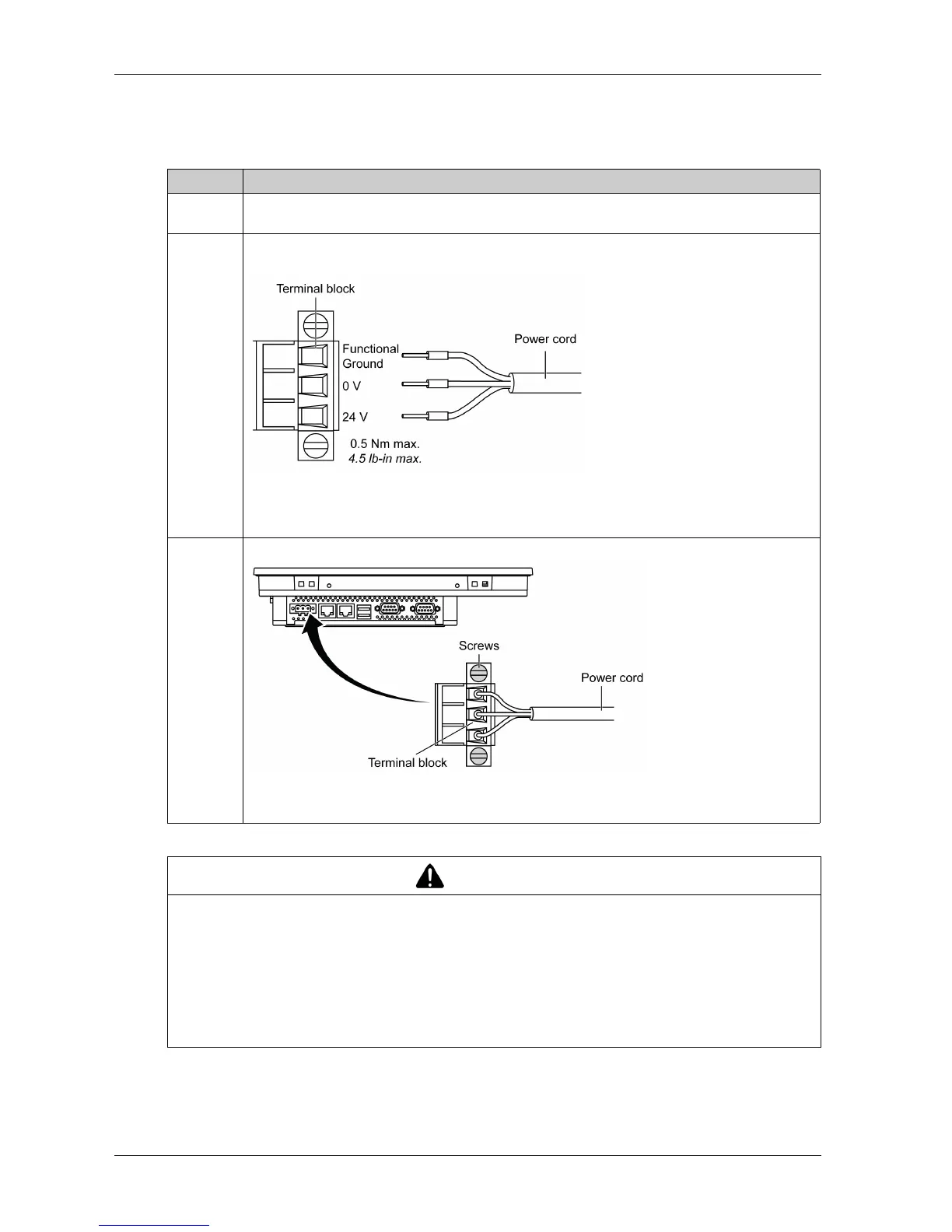
Wiring and Connecting the Terminal Block
The table below describes how to connect the power cord to the DC terminal block of the Slim
Panel:
Step Action
1 Remove all power from the Slim Panel and confirm that the power adapter is disconnected from
its power source.
2 Remove the terminal block from the power connector and connect the power cord to the terminal
block:
Use copper wire rated for 75 °C (167 °F) with a section of 0.75 to 2.5 mm
2
(AWG 18 to AWG 14)
and use 2.5 mm
2
wire to make the ground connection.
3 Place the terminal block in the power connector and tighten the screws:
NOTE: The recommended torque to tighten these screws is 0.5 Nm (4.5 lb-in).
CAUTION
OVERTORQUE AND LOOSE HARDWARE
Do not exert more than 0.5 Nm (4.5 lb-in) of torque when tightening the installation fastener,
enclosure, accessory, or terminal block screws. Tightening the screws with excessive force
can damage the installation fastener.
When fastening or removing screws, ensure they do not fall inside the Industrial Personal
Computer chassis.
Failure to follow these instructions can result in injury or equipment damage.



 To Next Page