20
MAINTENANCE
Regular maintenance is important for optimal
performance and to reduce wear. Inspect and properly
tighten all parts each time the exercise bike is used.
Replace any worn parts immediately. Use only
manufacturer-supplied parts.
To clean the exercise bike, use a damp cloth and a
small amount of mild detergent. IMPORTANT: To
avoid damage to the console, keep liquids away
from the console and keep the console out of
direct sunlight.
PEDAL MAINTENANCE
Tighten the pedals weekly. Tighten the right
pedal clockwise, and tighten the left pedal
counterclockwise.
TROUBLESHOOTING
Many problems can be solved with the simple steps in
this section. If further assistance is needed, please see
the front cover of this manual.
HOW TO TROUBLESHOOT THE CONSOLE
If the console display becomes dim, replace the
batteries (see assembly step 11 on page 11); most
console problems are the result of low batteries.
If the exercise bike will not be used for an extended
period of time, remove the batteries from the console.
If the message CH0 or CH1 appears in the display
when you press the increase and decrease buttons,
you must recalibrate the resistance system. First, see
assembly step 11 on page 11 and remove the batteries
from the console. Next, press and hold any button on
the console for 20 seconds. Then, release the button
and reinsert the batteries into the console; the exercise
bike will adjust to the lowest resistance level.
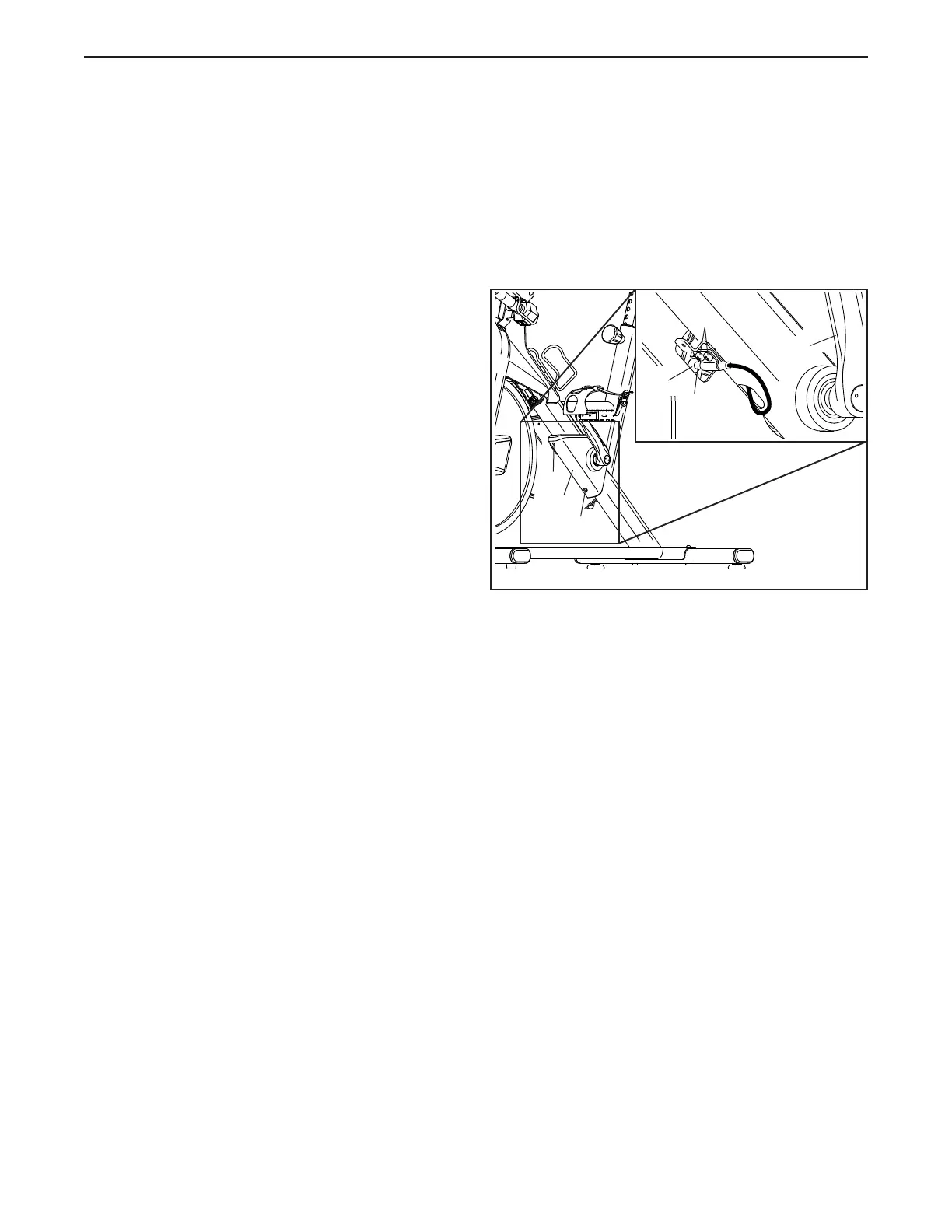
HOW TO ADJUST THE REED SWITCH
If the console does not display correct feedback, the
reed switch should be adjusted.
To adjust the reed switch, first remove the two M4 x
12mm Blunt Screws (74) from the Crank Cover (37),
and remove the Crank Cover.
Next, locate the Reed Switch (57). Slightly loosen
the two indicated M4 x 12mm Blunt Screws (74).
Then, turn the Left Crank Arm (19) until a Magnet
(62) is aligned with the Reed Switch. Slide the Reed
Switch slightly toward or away from the Magnet. Then,
retighten the Blunt Screws.
Turn the Left Crank Arm (19) for a moment. Repeat
the procedure above, if necessary, until the console
displays correct feedback. Then, reattach the Crank
Cover (37).
57
74
62
19
37
74
74
MAINTENANCE AND TROUBLESHOOTING



 To Next Page