All Info Copyright © Pro Spot International Inc.
4 - Operation
Page 14
i5
4.2.3 i5 Touch Screen Control
Semi-Auto Mode gives the user a high level of customizability that is based on the ma-
terials being welded rather than specic time and current settings. The user can select
either a predetermined weld setting (out of 16 common metal/coating/surface condition
combinations) or create a custom stack between 2-5 pieces of metal with industry stan-
dard coatings, surface conditions and material thicknesses.
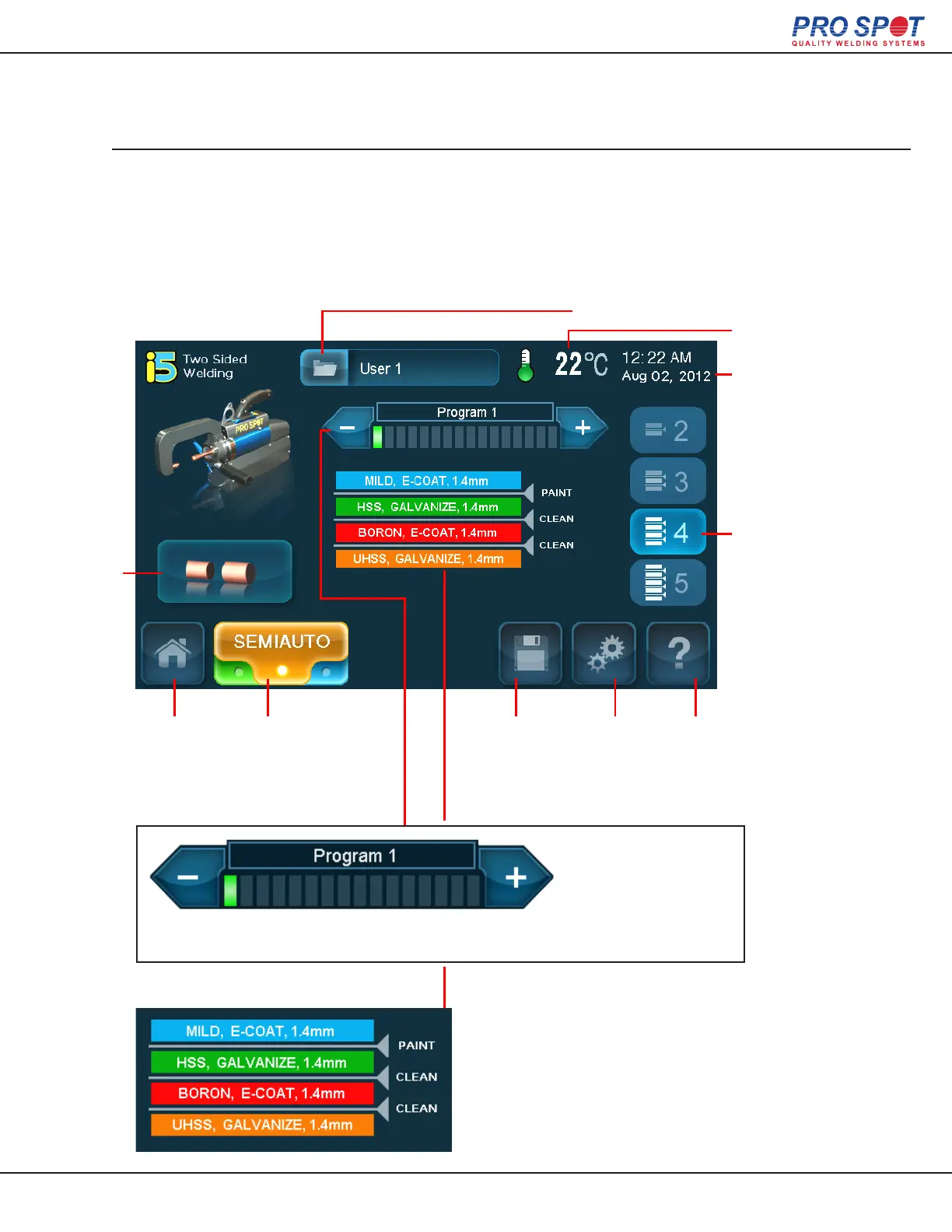
2-Sided Welding (Semi-Auto Mode)
Trans Gun
Temperature
Time and Date
Stack Size
(Highligted is
the Currently
Selected Size)
Login Status
Home
Tip
Selection
Save
Program
Advanced
Settings
Help
The navigation bar helps to visually establish
which weld program is currently selected.
Use the left and right
arrows to navigate
through the different
weld programs.
The weld program that is currently
selected will be represented visually.
Each colored stack represents a piece
of metal in the stack and the lines in
between each piece of metal repre-
sents the surface condition.
Weld Mode
Carousel
(Press to switch
between weld
modes.)
22



 To Next Page