All Info Copyright © Pro Spot International Inc.
4 - Operation
Page 14
i5
4.2.3 i5 Touch Screen Control
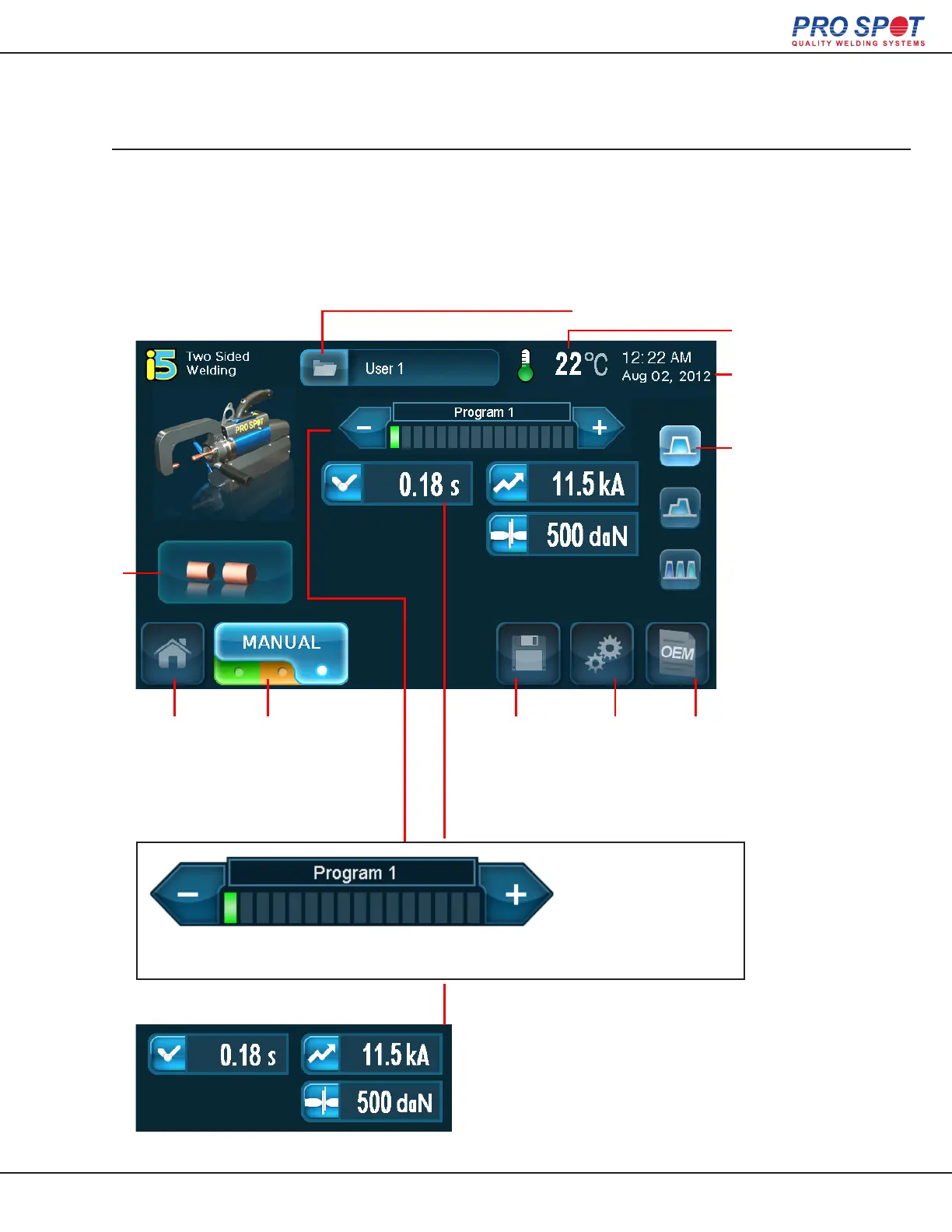
Manual Mode is for users that want complete control over their weld settings. Every
aspect of a weld scenario can be established in Manual Mode. As with Semi-Auto Mode
Manual Mode comes with 16 pre-loaded common weld programs that can be over writ-
ten by the user and can be reset in the global settings if necessary.
2-Sided Welding (Manual Mode)
Trans Gun
Temperature
Time and Date
Weld Types
Available:
Single
Double
Pulse Mode
(Highligted is
the Currently
Selected Weld
Type)
Login Status
Home
Tip
Selection
Save
Program
Advanced
Settings
OEM
Information
The navigation bar helps to visually establish
which weld program is currently selected.
Use the left and right
arrows to navigate
through the different
weld programs.
Some basic settings will be displayed
on the main Manual Mode Screen.
What settings are available are depen-
dant on which weld type is selected.
Weld Mode
Carousel
(Press to switch
between weld
modes.)
26



 To Next Page