EN-15
In STICK/MMA Welding (SMAW), for the connection
of the ground cable connector check for correct
polarity for the electrode you are going to use, refer
to the information on its box.
Most of the electrodes requires to connect the ground
cable on the negative (minus) connector - E - and to
connect the electrode holder on the positive (plus) - D
-. Positive connectors are allocated on the generator
and also on wire feeder, you can use both but just
one at time.
Press Mode key to enter in MMA menu
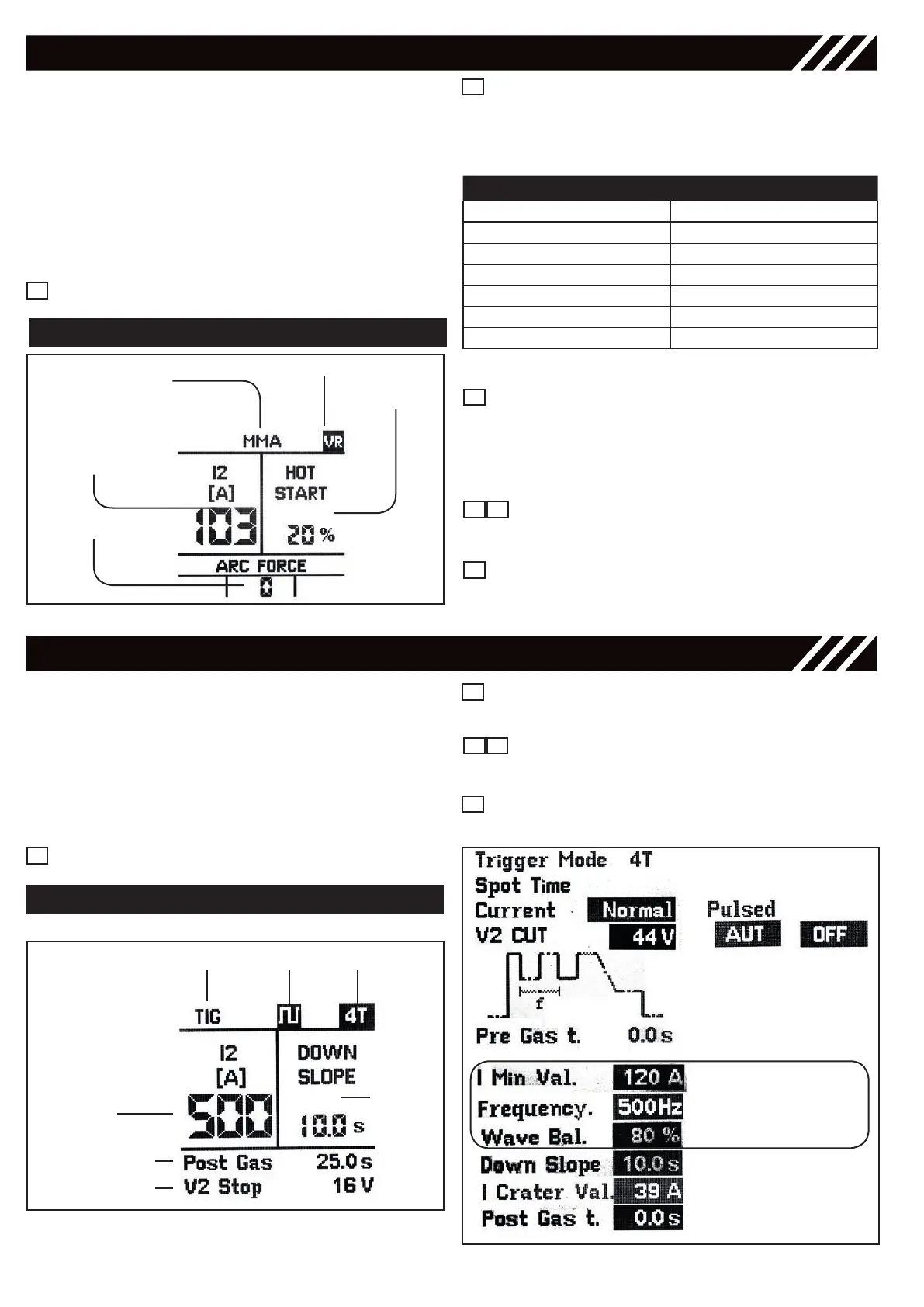
MMA WELDING
MMA WELDING
MMA welding process
Welding current
Arc force value
Hot start
value
VRD ON
Figure 25 - MMA Display View
Right Regulation Knob - Hot start
Adjust, in the start phase, the welding current
increase percentage variable from 0 to 50% on the
set current. Thanks to an initial peak current, this
function makes the welding arc striking easier.
Arc force key
Adjust arc force value on a range from 0 to 20
Save & Recall
Use this key to save and recall the points that the
operator can customize. Refer to “Save & Recall”.
5
6
4
8
1
Left Regulation Knob - Current
adjust the welding current (A) on a range from 5 to
maximum current value. Note: adjust the welding
current according to the diameter of the electrode
to be used.
RANGE Ø MM
UP TO 40 A 1.6mm
40÷70 A 2.0mm
55÷90 A 2.5mm
90÷135 A 3.2mm
135÷160 A 4.0mm
170÷220 A 5.0mm
230÷300 A 6.0mm
7
Table 5
TIG WELDING
Connect the earth cable to the Positive output
terminal (plus) - D - on the front of the unit and the
earth clamp to the workpiece.
Connect the Tig torch to the negative output terminal
(minus) - E - on the front of the unit.
Connect the torch trigger plug and the gas hose to
the corresponding connectors - F - and - G - on the
front panel (use inert gas).
Press Mode key to enter the TIG menu.
1
TIG WELDING
TIG welding
Welding
current
Post Gas (sec)
Down
Slope
(sec)
V2 Stop (volt)
2T, 4T Pulsed
Figure 26 - TIG Display View
Setup Key
for entering the parameters’ setup screen.
Navigation Key
for running thru the parameters.
Right Regulation Knob
for changing the parameters.
3
6 8
5
Figure 27 - TIG Setup View
Only Pulsed



 To Next Page