Warranty Information
Warranty Registration
Your new thermostat has a 5 year limited warranty. You must register
your thermostat within 60 days of installation. Without this
registration the warranty period will begin on the date of manufacture.
For warranty issues please contact the HVAC professional that
installed this product. You can register your new thermostat in 2 ways:
Go to the company website, select warranty registration and
ll out a short registration form.
Complete the form below and mail it to the address shown.
Warranty Registration
Complete form and mail to:
Thermostat Warranty Registration
Online
Mail
Features
If your HVAC contractor has congured the thermostat to remind
you when the air lter needs changed, you will see a reminder in the
display when your air lter needs to be changed.
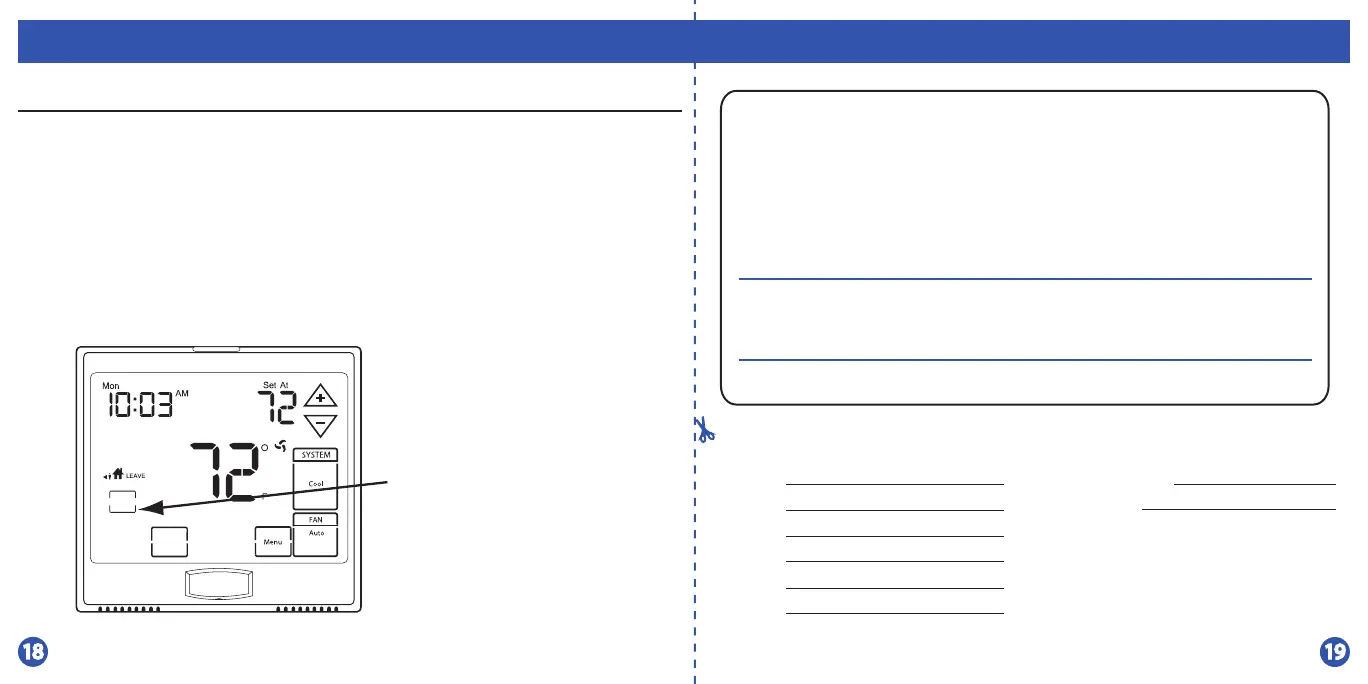
Resetting The Filter Change Reminder: When the reminder is
displayed, you should change your air lter and reset the reminder by
pressing the CLEAN key for 3 seconds.
Filter Change & Other Reminders
Hold down CLEAN for
3 seconds, to reset lter
reminder.
Temperature
Next Zone
Clean
Display
Humidity
Pro1iaq
P.O. Box 3377
Springeld, MO 65808-3377
Name:
Address:
City:
State:
Zip:
Thermostat Model:
Date Installed:







 To Next Page